

One form doesn’t fit every client. Now it doesn’t have to.
A sole trader and a non-UK resident corporate aren’t the same. An enhanced due diligence case and a standard KYC check don’t ask the same questions. When the form didn’t fit, you worked around it. Emails, calls, separate documents. Your compliance record ended up scattered across three places instead of one.
Creating a Custom KYC Questionnaire is essential for ensuring that every client receives the appropriate level of scrutiny, tailored to their specific requirements, and improving compliance efficiency.
When the Form Doesn't Fit, the Audit Trail Pays the Price
The previous setup gave firms a limited selection of forms tied directly to client type. There was no way to modify them, extend them, or build something specific to a particular engagement or risk profile. If your standard onboarding process asked for something the form didn’t cover, you worked around it.
Over time, those workarounds add up, and in a compliance context, workarounds are exactly the kind of thing that creates gaps in your audit trail.
With a Custom KYC Questionnaire, you can address unique compliance needs while maintaining a thorough audit trail.
Now, Build Exactly What the Engagement Needs
FigsFlow now includes a dedicated Forms section where you can create custom questionnaire templates from scratch. The form builder runs on a drag-and-drop system, so you add only the fields your engagement requires, nothing more and nothing less.
The flexibility of a Custom KYC Questionnaire allows you to adapt to the evolving regulatory landscape seamlessly.
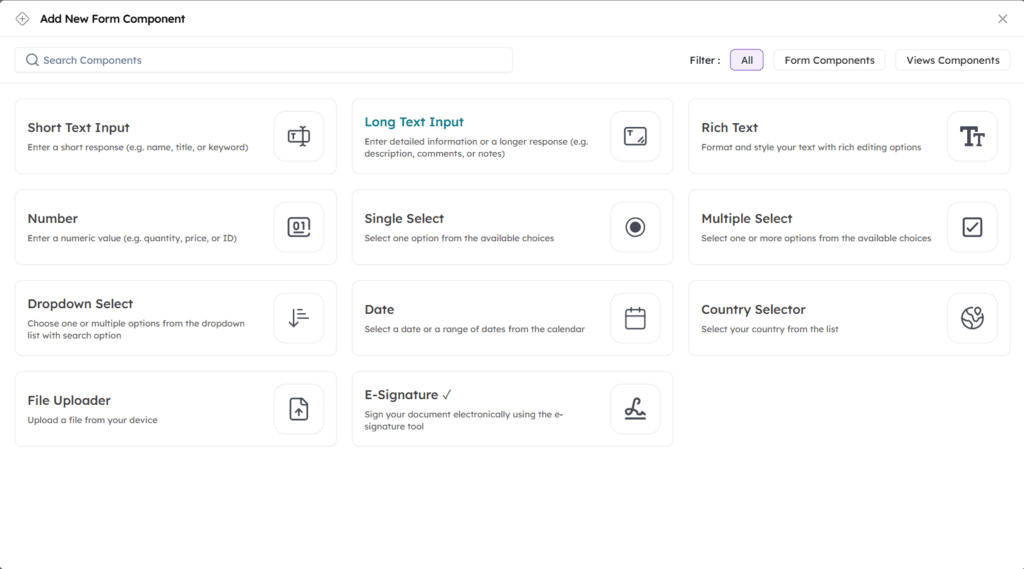
The available field types cover the full range of what a KYC or risk assessment questionnaire typically demands:
- Short text and long text fields
- Dropdown menus
- Date fields
- File uploads
- E-signatures
- Country selectors
You can divide the form into sections, give each section its own title and description, and structure the client journey exactly as you’d want it. Everything autosaves as you build.
Your Workflow Stays the Same
Nothing changes about how you send questionnaires to clients. When you initiate onboarding and go to send a KYC email, you’ll now see a dropdown that includes both the default templates and any custom forms your firm has created. Select the one that fits the client and send it.
The client completes it through the same portal they have always used. The difference is entirely on your end. You now control what they are asked, how the form is structured, and how that information sits on record.
Utilising a Custom KYC Questionnaire can significantly enhance your compliance processes and client interactions.
One Step That's Easy to Miss
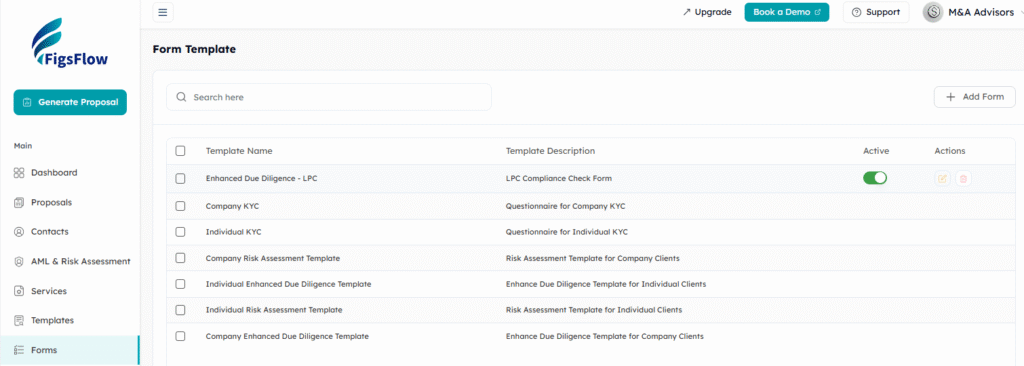
Forms save automatically as drafts while you’re building them, but a draft form won’t appear in your onboarding workflow until you activate it. Before you use a new form with a client, return to the Forms section and confirm it’s active. It’s a single toggle, but skipping it means the form won’t show up when you need it.
Ensure your Custom KYC Questionnaire is activated before client engagement to streamline the onboarding process.
How to Get Started
The Forms section sits in your FigsFlow dashboard navigation. Add a template, build your sections, and drop in the fields your engagement needs. It’s designed to be picked up without any guidance.
Start building your Custom KYC Questionnaire today and transform how you collect client information.