A Complete Guide to Drafting Engagement Letters with Figsflow
A complete guide to drafting engagement letters with FigsFlow. Learn how our platform simplifies the drafting process and improves letter quality and efficiency
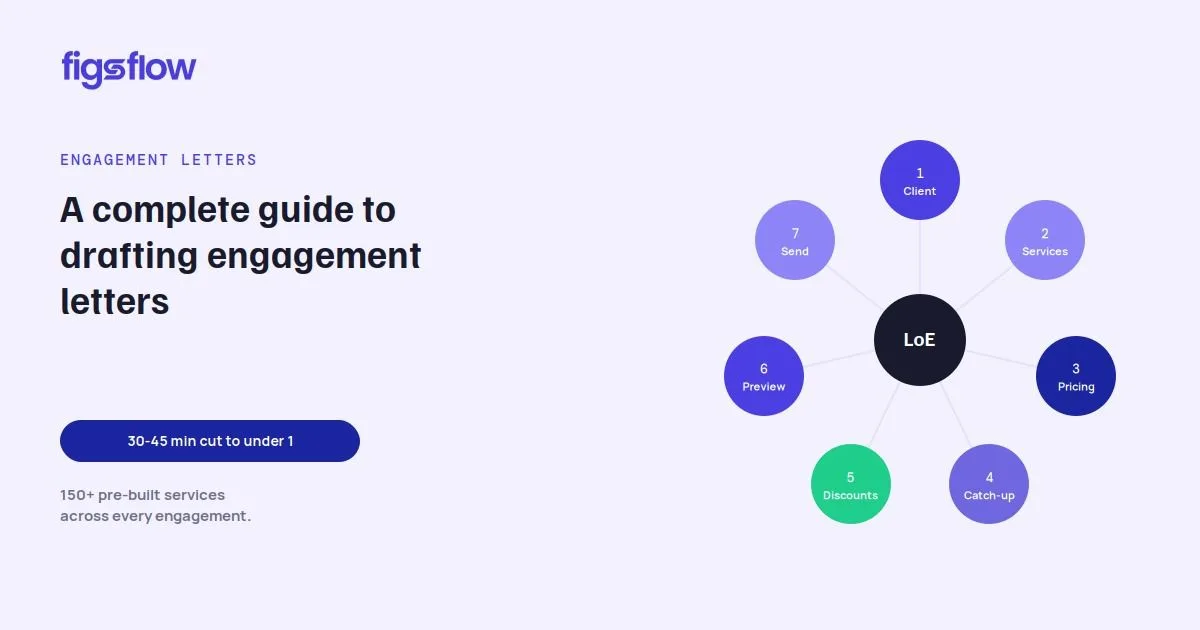
Drafting engagement letters manually takes 30 to 45 minutes per client. That is time most accountants do not have.
FigsFlow cuts that to under a minute. You select your services, input a few variables, pick a compliance-aligned template, and send. The letter writes itself.
This guide walks you through every step.
What is an engagement letter and why do UK accountants need one?
An engagement letter, or Letter of Engagement (LoE), is a legally binding document that sets out the terms of the relationship between an accountant and their client. It defines the scope of services, fees, responsibilities, and conditions under which either party can end the agreement.
For UK accountants, it is not optional. Bodies including ACCA, ICAEW, and CIOT all require members to issue engagement letters before work begins.
Done well, an LoE prevents scope creep, protects against disputes, and gives clients a clear picture of what they are paying for. Done poorly or not at all, it leaves the firm exposed.
What's Inside a FigsFlow Engagement Letter?
FigsFlow generates a structured, multi-section LoE that is auto-populated from the services you select and the pricing you configure. Here is what each section covers.
Scope of Services
This section defines the work you will carry out for the client and the boundaries around it. It includes your fees, any limitation of liability, and the client’s obligations under the Data Protection Act (DPA) and UK GDPR. It also includes the right to cancel specific services along with the relevant cancellation form.
Standard Terms and Conditions
The terms and conditions cover applicable law, confidentiality, conflicts of interest, data protection, fees and payment terms, and the refund policy. This is the legal backbone of the document and the section that protects both parties if a dispute arises.
Schedule of Services
This is a clear, itemised list of every service selected for the client, with pricing presented in a table. No ambiguity about what is included and what it costs.
How to Create an Engagement Letter in FigsFlow: Step by Step
Creating an engagement letter in FigsFlow takes 7 steps.
Each one takes seconds. Here is exactly what to do.
Step 1: Open Generate Proposal & Select Your Client
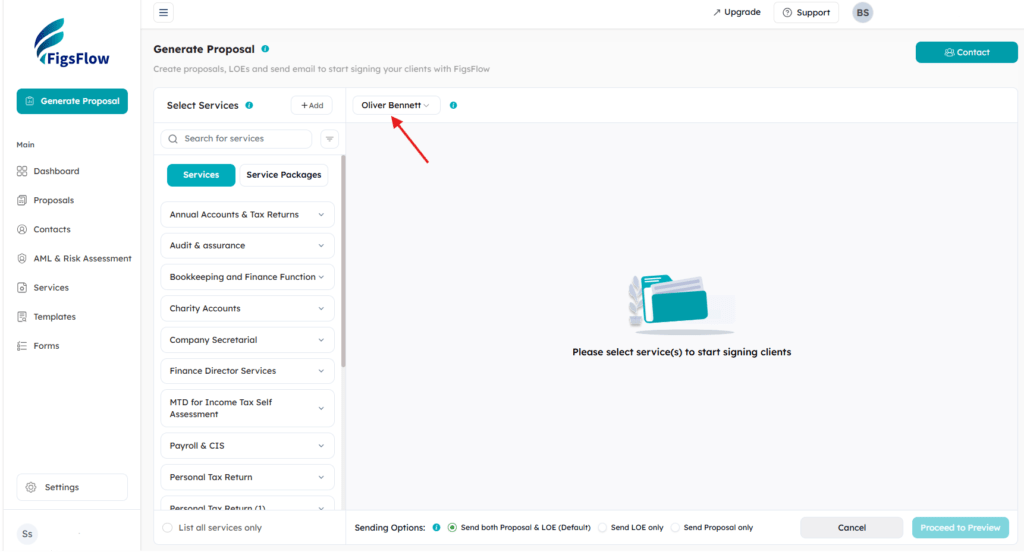
Click Generate Proposal in the left sidebar. This is the single entry point for creating proposals, engagement letters, or both.
Next, select your client from FigsFlow Contacts, either an individual or an organisation. If the engagement involves multiple entities, such as family members or group companies, FigsFlow handles them as well. One proposal is generated, but separate LoEs are issued to each entity, as required by ACCA.
Step 2: Choose Services from the Library
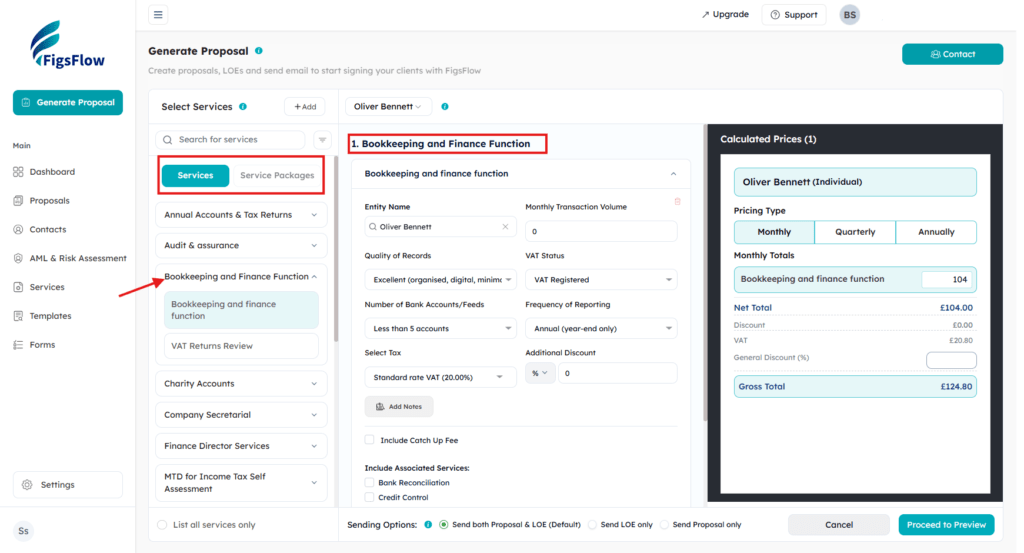
FigsFlow comes loaded with 150+ pre-built services across every major accounting, bookkeeping, and tax advisory category. These include Annual Accounts and Tax Returns, Bookkeeping and Finance Function, VAT Returns Review, Audit and Assurance, Charity Accounts, Company Secretarial, Finance Director Services, MTD for Income Tax Self Assessment, and more.
You can select individual services or choose preconfigured Service Packages that bundle multiple services for clients with broader needs.
Step 3: Configure Pricing with the Advanced Calculator
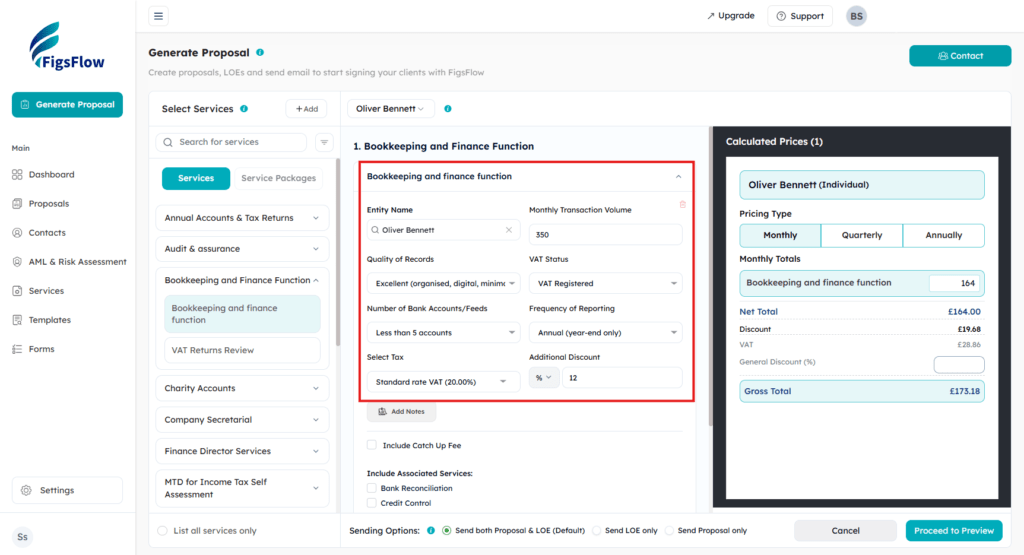
Each service has a built-in pricing engine. When you select a service, a configuration panel opens where you input the variables that drive the fee. For bookkeeping, for example, you would enter monthly transaction volume, quality of records, number of bank accounts, VAT status, and frequency of reporting.
FigsFlow’s advanced pricing calculator processes these inputs through the pre-built formula and outputs the fee instantly. The Calculated Prices panel on the right updates in real time, showing the net total, VAT, and gross total. You can switch the pricing type between Monthly, Quarterly, and Annually with a single click.
Step 4: Add Catch-Up Fees & Associated Services
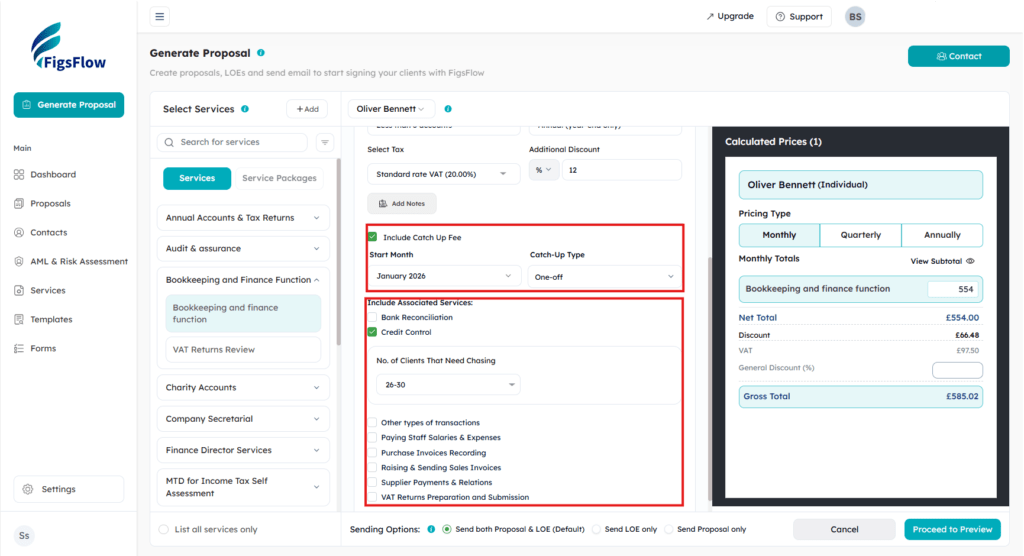
For new clients with a backlog of work, you can include a Catch-Up Fee directly within the service configuration panel. Toggle it on, and the pricing calculator automatically adds it to the total.
Some services also have Associated Services pre-linked in the library. Under Bookkeeping and Finance Function, for instance, you can add Bank Reconciliation or Credit Control with a checkbox. Each associated service carries its own pre-configured pricing, which is calculated and added to the running total without any manual input.
Step 5: Apply Discounts & Choose Your Sending Option
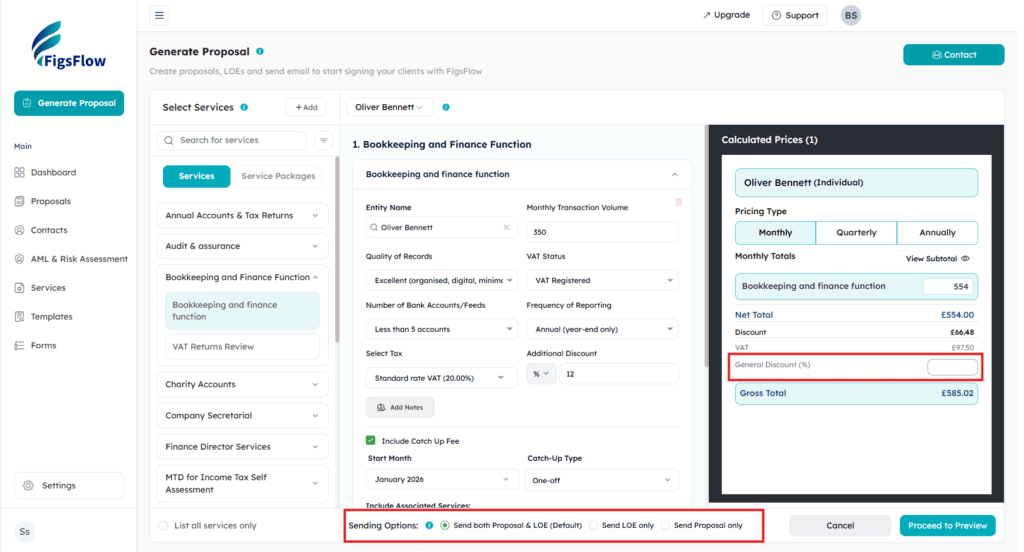
You can apply discounts at two levels. A service-level additional discount (percentage or fixed amount) can be set per individual service. A General Discount percentage applies across the entire proposal. Both are reflected immediately in the Calculated Prices panel.
At the bottom of the setup screen, choose how to send the document:
Sending both the Proposal and the LoE is the default and the most common option. Sending only the LoE is useful when the scope has already been agreed verbally, and you just need the formal letter signed. Send Proposal only works in situations where the LoE will be followed separately.
Step 6: Preview, Customise, & Select Your Compliance Template
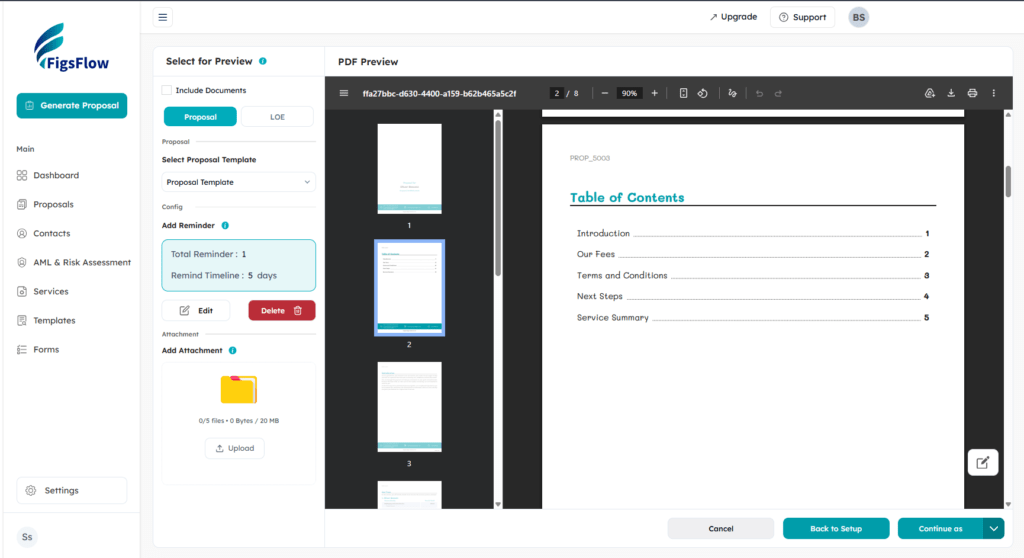
Click Proceed to Preview. This opens a two-tab preview screen showing both the Proposal and the LoE as a live PDF.
On the LoE tab, you:
Select the client entity the letter is addressed to. Choose the compliance-aligned LoE template. FigsFlow offers templates built to the standards of ACCA, ICAEW, CIOT, and other major bodies. Set the engagement start date, either On Acceptance or a specific future date. Add any attachments, up to five files and 20MB total.
The PDF preview updates in real time as you make selections. The generated LoE includes a full Table of Contents covering the Introduction, Schedule of Services, Standard Terms and Conditions, Privacy Notice, and Agreement of Terms.
Any client-specific edits can be made directly in the preview without touching the master template.
Step 7: Send Live or Save as Draft
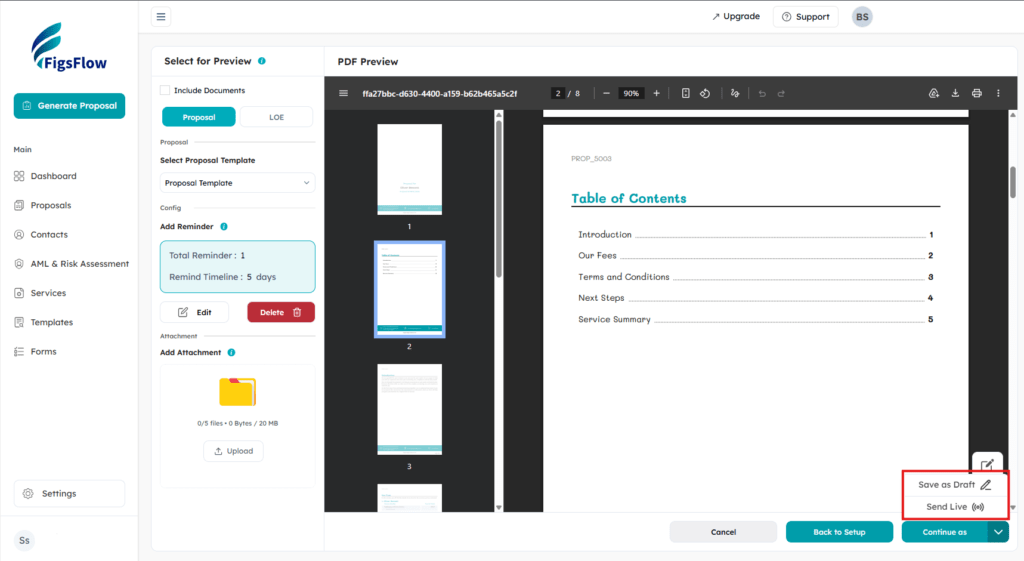
When everything looks right, send the document directly from FigsFlow. The client receives it by email and can sign digitally using the built-in e-signature. No printing, no scanning, no chasing.
If you prefer to review before sending, save it as a draft. Many accountants use this to queue up multiple letters in the morning and send them one by one after a final check.
Creating a Custom Service in FigsFlow
The 150-service library covers most standard engagements. For anything outside it, you can build one from scratch in minutes.
Go to Services in the sidebar, select a service category, and add a new service. The setup walks you through the basics: service name, tax rate, billing period, recurrence, and the variables that will drive the price, such as number of items, frequency, or transaction volume.
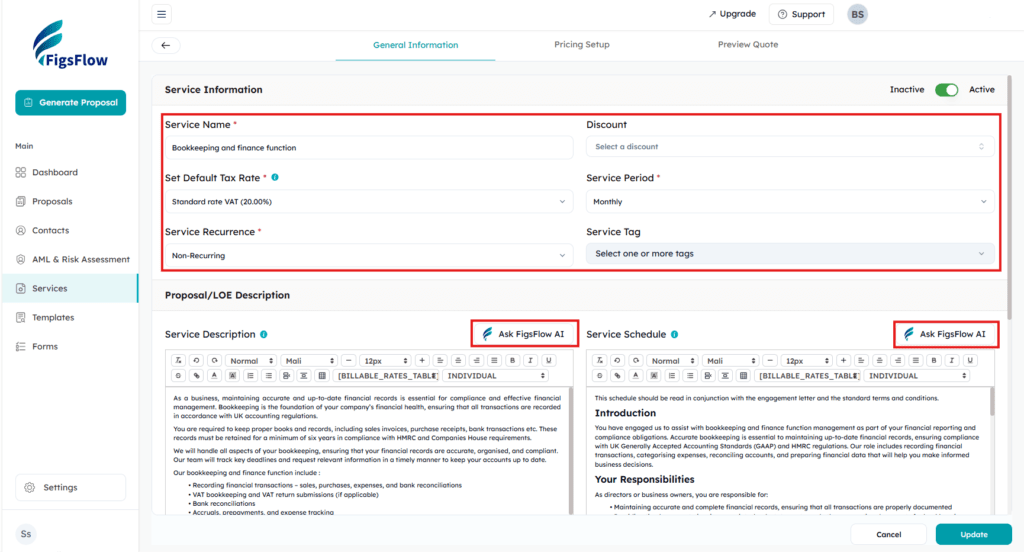
For the Service Description (which appears in the proposal) and the Service Schedule (which goes into the LoE), you can prompt FigsFlow AI to write and refine both directly within the editor.
Once done, move to the Pricing Setup tab. This is where you build the pricing engine. Using a visual formula builder, you can create powerful pricing logic with functions like MAX, MIN, AVG, If Conditions, tiered rates, volume-based rates, and graduated pricing. Test it with Preview Quote before saving.
Once saved, it works exactly like any library service.
Engagement Letter Best Practices for UK Accountants
Renew annually.
Scope and fees change. A letter signed two years ago does not reflect your current terms. Most professional bodies recommend issuing a fresh LoE every year.
Be specific about scope.
Vague wording invites scope creep. If a service is not in the letter, it is outside the engagement. State clearly what is included and what falls outside.
Include client obligations.
The LoE is not one-sided. Specify what the client needs to provide, by when, and in what format. This protects you if work is delayed due to missing information.
Use the right template for the right body.
If your client is governed by ACCA requirements and you send an ICAEW template, you have a compliance problem. FigsFlow’s template selector makes it easy to get this right.
Send it before any work begins.
This is non-negotiable. An unsigned LoE offers no protection.
Conclusion
Creating an engagement letter used to mean opening a Word template, editing it by hand, and hoping nothing was missed. That approach has a cost in both time and risk.
FigsFlow handles the structure, the compliance language, and the pricing. You handle the client relationship.
Start your 30-day free trial and send your first engagement letter today.
Further Reading
Engagement Letters: Accountants Need to Know | FigsFlow
Engagement Letter vs Proposal: Understanding Key Differences
Engagement Letter vs Letter of Intent: Key Differences Explained
When to Reissue an Engagement Letter (UK Guide) | FigsFlow