
Bulk Fee Adjustment Is Live: Reprice Services Across Your Library in One Click
Learn how to increase accounting fees in bulk in FigsFlow — by % or fixed £, up or down, in one click. Tracked, reversible, built for UK practices.

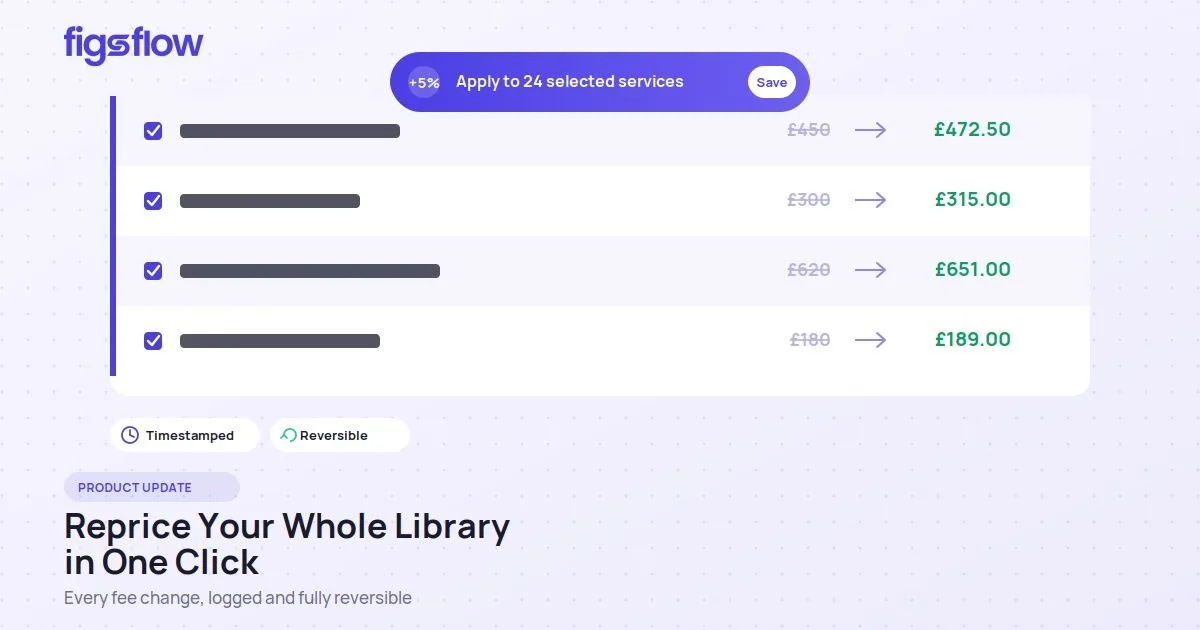
Knowing how to increase accounting fees in bulk is the difference between protecting your margins at the annual review and losing two or three days to manual admin. For UK practices with 100+ services in their library, a simple inflation uplift has meant opening every service, recalculating, and saving – one by one.
Bulk Fee Adjustment, now live in FigsFlow, fixes that. You can update the fees of multiple services at once – by percentage or by fixed pound amount, in either direction – in a single click. Every change is timestamped, attributed, and fully reversible, and your updated fees flow straight into new client proposals.
It's one of three features in our latest release. This post covers the first.
What's New in This Release

What Is Bulk Fee Adjustment?
Bulk Fee Adjustment is a feature that lets you update the price of multiple services at once – by percentage or by fixed amount, up or down – across your whole library. Instead of opening, recalculating, and saving 100+ services individually during an annual review, you apply one change to a service group and FigsFlow updates them all.
It sits inside the Services section, works alongside the Advanced Pricing Calculator, and records every change with a timestamp for audit purposes. In short, it's the fastest way for a UK practice to increase accounting fees in bulk while keeping a full record of what changed and when.
Why UK Practices Stop Repricing - and Why That Costs Them
Many UK practices skip their annual fee review because the admin costs more than the increase earns. Updating 100+ services by hand can take two to three days. As one firm told us: "A 5% inflation adjustment means opening every service, recalculating, and saving – two to three days of work."
The result is margin erosion. With UK firms typically raising fees 4–7% for inflation, a practice that holds fees flat while costs rise loses real profitability each year. That's a software problem, not a pricing problem – and it's what Bulk Fee Adjustment solves.
Manual vs Bulk Fee Adjustment
| Manual repricing | Bulk Fee Adjustment | |
|---|---|---|
| Time for 100+ services | 2–3 days | Under 1 minute |
| Method | One service at a time | Whole group at once |
| Adjustment type | Manual recalculation | % or fixed £, up or down |
| Audit trail | None | Timestamped & reversible |
| Flows into proposals | Manual re-entry | Automatic |
How It Works
Updating library service fees takes just three simple steps:
Step 1: Select Services

Open the Services page, tick the service group you want to update, then click Change Fee. You can apply the change to the entire group or untick any individual services you want to leave unchanged.
Step 2: Choose How to Adjust Fee

Select whether you want to change fees by:
- a percentage, or
- a fixed pound amount
Then choose whether the fees should increase or decrease.
Step 3: Enter the Value and Save
Enter the amount, then click Save.
The system automatically updates all selected services and records the change with a timestamp for tracking and audit purposes.
One Rule to Know: Adjustments Stack on the Latest Price
Every new adjustment is calculated from the current service price, not the original starting price.
Worked example:
A service starts at £100
On 20 May 2026, you apply a 10% increase
→ New price: £110
On 21 May 2026, you apply a 20% decrease
The system calculates the decrease from £110, not £100.
→ New price: £88
Any proposal generated for clients will always show the most recent adjusted price.
Every Change Is Logged and Reversible
Each fee adjustment is automatically recorded with the:
- User who made the change
- Date
- Time of the update
If needed, any entry can be deleted to restore the service price to what it was before that adjustment was applied.
Services linked within the same group also share the same adjustment history, making it easier to track and manage changes across related services.
Available Now in FigsFlow
Bulk Fee Adjustment is now available to all FigsFlow users.
To get started, head to Services, select the services or group you want to update, then click Change Fee.
Any changes made will automatically flow through to newly generated proposals, working seamlessly alongside the Advanced Pricing Calculator.
Coming next:
- Automated AML
- Bulk Letter of Engagement
More updates soon.
Update every service fee in your library in one click - by percentage or fixed amount, fully logged and reversible. Built for UK accountants, bookkeepers and tax advisers.
Conclusion
Repricing shouldn't cost you days. With Bulk Fee Adjustment, you can increase accounting fees in bulk across your whole library in one click – and every change is logged and reversible, so there's nothing to fear in getting it wrong.
Next time inflation bites, you won't put the review off. Head to Services, pick your group, and click Change Fee – and let your fees keep pace without the admin.