
Practice management software that runs on one client record
Practice management software for UK accountants. Proposals, engagement letters, jobs, deadlines, time and billing on one client record — so nothing is chased twice, and nothing is remembered by one person only.
Every module free until 28 February 2027. Proposals, engagement letters, practice management, CRM and client portal, with no card needed. You only pay for the AML checks you run, from £3.50 each. See pricing
 G2 reviews
 Google reviews
Verified reviews
Trustpilot reviews
Google reviews
Verified reviews
Trustpilot reviews
Sits alongside
- Microsoft 365
- Xero
- QuickBooks
- Google Workspace
- Zapier
One practice. One live view. The rail and the tabs both work — try them.
✓Records in✓Prepare3Review14 here4Approve5File
- Rowan & Ash LtdID, PSC, registerClear
- Delta Care HomesEnhanced DDReview due
- H. MistrySole traderClear
Summarise where Rowan & Ash are and what is outstanding
| Client | Year end | VAT | Services | Risk |
|---|---|---|---|---|
| Rowan & Ash Ltd | 31 Mar | Stagger 1 | Accounts, VAT, payroll | Low |
| Delta Care Homes Ltd | 30 Sep | Stagger 2 | Accounts, CT600, advisory | Enhanced |
| Bramble Cafe Ltd | 31 Dec | Stagger 3 | MTD VAT, bookkeeping | Low |
| Greenfield Property Ltd | 5 Apr | Stagger 1 | Accounts, SPV admin | Held at EDD |
| H. Mistry | 5 Apr | Not registered | Self assessment | Low |
| Trellis Advisory Ltd | 30 Jun | Stagger 2 | Accounts, retainer | Low |
| Estate of R. Okonkwo | 5 Apr | Not registered | Trust and estate returns | Standard |
| Client | Services | Stage | Fee |
|---|---|---|---|
| Rowan & Ash Ltd | Accounts, VAT, payroll | Accepted | £7,200 |
| Halloran Holdings Ltd | Accounts, VAT, bookkeeping | Sent | £4,900 |
| Greenfield Property Ltd | Accounts, CT600, SPV admin | Held at EDD | £6,200 |
| Bramble Cafe Ltd | MTD VAT, payroll | Drafting | £1,750 |
| Estate of R. Okonkwo | Trust and estate returns | Drafting | £2,100 |
| Client | Instrument | Signed | Status |
|---|---|---|---|
| Rowan & Ash Ltd | Engagement letter v1 | 14 August 2026 | Locked |
| Trellis Advisory Ltd | Engagement letter v1 | 2 July 2026 | Locked |
| Trellis Advisory Ltd | Variation · payroll added | — | Awaiting signature |
| Bramble Cafe Ltd | Engagement letter draft | — | Pending CDD |
| Delta Care Homes Ltd | Engagement letter v2 | 19 May 2026 | Locked |
The letter is the signed instrument. Once locked, changes to scope become signed variations rather than quiet edits — and the price snapshot behind billing moves with them.
| Client | Scope | Risk rating | Next review | Status |
|---|---|---|---|---|
| Rowan & Ash Ltd | ID, PSC, register | Low | Aug 2027 | Cleared |
| Delta Care Homes Ltd | Enhanced DD | High | Nov 2026 | Review due |
| Greenfield Property Ltd | Source of wealth, ownership layer | High | — | With MLRO |
| Bramble Cafe Ltd | ID, register | Low | Sep 2027 | Cleared |
| H. Mistry | ID, sole trader | Low | Jan 2028 | Cleared |
| Estate of R. Okonkwo | Trustee verification | Standard | Apr 2027 | In progress |
Scope and risk rating are determined from coded rules, not inferred. Obligations under the Money Laundering Regulations 2017 remain with your firm and your MLRO — FigsFlow evidences the decision, it does not make it.
- Statutory accounts · limited company6 steps · maker-checker
- MTD quarterly update5 steps · 28 jobs a year
- VAT return · standard scheme5 steps · 38 clients
- Payroll · monthly RTI4 steps · 12 clients
- Onboarding and CDD7 steps · MLRO escalation
- Self assessment · SA1005 steps · 19 clients
A job cannot close while anything beneath it is still open. The control sits in the workflow rather than in a reminder somebody has to send.
| Client | Raised | Basis | Status | Amount |
|---|---|---|---|---|
| Rowan & Ash Ltd | 1 Sep | Frozen price snapshot | Paid | £4,250 |
| Trellis Advisory Ltd | 1 Sep | Retainer · monthly | Paid | £700 |
| Delta Care Homes Ltd | 3 Sep | Snapshot + variation | Sent | £5,400 |
| Bramble Cafe Ltd | 5 Sep | Frozen price snapshot | Sent | £1,750 |
| Ludworth & Co | 28 Jul | Frozen price snapshot | Overdue | £2,300 |
| Service line | Fees | Realisation | Action |
|---|---|---|---|
| Statutory accounts | £86.4k | 88% | Stable |
| Advisory | £51.0k | 94% | Grow |
| VAT and MTD | £41.2k | 79% | Watch |
| Bookkeeping | £33.8k | 61% | Reprice |
| Payroll | £18.4k | 84% | Stable |
Write-up and write-down are captured at billing, against the job — so the fixed fee that is underwater surfaces in March, while there is still time to reprice it.
Assist drafts and summarises from records already on the client file. A person approves. Risk ratings and AML scope are determined from coded rules, not inferred by a model.
Happy on FigsFlow






The platform
Everything the practice runs on. Connected.
Twelve modules, one record, in the order a client moves through them: win the work, set the client up, deliver it, get paid, and run the firm. No reconciling four subscriptions at the end of every quarter.
CRM and pipeline
Enquiries captured with their source, scoped, priced and tracked to won or lost, on the record they will become.
Proposals and pricing
Fees computed from your own rate card, turnover bands and complexity factors, so two managers quoting the same job land on the same number. The client picks a tier and accepts online.
Price frozen the moment the client accepts
Engagement letters
Assembled clause by clause from the accepted services and locked at signature. Scope changes go out as signed variations.
A variation, never a quiet edit
AML and client due diligence
CDD scope and risk scored from coded rules, with ID, PEP and sanctions checks and escalation to your MLRO. Nothing goes out until CDD clears.
AML checks from £3.50 each
Evidence filed to the client record
Client management
One record per client carrying group structure, directors and PSCs, year end, VAT stagger, agent authorisations and every service you have signed for.
Group structure and authorisations on the same record
Deadline tracking
Year ends, VAT staggers, MTD quarters and confirmation statements computed per client, as first-class objects on the record rather than dates somebody remembered.
Computed from each client's own dates, not a shared spreadsheet
Task management
Jobs built from your own workflow templates, with steps, assignees, reviewers and maker-checker review enforced. Capacity and review queues sit beside the work.
Two awaiting partner review
Client portal and requests
Information requests the client completes step by step from any phone, saving as they go. Uploads land on the job, and drafts go back for approval.
Chased on a schedule, every reminder evidenced
Document management
Filed to the client record in your own SharePoint, under your retention policy, with Outlook threads attached without leaving the mailbox.
Time tracking
Timesheets that post against the job, not a vague code, so write-up and write-down are recorded where the work happened.
Billing
Invoices raised from the frozen price snapshot on the engagement letter, so the scope you agreed is the scope you bill.
Reporting
Realisation, budget, WIP and capacity per client and per job, so the fixed fee that is underwater shows up in March, not next January.
In the product
One record. Five people reading it five different ways.
A partner wants the number. A manager wants to know who is holding the job. A junior wants the next task. Scroll through the same working practice as each of them sees it. Every figure below is invented for illustration.
One job is holding £6.1k of unbilled time, flagged here before it becomes a write-off.
Halden & Rowe
VAT quarter
P. Nair
MTD quarter two
Kestrel
Annual accounts
Linden
Payroll
H. Mistry
SA100
Delta Care
Annual accounts
Move a card and the owner, the budget and the chase schedule move with it. The reviewer is named before the work starts, not after.
The accepted price is frozen on the engagement. Anything agreed outside it is flagged before the work is done.
£18.3kA junior does not decide what matters most today. The workflow does, from deadlines and recorded budget.
Two service lines here are being subsidised by the other two. Repricing that is a decision, not a discovery.
86.4%Five views, one client record underneath — the same data read by five different people, not five systems pretending to agree. Every figure shown is invented for illustration and does not describe a real practice.
The chain
Signature to invoice, without a single hand-off.
Six stages, one record. Choose any stage to see what FigsFlow does at that moment — and what your team no longer has to do.
What happens
Enquiry captured with its source, scoped and priced
Referral, search or existing client — recorded once, so months later you can see which channel actually pays. The pricing engine computes the fee from your own rates, turnover bands and complexity factors rather than a partner's memory.
Priced, not guessed
Scoped from your own rulesTurnover bands, entity type and complexity factors feed the fee, so two managers quoting the same job land on the same number.Nobody has to
Retype it into a proposalThe proposal is generated from the scoped services already on the record.What happens
Nothing goes out until client due diligence clears
CDD scope and risk scoring are determined from coded rules, with escalation routed to your MLRO. On acceptance the price is frozen and the engagement letter is assembled clause by clause from the accepted services.
On acceptance
The letter becomes the instrumentLocked at signature. Later changes become signed variations rather than quiet edits.Nobody has to
Create a second recordThe prospect becomes the client in place. No duplicate, nothing re-keyed.What happens
Signed services become jobs, built from your templates
Steps, tasks, assignees and reviewers are already in place the moment the engagement starts. Maker-checker review is enforced by the workflow, so a job cannot close while anything beneath it is still open.
Review is structural
Not a reminder somebody sendsThe control lives in the job, so sign-off is a step rather than a chase over email.Nobody has to
Build the job list by handTemplates carry your firm's method, so a new engagement starts the way the last one did.What happens
Deadlines load themselves, computed per client
Year ends, VAT staggers, MTD quarters and register dates exist as first-class objects on the record rather than tasks somebody remembered to create. Information requests go out on a schedule and every reminder is evidenced.
Chasing runs itself
Requests, reminders, evidenceScheduled from the obligation date, with the trail recorded against the client.Nobody has to
Remember the client calendarRecurring obligations exist whether or not anyone thought about them this month.What happens
Invoice raised from the frozen price snapshot
Billing draws on the price agreed at acceptance, so scope creep has to become a signed variation rather than a write-off discovered at the year end. Write-up and write-down are captured at billing, against the job.
Recorded honestly
Per job, not per firmRealisation means something because it is captured where the work actually happened.Filing stays yours
Submitted in your tax softwareFigsFlow tracks, chases and evidences the cycle. It does not file to HMRC or Companies House.What happens
Margin, per client and per job, read the way partners read it
Realisation, budget and work in progress come from the same records the work ran on. The fixed fee that is underwater surfaces in March, while there is still time to reprice it, rather than next January.
Early, not retrospective
Find it mid-yearUnderwater engagements show up while a conversation about price is still possible.Nobody has to
Reconcile three systemsPipeline, delivery and billing already agree, because they were never separate.See FigsFlow at work, in one short tour.
A short walkthrough of FigsFlow, the practice management platform for UK accountancy firms, with clients, compliance, jobs and billing in one place.
FigsFlow intelligence
Ask the practice a question. Get the answer, not a dashboard.
The assistant reads what is already on the record — deals, jobs, deadlines, requests and timesheets — and answers the questions a partner asks first thing on a Monday. It drafts, triages and summarises. People still approve.
FigsFlow assistant
Reading 31 client records · 9 open jobs · 24 obligations
Which clients need attention today?
YouThe assistant drafts and summarises; a person approves. Risk ratings and AML scope are determined from coded rules, not inferred by a model, and the decision stays with your MLRO. Answers above are illustrative, generated from fictional data.
What changes
Run the practice. Not the admin around it.
The figures below describe how the product is built, not averages measured across firms. On the demo we model them against your own client count, service mix and charge-out rates.
Faster workflow
3ssignature to invoice raised
The client signs. Four things happen without anyone touching a keyboard.
Won is an event, not a checkbox somebody remembers to tick. The engagement letter locks, the prospect becomes the client on the same record, statutory deadlines load, and the invoice is raised from the frozen price snapshot.
Less admin
0duplicate records created
Nothing is re-typed
The prospect becomes the client in place. No second record, no re-keying, no reconciliation later.
One client, one history, start to finish
Better collaboration
1record every role works from
One shared view
Capacity, reassignment and review queues sit beside the work, so partner sign-off is a step in the job.
Each sees what their role allows
Scope billed
100%of agreed scope billed
Scope creep has to be signed
Billing draws on the price snapshot taken at acceptance, so extra work becomes a variation rather than a write-off.
Frozen at the engagement letter
Systems replaced
12connected modules
One system, not five
Replaces the email, spreadsheet, Word letter and calendar stack that was doing this job badly.
All reading the same client record
From the practice floor
Written by accountants who file against these dates.
FigsFlow is built by UK Property Accountants and Sterling Wells — practising firms whose own teams run the platform on live client work. Client names are published as consent is confirmed.
Find the practice that looks like yours.
Same platform, different starting point. Pick the way in that matches your practice, the work you do, or the thing that is currently costing you time.
Not sure which one you are?
See the whole platform on one page
A practice of one and a fifty-person, multi-office firm run the same client record. What changes is who reviews the work, and how much of the process has to be enforced rather than remembered.
- Sole practitionersOne person carrying the whole client list, with no one to hand the admin to.See the one-person setup1
- Small practicesA handful of people who each know their own clients, and a process that differs by whoever is doing it.See the shared setup2–10
- Growing practicesEnough people that nobody can hold the whole picture, and not yet a full-time practice manager.See what changes as you grow10–50
- Larger firmsMultiple teams and offices that need one process enforced rather than described.See the multi-team setup50+
Not sure which one you are? See the whole platform on one page
Integrations
Sits on the stack you already run.
FigsFlow is the workflow layer, not a replacement for your ledger, tax or filing software. Everything below connects to the tools your practice signed up to years ago.
 Practice layer

Sign-in runs on Entra ID, documents stay in your own SharePoint, and ledger data flows in from Xero or QuickBooks. FigsFlow does not file to HMRC or Companies House and is not HMRC-recognised compatible software. It tracks, schedules, chases and evidences the compliance cycle around the software that does.
Trust and security
Your tenant. Your files. Your controls.
If your IT governs identity and retention centrally, FigsFlow inherits it rather than asking for an exception.
Select a control to see where it applies ↑↓
Pricing
Priced in the open.
Take the whole suite, pay by client list if you are five people or fewer, or start with one module free. The figures below are the published prices, not a starting point for negotiation.
Up to five people
Small Practice Suite
from £69 a month
Priced by your client list, with no per-seat charge: £69 for up to 100 clients, up to £249 for 750.
- Proposals, pricing engine and engagement letters
- Practice management and client portal
- Compliance Programme included; AML checks charged per check, including during the free period
The whole platform
Practice Suite
£59 per user a month
Every module, one price per person. Billed annually, minimum two seats.
- Everything on one client record
- Unlimited e-signatures and documents
- Entra ID sign-on, SharePoint storage, Outlook sync
Start with one part
Single modules
Free to start
Engagement letters free for one person (20 a year). CRM Core free for two seats.
- Onboarding from £24 a month
- Practice management £45 per user
- AML checks £3.50 each, charged during the free period too
Prices exclude VAT. Annual rates shown. AML checks billed per check.
Switching
Moving from another tool? We do the move.
Switching is the expensive part, not the subscription. These terms apply to every practice that moves to the suite, with no closing date.
Find your current tool under "By what you run today" →- Migration from your current tools, done by us
- Unused months on your outgoing contract credited, up to three
- Your price locked for 24 months on annual billing
- A 60-day trial if you are moving a team of five or more
- Your documents move into your own tenant before you commit
Cost and return calculator
What you pay now, and what FigsFlow would cost.
Pick what your practice runs today. The calculator uses each vendor's published list price and FigsFlow's published price book, both on annual billing and excluding VAT.
Software saving with FigsFlow
£1,680
a year, before any time you win back (£140 a month)
- You pay FigsFlow
- £472/month
- Time lost today
- £12,420/year
- Return on FigsFlow
- 139%
Practice Suite, billed annually
at your hours and rate
saving from month one
See the working
| Line | Today | FigsFlow |
|---|---|---|
| Software | £5,6648 users × £59 a month | £5,6648 users × £59 a month |
| Proposal tool | £1,680 | Included |
| AML | Left out | Left out |
| Total a year | £7,344 | £5,664 |
| Time won back | £6,21050% of £12,420 |
Competitor list prices checked 28/09/2026 and shown excluding VAT, on annual billing: TaxDome UK (£600 per seat a year), Karbon (Team £59, Business £89 per user a month), BrightManager (Premium £694.26 per user a year). Separate tools uses the comparison on the FigsFlow pricing page (practice management £68 per user, proposal tool £169 per firm, CRM £70 per user for up to three, per month). GoProposal Standard £140 a month is from a third-party summary dated 15/04/2026. Canopy, Financial Cents, Jetpack Workflow and Pixie publish US dollar prices only, so use "Something else" for them. FigsFlow AML checks are £3.50 each, £3.00 from the 100th. Time figures assume 46 working weeks a year.
Cost and return calculator
What you pay now, and what FigsFlow would cost.
Pick what your practice runs today. We add the tools it doesn't include, so both sides cover the same work: proposals and engagement letters, CRM, and AML. List prices, annual billing, excluding VAT.
Better off with FigsFlow
£0
a year
- You pay FigsFlow
- £0/month
- Software difference
- £0/year
- Return on FigsFlow
- 0%
Practice Suite
less than today
in the first year
See the working
| Line | Today | FigsFlow |
|---|
Case studies
Three practices. One client record. What changed.
A property tax specialist, a Bromley general practice founded in 1910 and a firm serving overseas clients. Each runs its whole practice on FigsFlow and wrote up what changed, with the numbers it measured.
“We do not keep any of them now. FigsFlow replaced them all.”Crane & Partners case study
-
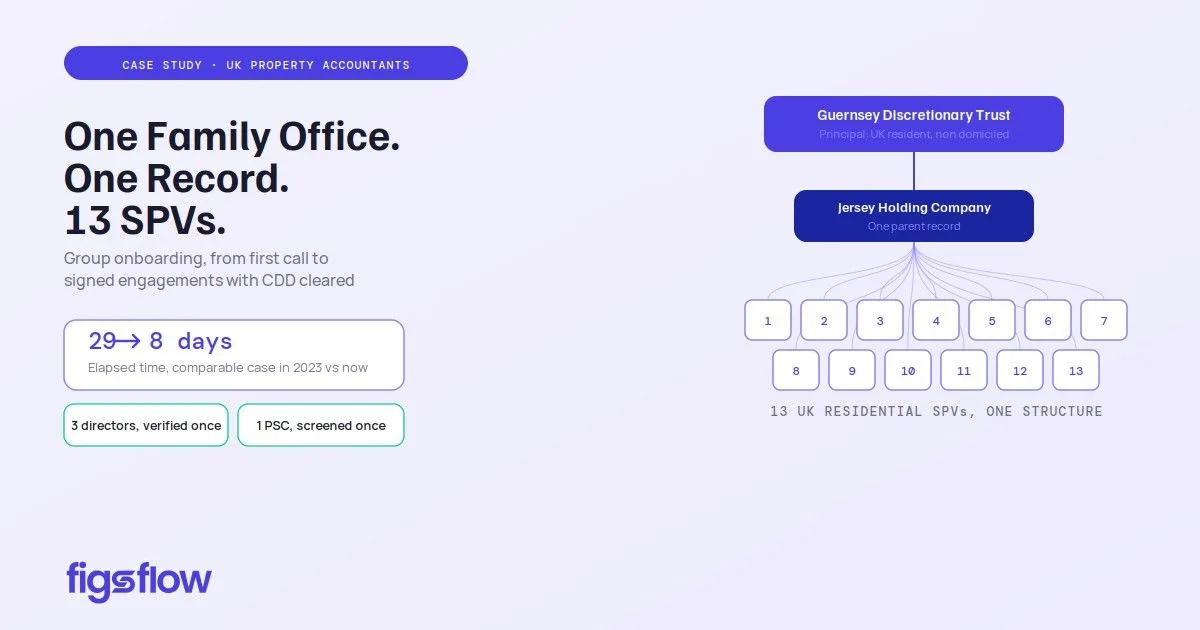 UK Property Accountants
Property tax specialists · Central London
How UK Property Accountants runs a property tax practice on FigsFlow
A Guernsey trust, a Jersey holding company and 13 UK SPVs onboarded onto one parent record. Each director verified once, one MLRO review, and 13 engagement letters from a single acceptance.
From 29 to 8working days from first call to signed engagements with CDD cleared
-
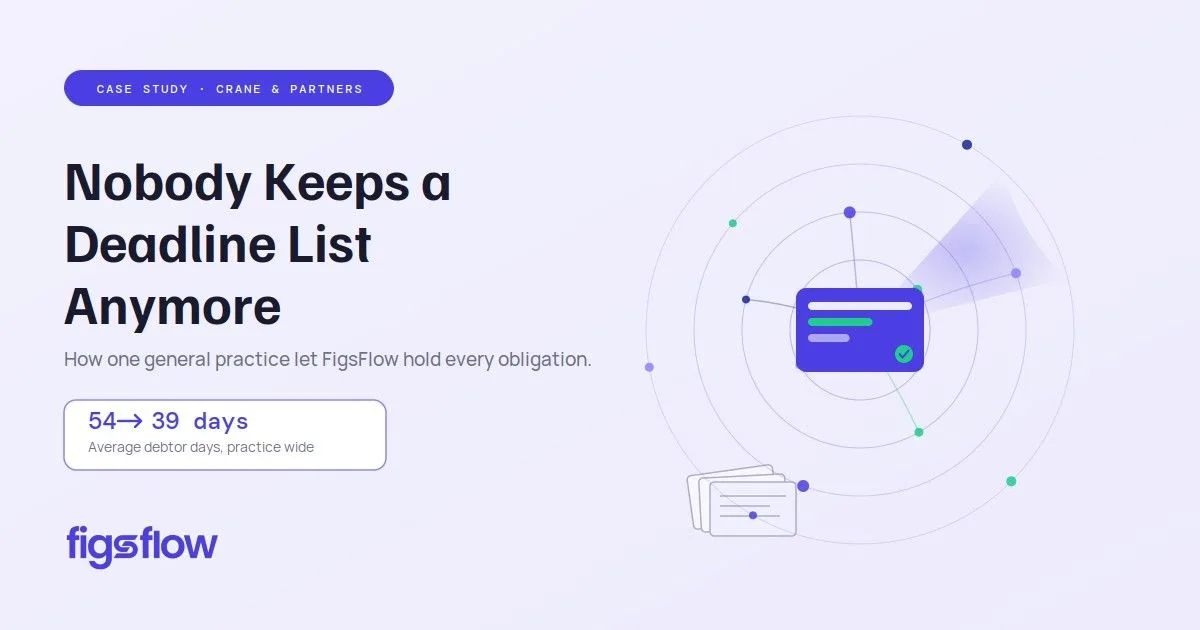 Crane & Partners
General practice · Bromley, since 1910
Nobody at Crane & Partners keeps a deadline list any more
An ordinary Tuesday, hour by hour. Deadlines worked out from each client's own dates, records chased on a schedule, and invoices billed against the scope the client signed.
From 54 to 39debtor days across the practice, with write-offs down to roughly a third
-
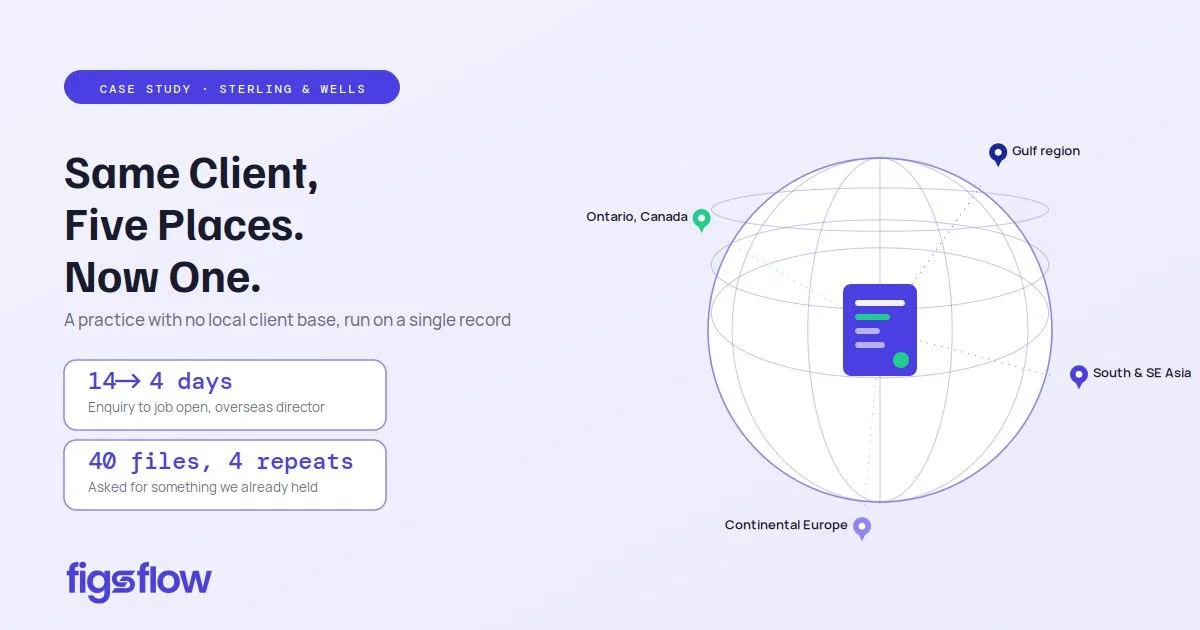 Sterling Wells
Overseas clients · VAT and company formation
We promised clients they won't have to repeat themselves. Then we counted.
Overseas directors verify from their own phone, enhanced due diligence routes to the MLRO from coded rules, and jobs open on signature already carrying their dates.
From 14 to 4median working days from enquiry to open job for an overseas director
UK Property Accountants, Crane & Partners and Sterling Wells are practices related to FigsFlow. Each figure is the firm's own, measured on its own files and reported in its case study. Your results will depend on your practice.
Questions · 10