

Making Tax Digital for Income Tax Self Assessment is live. From 6 April 2026, sole traders and landlords with qualifying income above £50,000 must keep digital records, submit quarterly updates to HMRC, and file a Final Declaration, all through compatible software. The threshold drops further in 2027 and again in 2028.
For most accountancy practices, that means repricing services, reissuing engagement letters, rebuilding onboarding workflows, and finding software that actually meets MTD requirements. This guide covers all of it: scope rules, filing obligations, penalties, agent setup, and what changes inside your practice.
Two tools sit alongside it. RentalBux – HMRC-recognised MTD software for landlords and sole traders, currently free to use, and FigsFlow – the proposal, pricing, engagement letter, and AML software for accountants and tax agents. Plus, there’s a little bonus at the end for up to 50% off.
What MTD ITSA Actually Is
Making Tax Digital for Income Tax Self Assessment is HMRC’s programme mandating digital record-keeping and quarterly reporting for individuals with trading or property income above a specified threshold. It replaces the annual Self Assessment return with four in-year submissions and one Final Declaration, all through HMRC-recognised software.
The legal framework sits across three tiers. The enabling power is Section 60 of the Finance (No. 2) Act 2017, which inserted Schedule A1 into the Taxes Management Act 1970. The operational detail sits in the Income Tax (Digital Obligations) Regulations 2026 (SI 2026/336), in force from 1 April 2026. Below that, two HMRC directions set the specific record-keeping requirements and quarterly update categories. Those directions require no Parliamentary process to change, which is why the detailed rules can shift faster than most practitioners expect.
How Does MTD ITSA Differ from Self-Assessment?
| Self Assessment | MTD ITSA from April 2026 | |
|---|---|---|
| Record keeping | Any method | Digital only, in MTD-recognised software or linked spreadsheet |
| Reporting frequency | Once a year | Four quarterly updates plus one Final Declaration |
| Submission channel | HMRC online portal or paper | MTD-recognised software only |
| Data submitted | Full return in one go | Quarterly totals, then full picture at Final Declaration |
| In-year tax visibility | None | Running estimate after each quarterly update |
| Main deadlines | 31 Jan return, 31 Jul payment on account | 7 Aug, 7 Nov, 7 Feb, 7 May updates. 31 Jan Final Declaration |
Under the current Self Assessment regime, a client records income however they choose, paper, spreadsheet, or accounting software, and files one return by 31 January. Under MTD ITSA, the same client must:
- Keep digital records of every transaction, capturing at minimum the date, the amount, and the HMRC-defined category
- Submit four cumulative quarterly updates per qualifying business, each due one month and seven days after the quarter end
- File a Final Declaration by 31 January, which replaces the SA100
- Continue paying tax on the existing Self Assessment cycle. Payment dates are unchanged
That is a minimum of five filings per year for a client with one qualifying business. A client with self-employment income and UK rental properties files nine times: four updates for the trade, four for the UK property business, and one Final Declaration. Add foreign property, and that rises to thirteen.
Who Is In Scope for MTD ITSA?
MTD ITSA applies to sole traders and landlords with qualifying income above the relevant threshold, assessed using their Self Assessment return from two years prior.
| From | Qualifying Income Threshold | Who Is Caught |
|---|---|---|
| 6 April 2026 | Above £50,000 | Sole traders and landlords whose 2024/25 SA return showed gross qualifying income above £50,000 |
| 6 April 2027 | Above £30,000 | Sole traders and landlords whose 2025/26 SA return showed gross qualifying income above £30,000 |
| 6 April 2028 | Above £20,000 | Sole traders and landlords whose 2026/27 SA return showed gross qualifying income above £20,000 |
The CY-2 Rule for MTD ITSA?
HMRC does not assess mandation against current-year income. It looks two years back, at the Self Assessment return for the current year minus two. April 2026 mandation is assessed against the 2024/25 return. April 2027 against 2025/26. April 2028 against 2026/27.
The reason is practical. HMRC needs a filed return in hand before 6 April of the mandation year to know who to enrol.
One Caution for Late Filers
A taxpayer who files their 2024/25 return in March 2026 may still be identified and enrolled for April 2026. Deliberately delaying a return to avoid mandation is inadvisable given existing late filing penalties.
What Counts as Qualifying Income for MTD ITSA?
Qualifying income is the gross income from self-employment turnover, UK property gross rents, and overseas property gross rents, aggregated before any deduction for expenses.
This catches clients that many practices miss on first review. A landlord with £45,000 of gross rents who also runs a consultancy at £8,000 of turnover has qualifying income of £53,000 and is in scope from April 2026. Neither source alone crosses the threshold, but the aggregate does.
Three points worth noting:
- Former Furnished Holiday Lettings income counts. The FHL regime was abolished from April 2025, but the income is now standard property income and counts at the gross rents figure
- Rent-a-Room Relief does not reduce qualifying income for threshold purposes
- The £1,000 Property Income Allowance does not reduce it either
The test is always gross receipts before any allowance or relief is applied.
How Does Joint Ownership Work Under MTD ITSA?
Each co-owner is assessed individually against the qualifying income threshold based on their own share of gross income. Two joint owners of the same property can have different qualifying income figures and different mandation dates.
For married couples and civil partners, the default income split is 50:50 under ITA 2007 s.836 regardless of actual beneficial ownership. A different split requires a Declaration of Trust, the property held as tenants in common, and a Form 17 submitted to HMRC within 60 days of the last spouse signing. HMRC enforces this deadline strictly and the declaration cannot be backdated.
For a passive co-owner who only knows their net share, HMRC will assess qualifying income based on the figure on their return. A passive co-owner reporting a net figure may have a lower qualifying income assessment than the managing co-owner reporting gross figures. Both are taxed on their share of profit, but the threshold assessment can differ.
Can a Client Leave MTD Once They Are In?
A taxpayer who crosses the threshold stays in MTD for a minimum of three consecutive tax years, even if qualifying income subsequently drops below the threshold. After the three-year minimum, they can apply to opt out only if qualifying income has remained at or below £20,000 for each of those three years.
Note the distinction: the mandation thresholds step down (£50,000, £30,000, £20,000), but the opt-out threshold is fixed at £20,000 for all years from 2026/27 onwards, regardless of which cohort the taxpayer entered.
Who Is Exempt From MTD ITSA?
Permanent Automatic Exemptions
No application to HMRC is needed for any of the following. They are set out in Part 7 of the Income Tax (Digital Obligations) Regulations 2026.
- Qualifying income of £20,000 or less
- Trustees, including charitable trustees
- Personal representatives of deceased persons
- Persons with no National Insurance number
- Persons for whom deputies, guardians or controllers have been appointed, or who hold powers of attorney
Temporary Automatic Exemptions
The following are temporarily exempt based on their 2024/25 return and do not need to contact HMRC. The exemption expires and they must join MTD from 2027/28 if qualifying income is above the applicable threshold:
- Non-UK residents and UK residents also tax resident in another country
- Persons eligible for overseas workday relief or split year treatment
- Persons who included the SA107 or SA109 supplementary pages in their 2024/25 return
Exemptions Beyond April 2027 Without a Confirmed Join Date
The following are automatically exempt with no confirmed future join date:
- Employed Ministers of religion using SA102M
- Persons who received or transferred Blind Person’s Allowance
- Lloyd’s members with self-employment or property income
- Persons who received or transferred Married Couple’s Allowance. This is narrow: MCA is only available where at least one spouse was born before 6 April 1935. Marriage Allowance, introduced in 2015, does not trigger this exemption
Digital Exclusion
A person is exempt if it is not reasonably practicable for them to use compatible software due to age, disability, religious beliefs incompatible with digital communications, or inability to access the internet due to location. HMRC will not accept applications based on unfamiliarity with software, transaction volume, or cost of compliance. Applications are assessed individually and HMRC must respond within 28 days. The test is functional, not numerical.
Clients already exempt from MTD for VAT for the same reason can confirm their MTD ITSA exemption by phone using their NI number and VAT registration number, without a fresh application.
How Does a Client Exit MTD ITSA?
There are two exit routes, and the difference matters operationally.
Route 1 applies when income drops below the threshold but the qualifying business continues. The earliest a taxpayer mandated from April 2026 can opt out is from the 2029/30 tax year, provided qualifying income has been at or below £20,000 for each of the three preceding digital obligation tax years. The client stays in MTD throughout, filing quarterly updates as normal.
Route 2 applies when all qualifying businesses cease entirely. A landlord who sells all their properties, a sole trader who closes their business, or a client who does both exits MTD immediately. There is no three-year wait.
A client who sells half their portfolio and drops below £20,000 is on Route 1. A client who sells everything is on Route 2. The engagement letter should address both scenarios from the outset.
Digital Record-Keeping Obligations
What Must Be Recorded Digitally?
For every transaction, three data points must be held digitally:
- the date,
- the amount, and
- the HMRC-defined category
That is the legal minimum. A description is not required by legislation, but is strongly recommended for client queries and HMRC enquiries.
MTD does not require double-entry bookkeeping. Three fields per transaction is the threshold. Supporting documents, receipts, invoices, bank statements, and letting agent statements, do not have to sit in the same software. They must exist and be retrievable on request.
What Counts as Compliant & What Does Not
| Method | Compliant | Notes |
|---|---|---|
| MTD-recognised cloud bookkeeping software | ✓ Yes | Full compliance. Records and submissions in one system. |
| Spreadsheet plus HMRC-recognised bridging software with unbroken digital link | ✓ Yes | Compliant only if digital link is maintained. No manual steps between systems. |
| Software with manual export and re-import | ✗ No | Manual step breaks the digital link requirement. |
| Paper cash book | ✗ No | Records must be held digitally. Penalty of up to £3,000 applies from day one. |
| Standalone spreadsheet with no digital link | ✗ No | No submission route to HMRC. Bridging software required. |
| Manual re-keying between systems | ✗ No | Breaks the digital link regardless of software used. |
| Filing via existing HMRC SA portal | ✗ No | SA portal is closed to MTD in-scope taxpayers. MTD-recognised software required. |
The key principle is the digital link. Data must move between systems electronically. A spreadsheet linked to bridging software via a formula or automated export is compliant. A spreadsheet whose totals are typed manually into a separate system is not. The requirement applies from day one with no soft landing.
A Recognised Product Can Still Be the Wrong Product
HMRC Product Recognition confirms the software can communicate with HMRC’s API. It says nothing about whether the product handles your client base. A recognised product can still lack joint ownership handling, Section 24 categorisation, or foreign property support. Check what the software actually does, not just whether it carries the recognition badge.
Record Retention
Digital records must be retained for five years and ten months after the end of the tax year. If HMRC opens an enquiry, the obligation extends until it closes. Records for 2026/27 must be kept until at least 31 January 2033.
The Full Filing Cycle
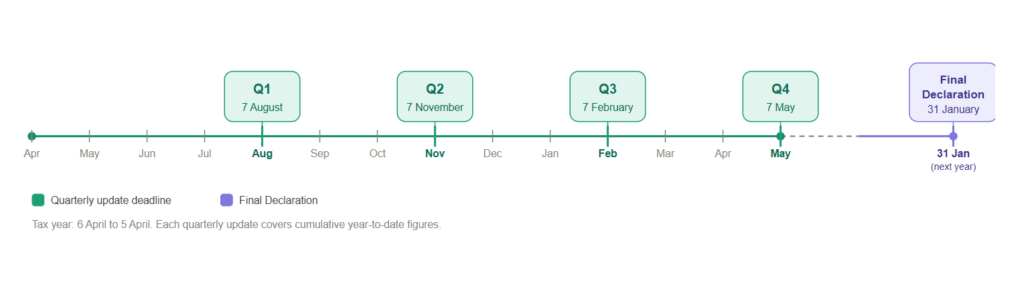
Quarterly Update Deadlines & the Calendar-Quarter Election
The default quarters run on a tax-year basis, with each update due one month and seven days after the quarter closes.
| Quarter | Period Covered | Filing Deadline |
|---|---|---|
| Q1 | 6 April to 5 July | 7 August |
| Q2 | 6 April to 5 October (cumulative) | 7 November |
| Q3 | 6 April to 5 January (cumulative) | 7 February |
| Q4 | 6 April to 5 April (cumulative) | 7 May |
| Final Declaration | Full tax year | 31 January |
Taxpayers can elect for calendar quarters instead, ending 30 June, 30 September, 31 December, and 31 March. The filing deadlines are identical under both options. For sole traders with a 31 March year-end, the calendar-quarter election aligns naturally with existing bookkeeping cycles. The election applies for the full tax year and can be changed for the following year.
How Cumulative Updates Work
Quarterly updates are cumulative from the start of the tax year. Q2 reports year-to-date figures to the Q2 end date, not just the three months since Q1. This is the most commonly misunderstood feature of the regime.
The practical benefit is self-correction. If a £1,200 insurance payment was missed in Q1, include it in the Q2 cumulative total. The figure corrects itself in the next submission. Nothing else is needed.
A client with no new transactions still has to file. A quarterly update is a legal obligation regardless of whether anything new has occurred. The filing process must be driven by a list of client obligations, not by who has sent data.
Separate Updates Per Qualifying Business
A client with multiple qualifying businesses files separate quarterly updates for each. Self-employment and property income are always separate. UK property and overseas property are two separate businesses.
Within the UK property business, individual properties are not separated at HMRC submission level. One combined set of totals covers all UK properties. Good software tracks performance per property for management purposes, but only the aggregated totals go to HMRC.
The Final Declaration
The Final Declaration serves the same function as the SA100 but is filed exclusively through MTD-recognised software. It brings together every source of income, claims all reliefs, makes all accounting adjustments, and produces the final tax calculation. The HMRC Self Assessment online portal is no longer available for MTD-in-scope taxpayers.
Everything that quarterly updates do not contain sits here: capital allowances, loss relief claims, pension contributions, Gift Aid, Marriage Allowance transfers, and all other reliefs and adjustments. The content is not new. The filing method is.
The deadline is 31 January following the end of the tax year. For 2026/27, that is 31 January 2028.
Check Your Software Covers the Full Cycle
Some products handle quarterly updates but do not support the Final Declaration. If your chosen software does not cover both, you will have no filing route at year-end. Verify this during software selection, not in January.
Does the Client Need to Approve the Final Declaration?
Yes. The taxpayer must review and confirm the information is correct before the agent submits. Some software builds this into the process with a client approval screen or email confirmation link. Either way, approval must be documented. It is both an HMRC requirement and a professional indemnity protection.
Schedule client review as a distinct step in the year-end workflow. For slow responders, this is the bottleneck that pushes practices toward the January deadline. Send the draft by early December at the latest. A client who has not approved cannot be filed.
MTD ITSA Penalties
MTD ITSA introduces three separate penalty tracks. A client can face all three simultaneously: a points-based regime for late filing, a percentage-based regime for late payment, and a standalone penalty for failure to keep digital records.
The Points-Based Late Filing System
Each missed deadline earns one penalty point, capped at one per deadline, regardless of how many businesses the taxpayer operates. Points for MTD ITSA are tracked separately from VAT penalty points.
| What Happens | Consequence |
|---|---|
| A quarterly update or Final Declaration is filed late | One penalty point |
| Points reach the four-point threshold | £200 financial penalty |
| Every further late submission after threshold | Additional £200 each time |
| Below threshold, no further late submissions | Each point expires 24 months after the missed deadline |
| At or above threshold | 12 months compliant filing plus all outstanding returns clears all points |
Once the threshold is reached, points no longer expire individually. Both conditions must be met to clear them: 12 consecutive months of compliant filing and no outstanding returns from the previous 24 months.
Note that taxpayers who volunteered for MTD before being mandated are already on the 15-day grace period and do not benefit from the 30-day concession.
Late Payment Penalties
Late payment carries separate and more immediate consequences from the first year of mandation.
| How Late | 2026/27 | 2027/28 Onwards |
|---|---|---|
| Up to 15 days | No penalty | No penalty |
| 16 to 30 days | 3% of tax outstanding at day 15 | 4% of tax outstanding at day 15 |
| 31 or more days | 3% at day 15 plus 3% at day 30, then 10% per annum from day 31 | 4% at day 15 plus 4% at day 30, then 10% per annum from day 31 |
Interest accrues daily from the original due date. In 2026/27, HMRC will not assess the first late payment penalty if the taxpayer pays in full or agrees a Time to Pay arrangement within 30 days. This grace period will be reduced to 15 days from 2027/28 and will apply once only.
The Digital Record-Keeping Penalty
Schedule A1 paragraph 12 of TMA 1970 provides for a penalty of up to £3,000 for failure to maintain records in compliant digital form. This applies from day one with no soft landing. A client who enters MTD in April 2026 and continues using a paper cash book is immediately exposed, even if every quarterly update is filed on time.
What the Soft Landing Covers
HMRC has confirmed a soft landing for the first year: late quarterly updates in 2026/27 will not attract penalty points. That is all it covers. It does not apply to a late Final Declaration, late payment of tax, or failure to keep digital records. Build this distinction into your engagement letters from the outset.
Your Obligations as an Agent
What Is the Agent Services Account?
Every firm acting for MTD clients must have an Agent Services Account. The ASA is separate from the older Government Gateway agent account, which is being retired for MTD services. If your practice already has an ASA for MTD for VAT, the same account and credentials cover ITSA.
Before your first ITSA client goes live, confirm four things:
- The ASA is active and your administrator can log in
- AML supervisor details are current and match your supervisory body’s records
- Existing SA client authorisations have been transferred to the ASA
- At least one member of staff holds HMRC Agent Online Services administrator rights
One ASA covers all MTD services for a single legal entity. Multiple offices under a single entity share a single ASA. Separate legal entities each need their own.
What Is the Difference Between Authorisation & Sign-Up?
Authorisation means HMRC recognises your firm as the client’s agent for MTD ITSA. A paper 64-8 gives no access to MTD functionality. Existing SA authorisations must be actively transferred to the ASA. No fresh client consent is needed, but the transfer must be completed manually.
Sign-up means the client is enrolled on the MTD regime with active quarterly obligations. A client can be authorised but not yet signed up. Both must be in place before the first quarterly update can be filed.
Before initiating each sign-up you need the client’s NI number, UTR, date of birth and address as held by HMRC, details of each qualifying income source, a quarter-election decision, and compatible software confirmed. There is no bulk sign-up API. Two hundred MTD clients means two hundred individual sign-ups.
Main Agent vs Supporting Agent
MTD ITSA allows a client to have two agents simultaneously with different authority, a concept that did not exist under Self Assessment.
| Role | Authority | Typical Use |
|---|---|---|
| Main agent | Full: quarterly updates, Final Declaration, HMRC correspondence, authorisation management | Traditional full-service accountant |
| Supporting agent | Quarterly updates only. No Final Declaration, no HMRC correspondence | Bookkeeper handles quarterly; tax accountant handles year-end |
Only the Main agent can file the Final Declaration. If your firm is the Supporting agent, state that explicitly in the engagement letter. An engagement letter that says the firm will handle MTD compliance without specifying the role creates ambiguity over who is responsible for the Final Declaration and penalty exposure.
Where two firms are acting for the same client, agree the split in writing before initiating authorisations.
The 18-Month Software Authorisation Renewal
Before filing, the software itself must be connected to HMRC’s API. This is separate from the client-level authorisation and must be renewed every 18 months. If it lapses, no submissions can be made until the connection is restored.
What MTD Changes in Your Practice
MTD does not just add filings. It changes how a practice is structured, priced, and staffed. Four areas need attention before the client work begins.
Segmenting Your MTD Client Base
Six archetypes cover most practices: Simple Sole Trader, Simple Landlord, Complex Sole Trader, Portfolio Landlord, Multi-Source (both trade and property income), and HNW/Complex. Each has materially different quarterly hours, software requirements, and price points. Pricing them as a single tier means over-charging simple clients or under-charging complex ones.
Segment before you price. Run every SA client through the CY-2 threshold test, flag joint-owner relationships, and identify multi-source clients. This group exposes a gap most practices find too late: general-purpose software handles self-employment but not property, and property-specific software rarely handles self-employment.
Updating Engagement Letters & Pricing
An existing Self Assessment engagement letter will not cover MTD adequately. It under-describes the deliverables, under-specifies the client’s obligations, and leaves the fee ambiguous for a service with a structurally different delivery model. Reissuing engagement letters for MTD is not optional.
Every MTD letter needs to cover:
- Scope per qualifying business, covering quarterly updates and the Final Declaration
- Main or Supporting agent designation
- Client data obligations and quarterly cut-off dates
- Penalty exposure clause confirming who bears consequences for late data
- Software and data ownership terms
- Fee structure
Re-papering takes two to three months for any meaningful client base. Each letter needs to reflect the client’s specific circumstances, clients take time to sign, and fee conversations slow the process. Start early.
Flat fees do not work under MTD. A Simple Landlord requires materially less time per quarter than a Portfolio Landlord with twelve properties and a letting agent managing half the portfolio. Getting this wrong locks in an uncommercial engagement for at least three years.
If you want to go deeper on pricing MTD services or updating your engagement letters, read our complete guides on how to price MTD ITSA services and what to change in your engagement letter for MTD ITSA before the quarterly deadlines hit.
Capacity Planning Across Five Annual Peaks
Traditional practice capacity clusters in January. MTD spreads it across five peaks:
- Late July to Early August – Q1, directly over school holidays.
- Late October to Early November – Q2.
- Late January to Early February – Q3 alongside Final Declarations and non-MTD SA work.
- Late April to Early May – Q4.
- 31 January – Final Declaration deadline, unchanged.
January remains the busiest month but the other four are not trivial. Model capacity against your segmented client base before the first quarter, not after.
The Two Layers of Technology Every MTD Practice Needs
There are two distinct technology needs in an MTD practice, and they are commonly conflated.
The compliance layer is HMRC-recognised software that holds digital records, files quarterly updates, and files the Final Declaration. For property clients it must handle letting agent statement imports, Section 24 finance cost categorisation, and joint ownership. For multi-source clients it must cover both self-employment and property from one platform. Most products cover one. Few cover both.
The practice management layer covers proposals, pricing, engagement letters, AML, and client communication. This is what makes onboarding viable at scale and keeps the quarterly rhythm running without manual chasing.
MTD Practice Readiness Checklist
Use this as a self-assessment tool before the next quarterly deadline. Each item should be confirmed in writing inside the practice.
Agent Registration & HMRC
- Agent Services Account is set up with a business-level Government Gateway ID
- AML supervisor details on the ASA are current
- At least one MTD software product is linked to the ASA for test filing
- Main agent vs Supporting agent policy is documented per client type
Client Book & Segmentation
- Full client book screened against the CY-2 rule
- Each in-scope client tagged with a service archetype
- Joint-owner relationships mapped, including Form 17 elections
- Multi-source clients identified and software solution confirmed
Engagement, Pricing & Proposals
- MTD pricing variables defined per archetype
- MTD engagement letter template reviewed against professional body guidance
- Billing model per archetype documented
- Automated payment collection in place
AML, KYC & EDD
- Firm-wide AML risk assessment refreshed
- Electronic ID verification in place for new client intake
- Joint-owner KYC covers all beneficial owners
- Ongoing monitoring schedule in place
Operations & Technology
- Compliance software covers all MTD ITSA income types your clients have
- Bank feeds live or letting agent statement import configured
- Quarterly operating rhythm documented and in the practice calendar
- Review and sign-off workflow in writing
Team & Training
- MTD champion designated
- Fee-earners and bookkeeping team trained on MTD ITSA and chosen software
- Capacity plan modelled for the next 12 months
You can download a print-ready version of this checklist here: Download MTD Practice Readiness Checklist
Building Your MTD Workflow
Your MTD workflow needs two things: a way to onboard, price, and engage clients before the quarterly work begins, and a way to manage records, submissions, and deadlines once they are live. FigsFlow and RentalBux handle both as one connected workflow.
FigsFlow

FigsFlow is the proposal, pricing, engagement letter, and AML software for accountants and tax agents, from £8 per month.
Key Highlights
- Proposal Software of the Year 2026, SME 500 UK Awards
- AML/KYC Solution of the Year 2026, SME 500 UK Awards
- Rated 5.0 on G2 and 4.9 on Trustindex
- ACCA Approved Employer, Platinum
- 30-day free trial, no card required
Using FigsFlow is straightforward. Need to price a new MTD client? Just enter their income type, number of properties, and record quality, and the pricing engine produces the right fee in seconds. Need a compliant engagement letter? Just enter the client name, service types, and point of contact, and FigsFlow drafts a regulatory-compliant, binding letter instantly. Need to run AML checks? A single click screens the client against sanctions lists, PEP databases, and Amberhill.
From the first client enquiry to fully onboarded, ID verified, invoiced, and on automated payment, FigsFlow handles the job.
RentalBux

RentalBux is HMRC-recognised MTD software for landlords, sole traders, and mixed-income clients.
Key Highlights
- MTD Software of the Year 2026, SME 500 UK Awards
- HMRC-recognised: Product ID 3222, covering UK property, foreign property, and self-employment, all three mandated MTD ITSA income types
- FCA registered (FRN 1043507) for bank feeds
- GDPR compliant, UK data centres
- Available on iOS and Android
- Currently free on paid plans until August 2026
Most MTD software handles either property or self-employment. RentalBux handles both from one client record, which matters for any practice with multi-source clients. Property-specific features are built in from the ground up: Section 24 categorisation, joint ownership profit splits, letting agent statement imports, and foreign property with multi-currency support. The accountant dashboard tracks every client, every deadline, and every HMRC authorisation status in one place.
Quarterly updates and the Final Declaration are filed directly to HMRC from the same platform. No bridging software. No manual re-entry.
The FigsFlow-RentalBux Partner Programme
Every FigsFlow subscriber qualifies automatically from their first two MTD clients. Benefits grow across four tiers:
| Tier | Min. Clients | Discount | Key Benefits |
|---|---|---|---|
| Bronze | 2+ | Up to 15% | Free practice subscription, CPD certifications, adviser directory listing |
| Silver | 10+ | Up to 25% | Revenue share on referrals |
| Gold | 30+ | Up to 40% | Dedicated account manager, featured directory placement |
| Platinum | 100+ | Up to 50% | VIP support, highest revenue share, co-marketing |
CPD-eligible certifications, including MTD Fundamentals and Advanced Property Accounting, are free at every tier.
Conclusion
The scope rules, the CY-2 thresholds, the five filing peaks, the Main and Supporting agent distinction, the penalty tracks, the digital link requirement, it is all here. Read it once, apply it to your client book, and the operational picture becomes clear.
What catches practices out is not the legislation. It is the gap between knowing the rules and having the systems to deliver them at volume. Wrong pricing locked in for three years. Engagement letters that do not reflect the quarterly scope. Software that fails when a client has both a trade and rental income. Authorisations left until the week of the first deadline.
None of that is inevitable. The guide covers what to do. The checklist tells you what to confirm. The rest is execution.
Further reading: Once you know what MTD for Income Tax means for your practice, the next step is building the onboarding process. Read this next: How to Onboard MTD Clients Efficiently in 2026 | FigsFlow