
I bet you’re stuck in one of two situations right now.
One: Absolute chaos. Every client’s ringing off the hook asking what MTD means for them, how to prepare, which software to use, whether they even need to comply. Your inbox is drowning. Or two: Absolute silence. Your MTD strategy fell flat and clients are quietly slipping away to competitors who actually seemed prepared.
Both roads lead to the same place: you’re losing ground while other firms are locking in clients for the long term.
But there’s a way out. FigsFlow.
With FigsFlow, you can complete entire MTD client onboarding journey from initial proposal and engagement letter through service pricing, KYC, EDD, CDD, invoicing and payment collection in one seamless workflow.
But don’t believe me yet. Imagine your most recent client and we’ll take you on a very short journey to onboarding them. Let the journey begin.
Your MTD Client Onboarding Journey at a Glance
You import MTD client contacts and send professional proposals with engagement letters in under a minute- pricing included. Your client gets an email, clicks through to their secure portal, and signs digitally. Once you win the proposal, it triggers the KYC process. Client uploads documents through their dashboard. You run in-house risk assessments, combine software AML checks with compliance data to form their complete risk profile, and run EDD when needed. Payment and invoicing? FigsFlow integrations with QuickBooks, Xero, GoCardless, and Adafin handle everything automatically. Simple as that.
Stage 1: How to Send Proposals & Engagement Letters to MTD Clients
In this step, we’ll import your client, configure their MTD service package, generate a professional proposal with accurate pricing, and send them everything they need to sign digitally.
Import Client
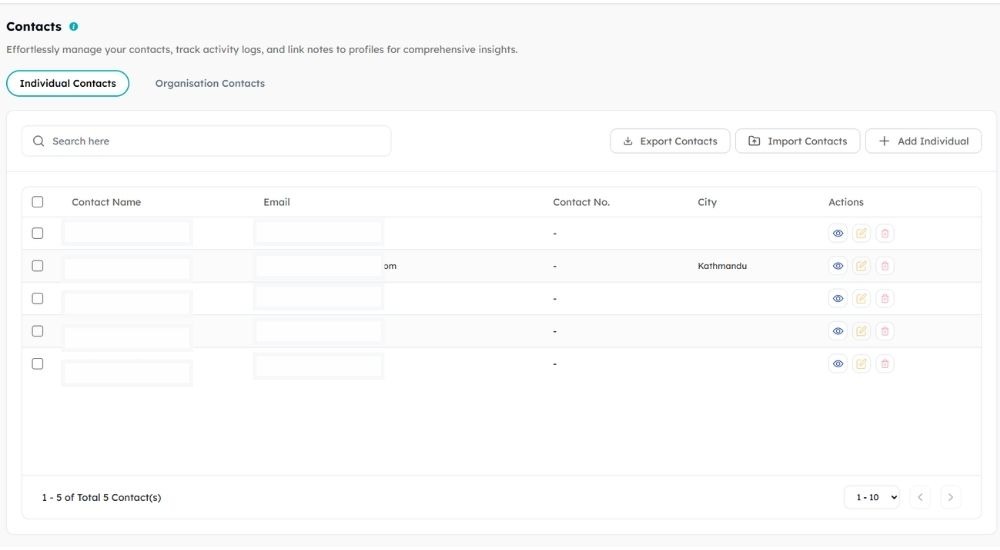
Start by getting your client into FigsFlow.
You can import contact details directly from your existing database, add them manually if it’s a single prospect, or bulk upload via CSV if you’re bringing over multiple clients at once.
Import MTD Service
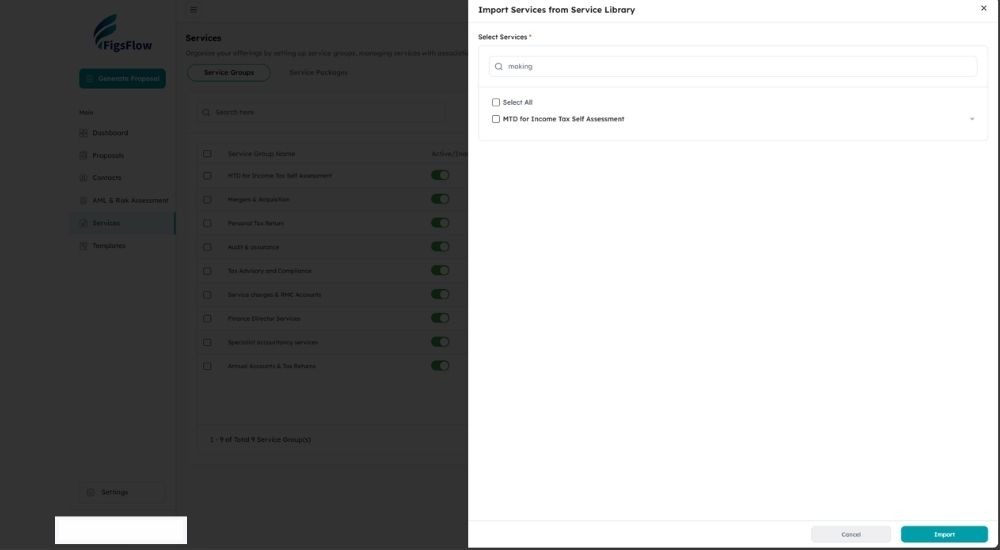
Search the service library for “MTD for Income Tax Self Assessment” and import it. If you’re going through this link to try FigsFlow for free, skip this step entirely. We’ve already done it for you and you can jump straight to proposal generation.
The template includes standard scope elements, compliance requirements, quarterly update deliverables, and all the foundational structure that defines MTD work.
Generate Proposal & Configure Pricing
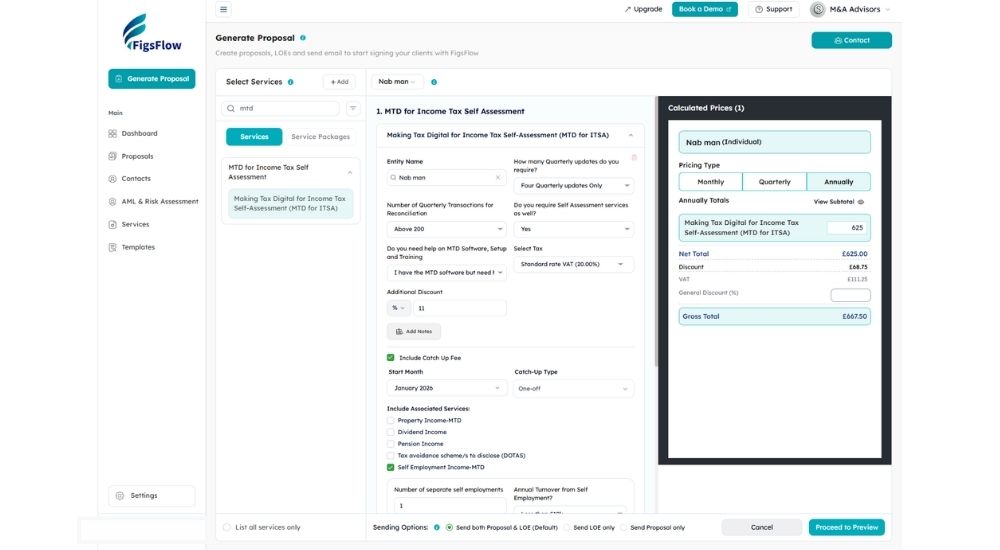
Select the imported MTD service and start configuring it for this specific client. Here’s what you can tailor to their specific needs:
- Add the entity name for proper personalisation
- Specify how many quarterly updates they require
- Input their typical quarterly transaction volume
- Indicate whether they need MTD software setup and training
- Select their applicable tax standard rate
- And more.
If the standard MTD service doesn’t cover everything, include associated services like property income, dividend income, pension income, employment income, partnership income, or capital gains by checking the relevant boxes.
Based on all your inputs, FigsFlow automatically calculates the appropriate pricing. Change it if it doesn’t match your business model or this client’s specific circumstances.
And, proceed to preview.
Review & Send
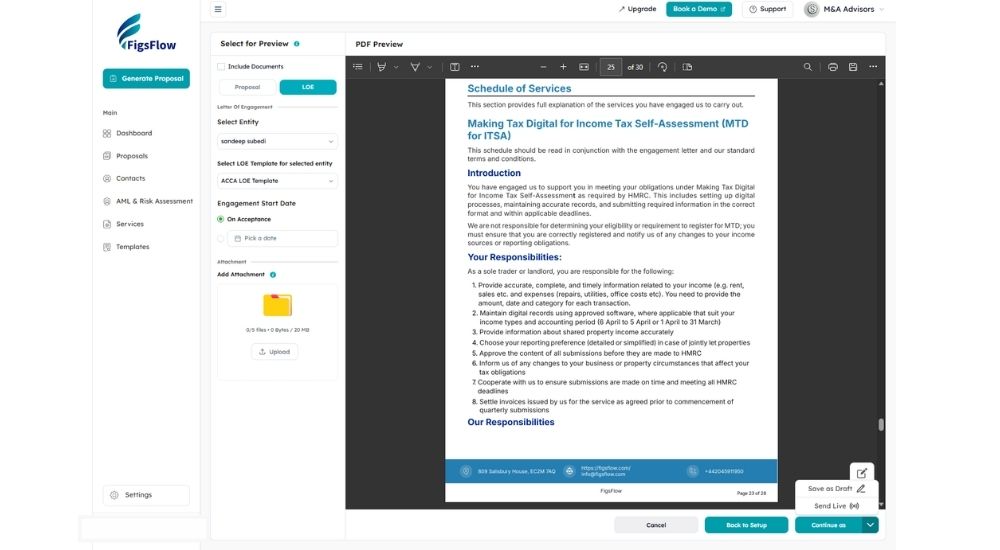
Review your proposal and engagement letter in the preview panel. Something feels off?
You don’t have to go back. Edit it right here. Add custom reminders for proposals which stop automatically once the client responds. Attach any supporting documents like fee schedules or MTD compliance guides that clients need to review alongside the proposal.
Once everything is perfect, continue as and then send live or save as draft.
Let’s do it before your competitors. Send it live.
A Peek at Your Client POV
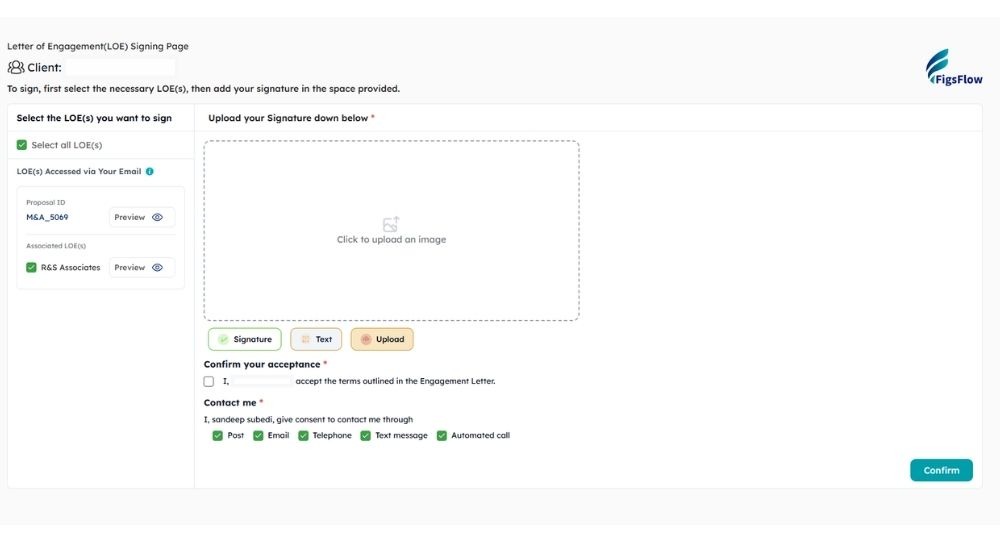
The client gets a clean, professional email. Click through the link and they get the dashboard.
They can preview the engagement letter with all terms and conditions laid out clearly. They can review the proposal outlining your services, fees, and what happens next. Everything displays properly on any device: desktop, tablet, mobile phone, because clients rarely review proposals while sitting at their desk anymore.
No need to download and sign it manually. Just sign it digitally, either via text, signature, their unique font, or upload their digital signature.
And done. Your client just did all the paperwork between coffee sips.
Beyond the Basics
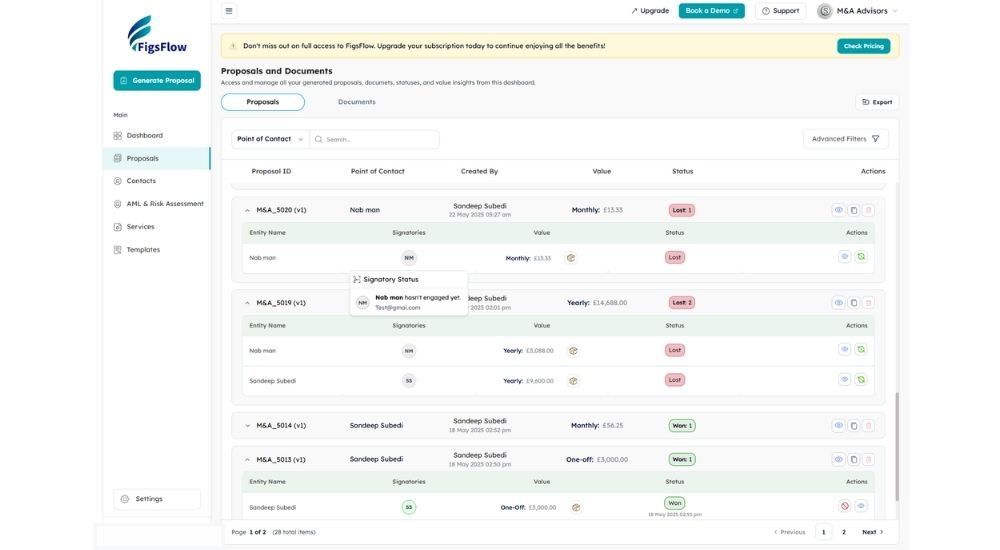
This is the foundation, but FigsFlow does considerably more. Let’s not bog you down with all the minor features like status tracking, proposal retrieval, signatory status, and all other stuffs.
Let us just share a single feature we find so much cool.
Click on the small initials icon (it’s the signatory’s initials: SS for Sandeep Subedi, SM for Sarah Malik, and so on) and you can see which signatories have viewed and signed the document. This provides insights into who’s holding things up and who’s already done their part.
Once the agreement is signed, the actual onboarding work begins: AML, KYC, sanctions and PEP screening. The compliance-heavy part that typically consumes hours of manual checking and verification.
But with FigsFlow handling the workflows, what used to be your bottleneck becomes your competitive advantage.
Let’s move to step 2.
Stage 2: How to Run AML Checks for MTD Clients?
In this step, we’ll collect all necessary client details, verify identity documents, and run comprehensive AML checks to ensure full regulatory compliance.
Your AML Dashboard Overview
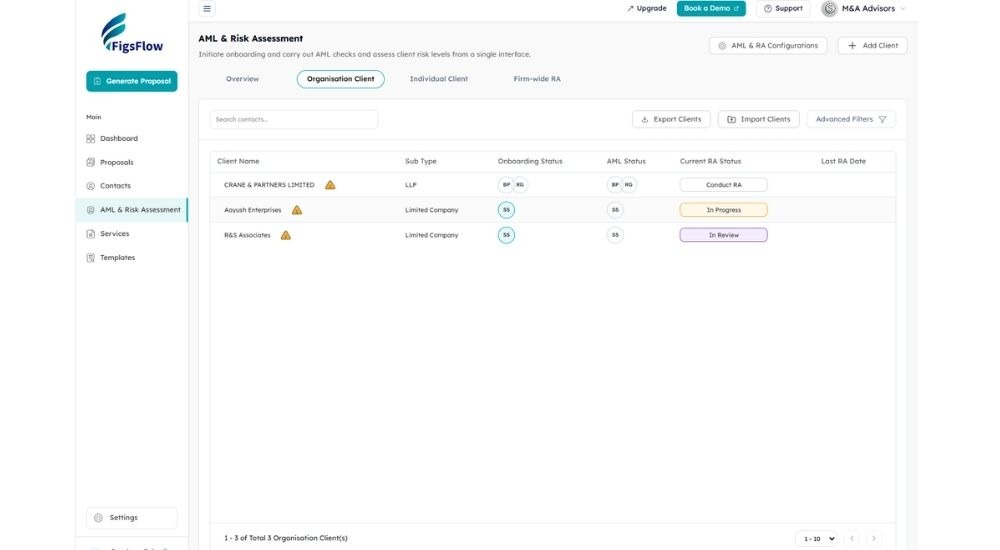
The AML & Risk Assessment dashboard shows every client’s status at a glance. Individual clients appear separately from organisational clients. Each column displays their onboarding status, AML check status, and risk assessment status. Yellow warning icons flag clients who need attention. Green “Conduct AML” buttons indicate clients ready for verification.
Collecting Client Information
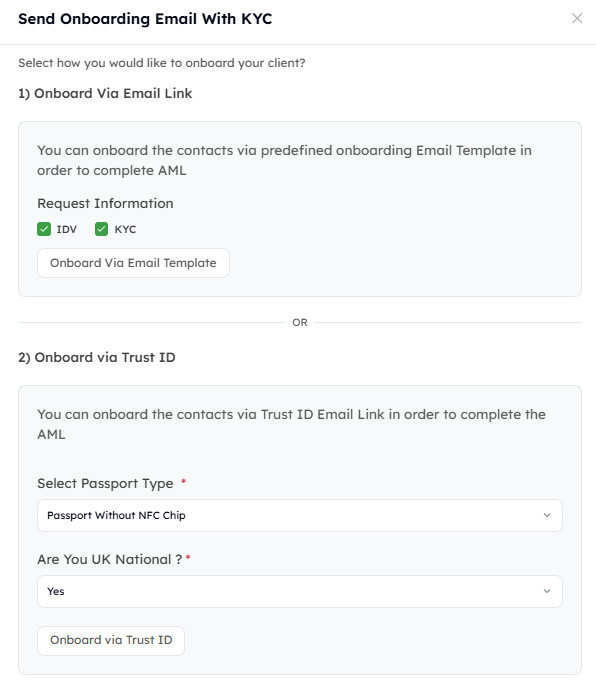
All the information regarding your client appears on their separate profile. You can access it by clicking on any client. The Information Overview includes contact details, address details, and identity details in organised sections.
So, how do you fill in or get this information from your client?
Well, you’ve got two options here: either onboard via email template or onboard via Trust ID. Both are equally easy and accurate. Select your preferred method, choose whether you need ID verification or KYC information (or both), and send.
What Your Client Experiences
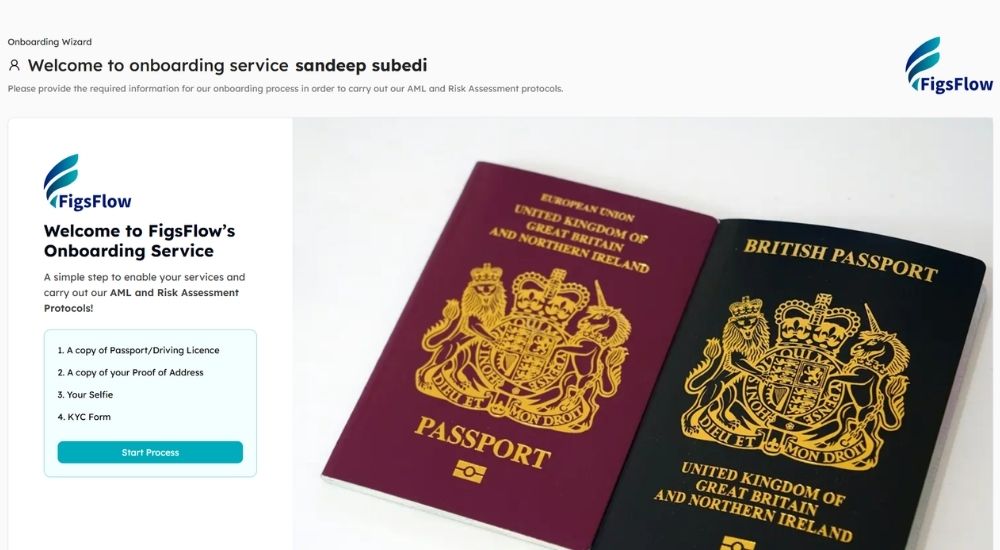
Your client receives a professional onboarding email with a secure link. Clicking through brings them to a clean wizard showing exactly what’s required: passport or driving license, proof of address, selfie, and KYC form.
They upload documents by dragging and dropping or clicking to browse. The system checks image quality in real time, flagging issues like poor lighting, unclear faces, or missing corners. They complete the same process for proof of address and selfie, then fill out the KYC form.
The entire process takes about five minutes.
Back on Your End
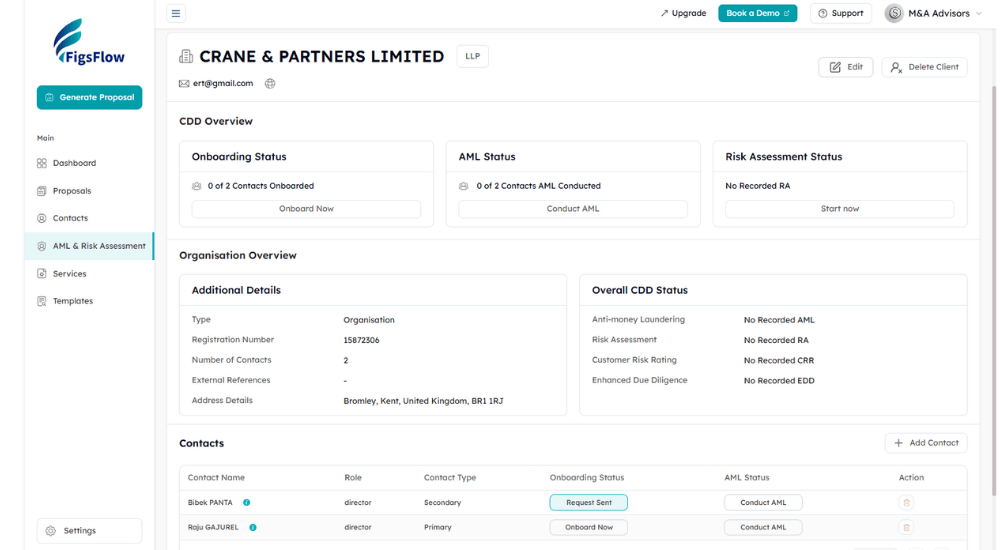
Once your client submits everything, their profile updates automatically. The Information Overview tab now contains complete contact details, full address information, and verified identity documents. Data from the KYC form autopopulates. Other fields you input manually based on the documents provided.
But who’s to say the identity documents aren’t fake or stolen? Or that the person isn’t sanctioned in the UK or politically exposed?
Running AML Checks & Getting Your Report
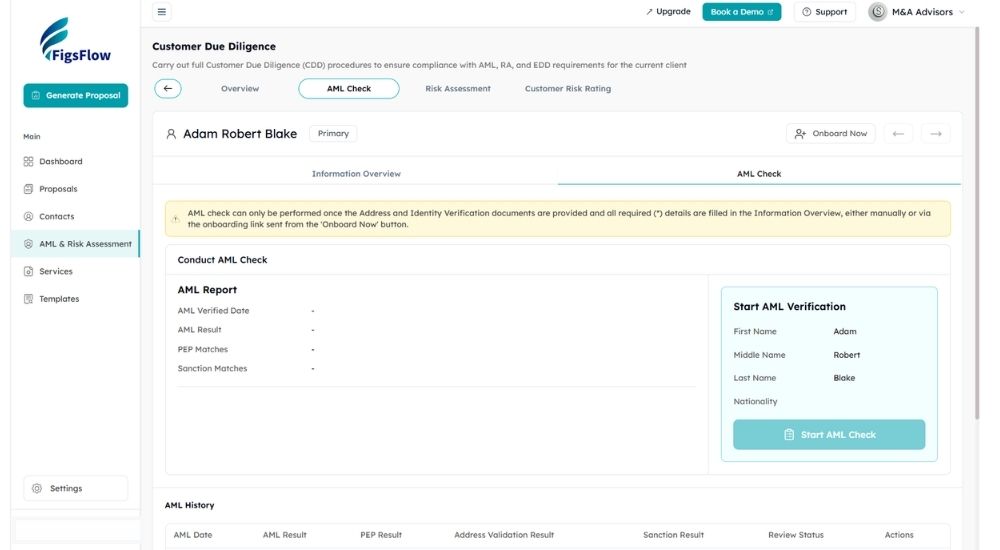
Click on the “AML Check” tab and then “Start AML Verification.” Within minutes, you get a comprehensive AML report. The cost is £2.10 or £3.00 per check depending on your FigsFlow package.
Here’s what happens in the background:
- Document verification checks authenticity and validity
- PEP screening searches political exposure databases
- Sanctions screening checks UK and international sanctions lists
- Amberhill verification cross-references multiple compliance databases
- MRZ/checksum validation confirms technical document integrity
- Address verification validates residential details, and
- document details extraction pulls forename, surname, sex, document type, document number, expiry date, issuing country, and issuing authority
The report stays in your client profile with clear timestamp and audit trail. You can retrieve it instantly when HMRC asks questions during an audit.
What used to be your bottleneck just became a two-minute process.
Stage 3: How to Conduct Risk Assessment for MTD Clients?
In this step, we’ll assess client risk based on firm’s risk appetite, assign appropriate risk ratings, and determine whether enhanced due diligence is required.
Conducting Risk Assessment
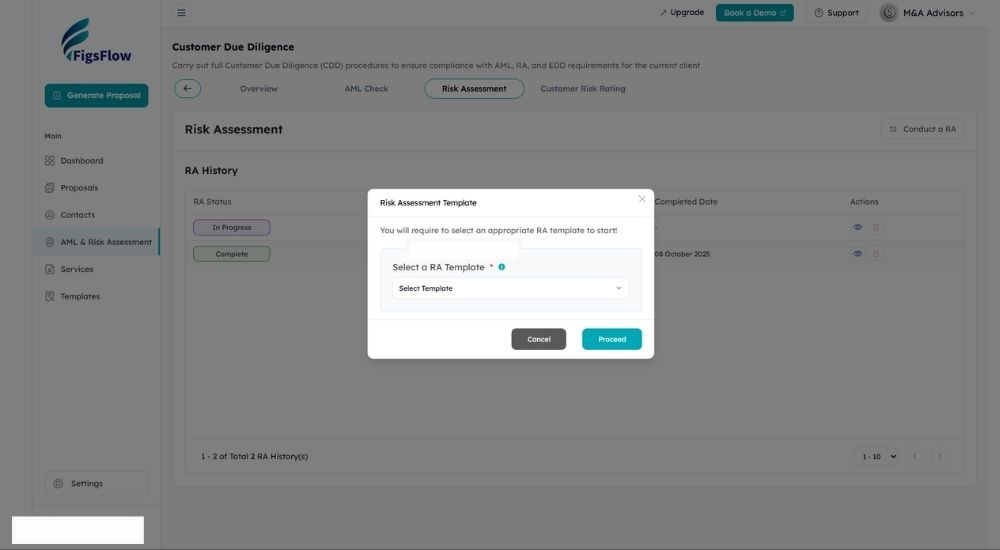
The Risk Assessment tab shows your RA report status, completion date, and reviewer. You can select an appropriate RA template based on client type or business category. Fill in information based on what you know about the client: business type, transaction patterns, geographic connections, and other relevant risk factors. Once completed, proceed directly or send it for senior management review to assign the final RA status.
Customer Risk Rating
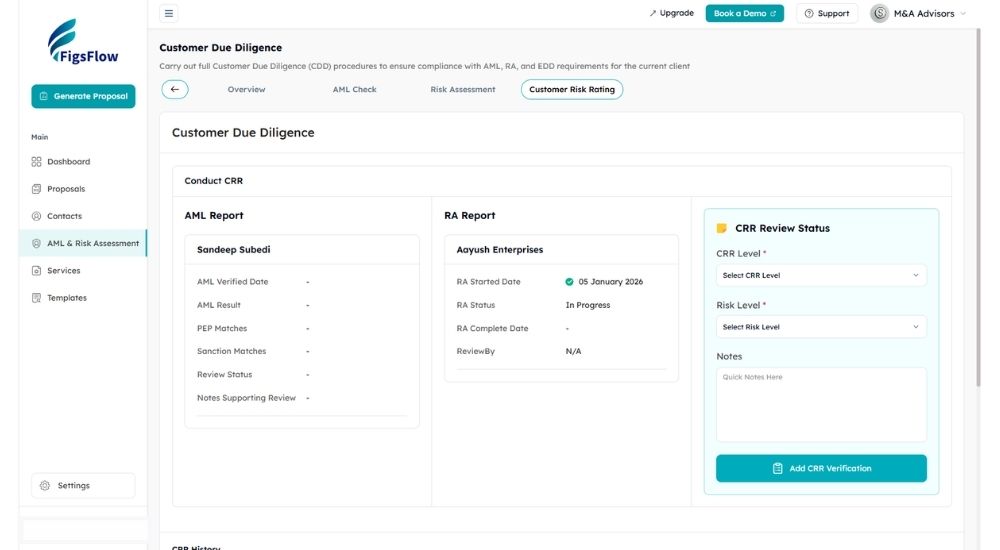
The Customer Risk Rating tab displays your AML report and RA report side by side. Based on both reports, you assign the CRR level (simplified, standard, or enhanced) and risk level (high, low, or normal). This combined view lets you make informed decisions using complete compliance data.
If a client requires enhanced due diligence, FigsFlow includes EDD templates for both individual and organisational clients. The CRR History table records every risk rating decision with full audit trail for regulatory review.
This marks the end of client onboarding. You’ve completed everything from proposal and engagement letter to risk assessment, AML checks, customer risk rating, and EDD when required.
Now, you do your work. And once it’s done, it’s time for payment and invoicing. FigsFlow can help with that as well.
Stage 4: How to Automate Invoicing & Payment Collection for MTD Clients?
In this section, we’ll handle invoicing and payment collection through seamless integrations with your existing systems.
Invoicing Integration
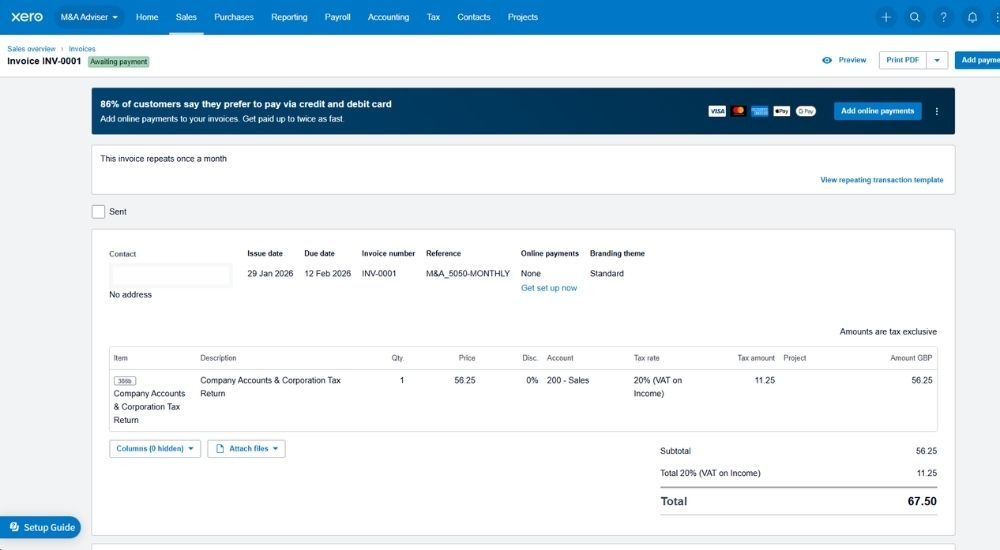
FigsFlow integrates with QuickBooks and Xero for automatic invoice generation. Once you win a proposal in FigsFlow, the invoice autogenerates within your accounting software. It appears as a draft, ready for you to review and approve. Once approved, the invoice goes live and your client receives it.
Payment Integration
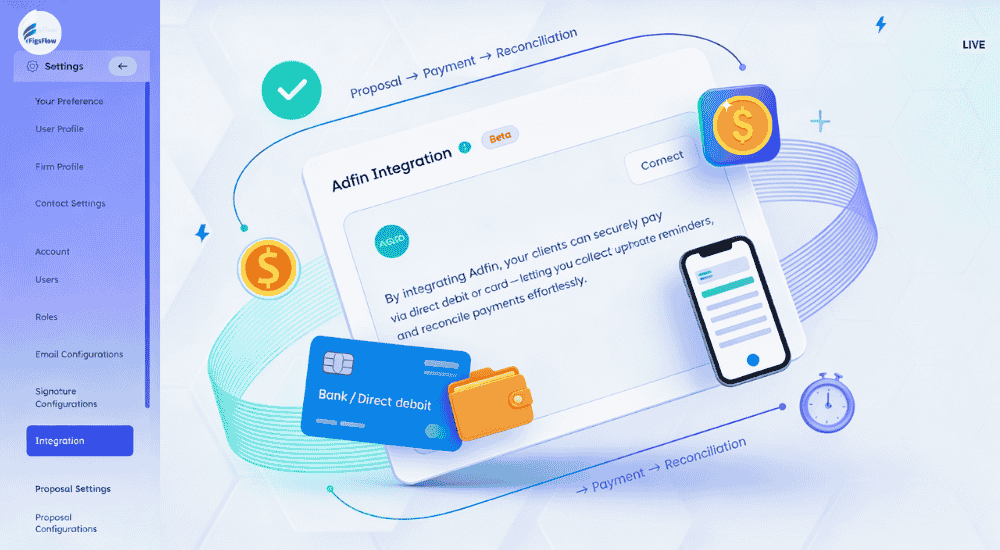
FigsFlow integrates with Adafin and GoCardless, making payment seamless for your clients. You can configure recurring payment schedules for quarterly MTD services based on the service package the client selected. Your clients get the convenience of automated payments without having to think about it each quarter. You get cash flow predictability and eliminate the admin burden of manual invoice chasing.
Complete MTD Client Onboarding at a Glance
Here’s what you’ve done so far:
- Sent professional proposals and engagement letters within minutes
- Collected KYC information with minimal back and forth
- Run comprehensive AML checks with automated verification
- Conducted PEP and sanctions screening across multiple databases
- Received e-signatures without the chasing game
- Completed risk assessments with structured templates
- Assigned customer risk ratings based on compliance data
- Generated invoices automatically in your accounting software
- Set up recurring payment schedules
All this, when accounted for the client’s whole journey, takes less than 10 minutes of your actual time. The rest happens automatically while you focus on serving clients or closing new ones.
And here’s a little secret: we’re launching a practice management system very soon into the same workflow. In a month or two, you’ll be able to time track, assign work, monitor team productivity, manage deadlines, and handle everything else from FigsFlow. One platform for your entire practice operations.
Why MTD Client Onboarding Journey Matters for Your Practice
Features and processes matter, but the business outcomes matter more. When you step back from the mechanics of automated proposals and integrated compliance workflows, three fundamental benefits emerge that shape your practice’s future.
Client Experience Transformation
First impressions matter. Professional, efficient onboarding signals competence and builds confidence. Clients see that you have your systems together and respect their time. When you make things easy for clients, they remember. Good onboarding experiences predict long-term relationships and natural referrals.
Compliance Confidence
AML requirements carry real penalties. HMRC audits happen. Systematic compliance eliminates uncertainty. You know checks were completed because the system doesn’t let you skip them. Documentation generates automatically. Junior staff can onboard clients properly with system guidance rather than relying entirely on experience.
Practice Scalability
Manual onboarding scales linearly with headcount. Automated onboarding scales exponentially. Three waves of MTD clients need onboarding between April 2026 and April 2028. Can your current process handle that volume? Time saved on administrative work redirects to advisory services. You’re positioning yourself to capitalise on MTD rather than just surviving it.
The practices that streamline onboarding now will dominate the MTD era while competitors struggle with processes that can’t scale.
Additional Resources
- Struggling with MTD pricing? Here’s exactly how you can price MTD for ITSA services: Charge Your Worth: Guide to Pricing MTD ITSA Services
- Worried about penalties? Understand the new penalties system under MTD and protect your practice: New MTD ITSA Penalty System: Miss a Deadline, Pay the Price
- New to MTD compliance? Your 8-step guide to understanding MTD for ITSA (checklist included): MTD ITSA for Individuals Simplified [Full Guide + Free Checklist]
- Confused about where to start? MTD for ITSA explained like never before. It’s everything you need to get started: Step-By-Step Guide to MTD ITSA for Agents [With Checklist]
- Don’t pay for MTD software. Here’s 9 free HMRC-approved MTD software for accountants and tax agents. Number one is the best: Top 9 Totally Free MTD Software for Accountants in 2025 | FigsFlow
So, What Should You Do Next?
By the time you read this, MTD deadlines are either approaching fast or already here. And you’re likely stuck in onboarding chaos.
Don’t waste any time. Book a demo, see how FigsFlow addresses the bottlenecks you’re facing, and once you’re satisfied, pick a plan that suits your firm and get started.
Conclusion
MTD isn’t coming. It’s here.
April 2026 marks the first wave, with thresholds dropping to £30,000 in 2027 and £20,000 in 2028. Thousands of clients need proper onboarding, and your manual processes won’t scale.
FigsFlow transforms what used to take hours into minutes.
- Professional proposals generate automatically
- E-signatures eliminate the chasing game
- AML checks, PEP screening, and risk assessments happen with a single click
- Invoicing and payment collection integrate seamlessly with QuickBooks, Xero, GoCardless, and Adafin
The entire client journey, from first contact to active service, completes in under 10 minutes of your actual time.
The practices that automate onboarding now will dominate the MTD era. The ones that don’t will drown in administrative chaos while clients quietly move to competitors who seemed prepared.
Ready to Onboard MTD Clients?
Frequently Asked Questions (FAQs)
You can use software like FigsFlow that lets you generate proposals and engagement letters (regulatory compliant) within minutes. The process is simple: import clients, select services, and done. The software handles everything including pricing and formatting.
Yes. MLR 2017 requires accountants to conduct AML checks on all clients, including MTD clients. This includes identity verification, PEP screening, sanctions checks, and risk assessments for regulatory compliance.
The key to onboarding clients faster is fast engagement, fast proposals, fast KYC and AML checks, and fast document collection. And that’s possible with software custom built for accountants such as FigsFlow.
You need to consider factors like quarterly updates, transaction volume, entity complexity, and additional income sources, then decide price accordingly. Or use FigsFlow that has a pricing calculator configured with all these variables. Just input and you get your service pricing.
You conduct enhanced due diligence, implement additional monitoring, document all risk factors thoroughly, obtain senior management approval, and maintain detailed records for regulatory compliance and future audit trails when needed.
April 2026 for self-employed and landlords earning over £50,000. The threshold drops to £30,000 in April 2027 and £20,000 in April 2028, expanding compliance requirements significantly across thousands of clients.