
How long did your last client onboarding take?
If the answer is “several hours” or “I’m still chasing documents from last month,” you’re experiencing the compliance bottleneck that plagues UK accounting practices nationwide.
Between ID verification, source of funds documentation, PEP screening, sanctions checks, and CRR determinations, the average client onboarding requires 15-20 separate compliance steps. Miss one, and you’re exposed to MLR 2017 penalties and 2 years of imprisionment.
FigsFlow eliminates the bottleneck. Our automated onboarding workflow captures every required data point, validates documents in real-time, and generates compliant audit trails that make HMRC supervision visits straightforward instead of stressful.
Here’s the complete process.
KEY TAKEAWAYS
- Manual client onboarding takes 110 minutes plus days of document chasing. FigsFlow completes it in 15 minutes same-day
- MLR 2017 requires Customer Due Diligence before client engagement
- FigsFlow automates AML screening, sanctions checks, PEP verification, and risk assessments with live database connections
- Common mistakes include incomplete beneficial ownership records, missed PEP family connections, and undocumented risk rationales
- FigsFlow procide complete audit trails and CRR history export in 30 seconds when HMRC supervision visits arrive
Why Client Onboarding Matters for AML Compliance
Client onboarding isn’t just administrative busywork.
It’s your first line of defence against money laundering, terrorist financing, and regulatory penalties. Under MLR 2017, UK accounting practices must conduct Customer Due Diligence before providing any regulated services. Miss this step or do it poorly, and you’re operating outside the law from day one.
Client onboarding matters for four critical reasons:
- Legal Obligation – MLR 2017 requires CDD before client engagement. No exceptions, no shortcuts. HMRC supervision teams specifically check your onboarding procedures during compliance visits.
- Risk Assessment Foundation – Your initial CDD determines whether a client needs Simplified, Standard, or Enhanced Due Diligence. Get this wrong, and you’re either wasting resources on low-risk clients or exposing yourself to high-risk ones.
- Audit Trail Creation – Proper onboarding generates the documentation you’ll need when HMRC asks, “How did you verify this client?” Three years later, that paper trail either saves you or sinks you.
- Ongoing Monitoring Baseline – You can’t detect unusual activity if you don’t know what’s normal. Client onboarding establishes the risk profile you’ll monitor throughout the relationship.
Skip proper onboarding, and you’re building your practice on regulatory quicksand. HMRC doesn’t care that you were busy or that the Client seemed trustworthy. They care about documented compliance procedures, and onboarding is where it all begins.
The FigsFlow Client Onboarding Workflow
FigsFlow transforms client onboarding from a manual slog into an automated workflow. Every step connects to the next, every document lands in the right place, and every compliance requirement gets ticked without you chasing anyone.
Here’s exactly how it works.
Step 1: Add Your Client to the System
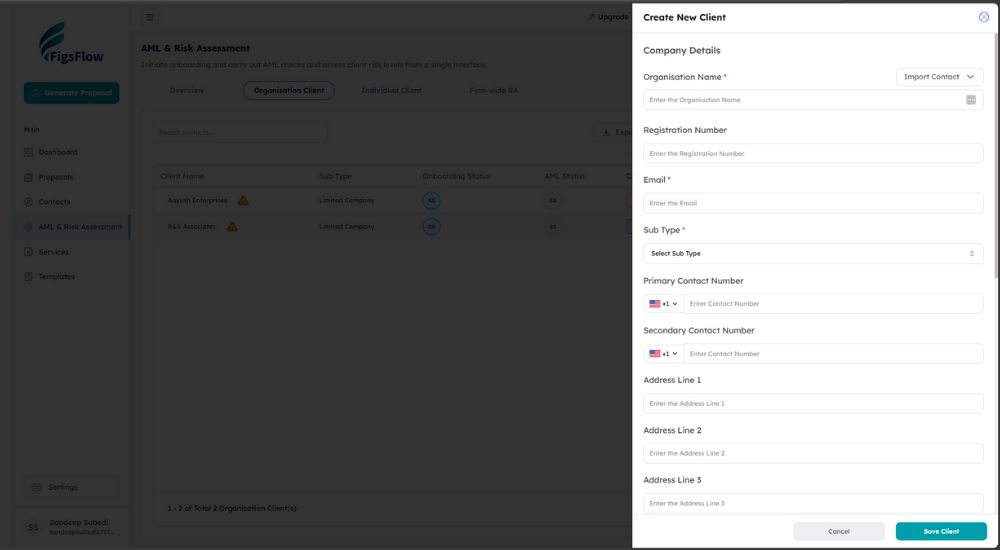
Open FigsFlow and navigate to AML & Risk Assessment.
Click “Add Client” and select the client type:
- Organisation Client for companies,
- partnerships, and trusts, or
- Individual Client for sole traders and personal clients.
Enter the basic details: client name, entity type (Limited Company, LLP, Partnership, Trust), and primary contact email.
FigsFlow creates a new client record in your dashboard. You’ll see three status indicators:
- Onboarding Status,
- AML Status, and
- Current RA Status.
All start blank because you haven’t run any checks yet.
Step 2: Choose Your Onboarding Method
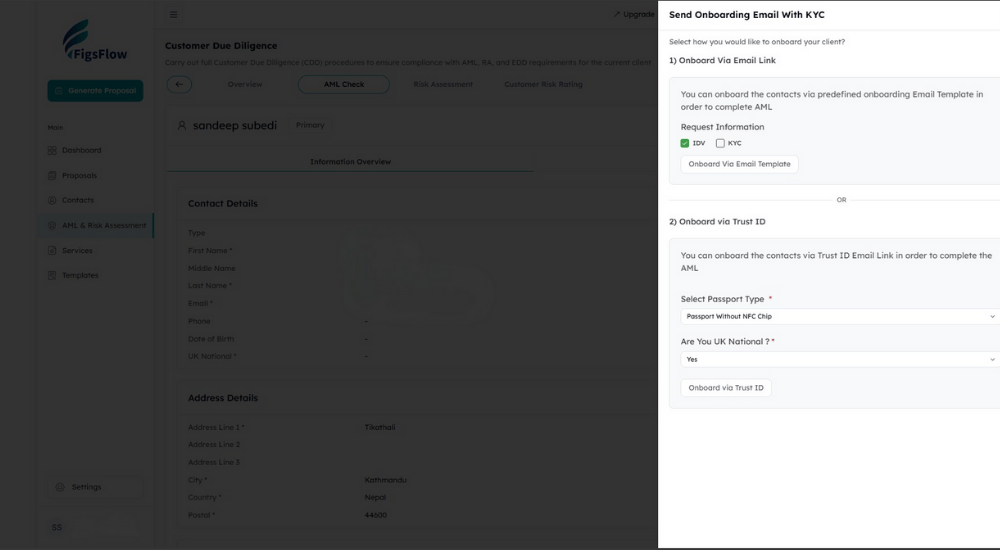
Click into the client record, and you’ll see the Customer Due Diligence dashboard.
Three action buttons stare back at you:
- Onboard Now,
- Conduct AML, and
- Start Risk Assessment.
Click “Onboard Now”, and FigsFlow presents two pathways.
- Onboard Via Email Link sends your Client a secure link to your predefined onboarding template. The Client uploads their identification documents, completes your KYC questions, and submits everything back through FigsFlow’s portal.
- Onboard via Trust ID uses Trust ID’s verification system with NFC passport scanning. Select the passport type (with or without NFC chip), and FigsFlow generates a unique Trust ID link. Your Client clicks the link, scans their passport using their phone camera, and Trust ID verifies their identity in real-time.
Both methods let you select what information to request: tick IDV for identity verification, tick KYC for know-your-customer details, or tick both. Most practices request both comprehensive coverage.
Send the link. Your Client gets an email within seconds.
Step 3: Client Completes Their KYC
Your Client opens the email and clicks the secure link.
For Email Link onboarding, they see your custom form requesting a passport copy, proof of address, beneficial ownership details, and source of funds questions. They upload documents directly to FigsFlow’s secure portal.
For Trust ID onboarding, they follow the prompts to scan their passport. The NFC chip verification takes 30 seconds. Trust ID extracts all identity data automatically: full name, date of birth, nationality, passport number, and facial recognition match.
Once submitted, FigsFlow notifies you instantly. The Client’s onboarding status updates from “Request Sent” to “Documents Received.” All their information sits in your FigsFlow dashboard, organised and ready for your AML checks.
Step 4: Run Automated AML Checks
Back in your FigsFlow dashboard, click “Conduct AML” next to the client name.
FigsFlow’s verification engine screens the Client against sanctions lists, PEP databases, and adverse media sources. We’re talking comprehensive checks: OFSI financial sanctions list, UN consolidated sanctions, EU sanctions, Interpol notices, and global PEP registries covering 240+ countries.
The screening runs in real-time.
- PEP Matches – Any politically exposed persons connections, including immediate family members and known close associates.
- Sanction Matches – Active sanctions, historical sanctions, and entities operating in sanctioned jurisdictions.
- Adverse Media – Negative news coverage related to financial crime, corruption, fraud, or regulatory enforcement.
FigsFlow colour-codes the results: green for no matches, amber for potential matches requiring review, red for confirmed matches. Click any match to see the full details: which list triggered the alert, the nature of the connection, and the date information.
Step 5: Complete the Risk Assessment
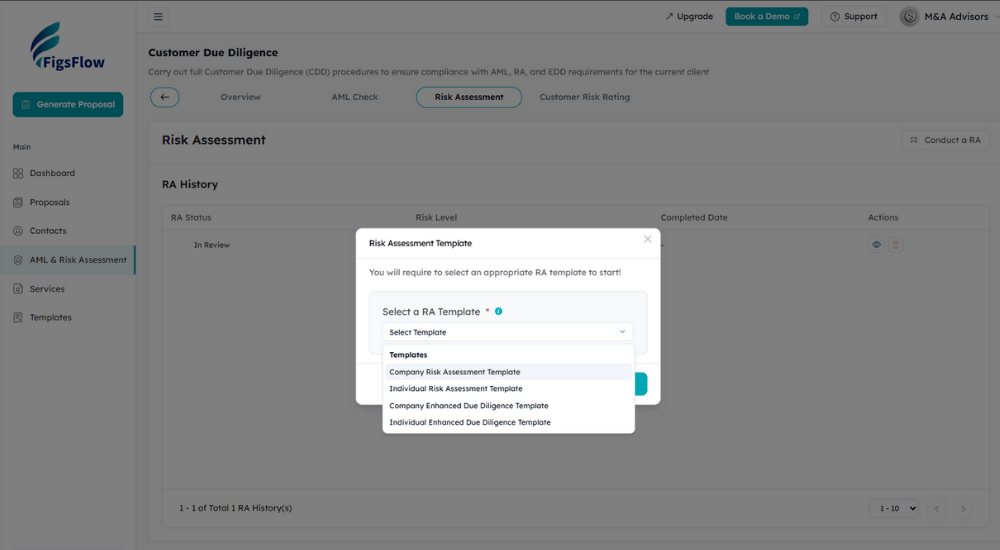
Click “Conduct a RA”, and FigsFlow presents your template options.
Select the appropriate template for your client type:
- Company Risk Assessment Template for organisations,
- Individual Risk Assessment Template for sole traders, or
- Enhanced Due Diligence templates when initial checks indicate elevated risk.
The questionnaire opens with four structured sections:
- Section 1: Client Identification & Verification asks binary questions about PEP status, sanctions lists, adverse media records, and politically connected family members. Simple Yes/No buttons.
- Section 2: Geographical Risk assesses where the Client operates, where beneficial owners reside, and whether any high-risk jurisdictions factor into their business.
- Section 3: Industry/Transaction Risk evaluates the Client’s business sector, typical transaction patterns, cash usage levels, and exposure to money laundering typologies.
- Section 4: Service/Product Risk examines which services you’re providing, fee structures, and any features that increase compliance complexity.
Answer each question in order. FigsFlow automatically calculates the risk score as you progress. The right sidebar shows your completion percentage and running risk assessment.
Most standard client assessments take 10 minutes to complete. Enhanced due diligence questionnaires take 20 minutes because they dig deeper into beneficial ownership structures and transaction monitoring requirements.
Step 6: Determine Customer Risk Rating
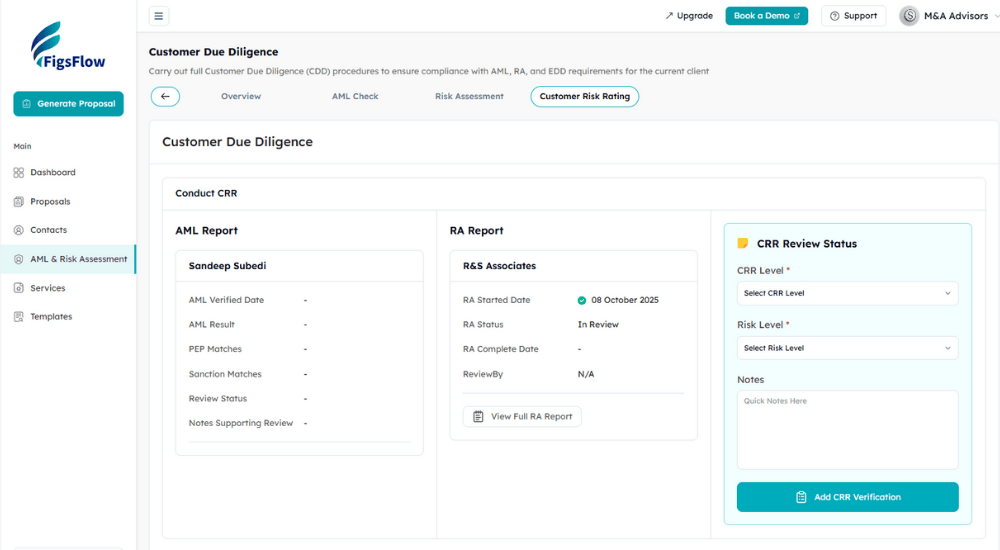
Submit the completed risk assessment, and FigsFlow calculates the Customer Risk Rating.
The CRR determination page splits into two columns: AML Report on the left showing your verification results, RA Report on the right displaying your risk assessment outcome.
FigsFlow presents three CRR levels:
- Simplified – Low-risk clients meeting all criteria for reduced monitoring. Think established UK companies with transparent ownership, no PEP connections, operating in low-risk sectors.
- Standard – Normal business risk requiring regular monitoring. Most UK SME clients fall into this category: straightforward operations, UK-based beneficial owners, conventional transaction patterns.
- Enhanced – High-risk clients needing intensive ongoing monitoring. Triggers include PEP connections, complex ownership structures, high-risk jurisdictions, or cash-intensive businesses.
Select the appropriate CRR level. Add notes explaining your professional judgment if you’re overriding the suggested rating. Click “Add CRR Verification” to finalise.
FigsFlow stamps the determination with date, time, and your username. The audit trail captures every decision point.
Step 7: Review & Document Everything
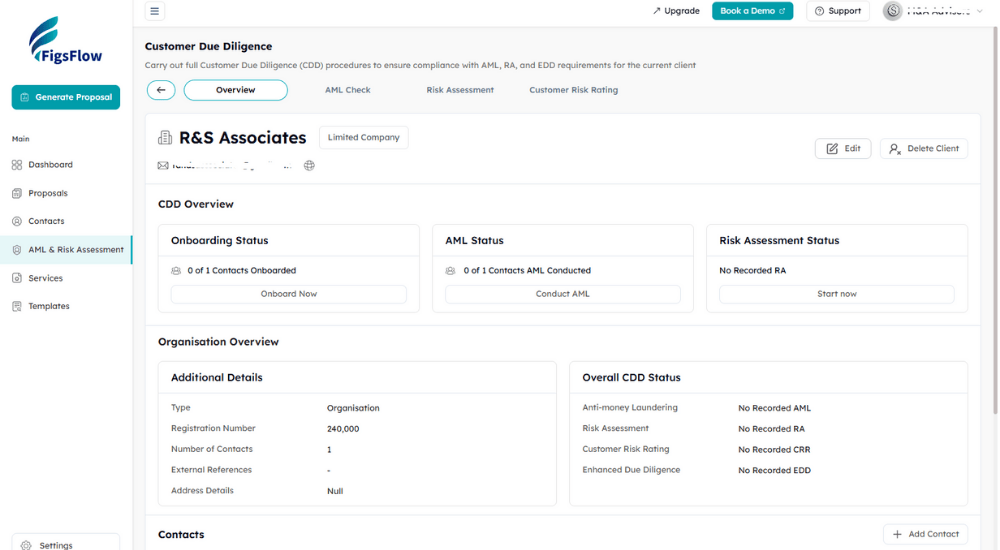
Your client onboarding is now complete.
The Overview tab shows all status indicators turned green: Onboarding Status complete, AML Status verified, Risk Assessment Status determined. The Last RA Date records when you completed the assessment for your annual review calendar.
FigsFlow stores everything in one place:
- Contact details and entity information in the Organisation Overview section.
- Identity documents and KYC responses in the secure document vault.
- AML screening results with match details and verification dates.
- Risk assessment questionnaire with your answers and calculated scores.
- CRR determination with supporting rationale and approval timestamp.
The entire history sits in your CRR History table. Every assessment, every review, every status change is preserved with date stamps and user attribution.
When HMRC shows up for supervision, you click the client name and export their complete compliance file in 30 seconds.
How Long Does Client Onboarding Take?
Let’s follow one Client through the traditional onboarding journey.
You send the initial document request email. 10 minutes. Clear instructions, professional tone, list of requirements. Off it goes into the Client’s inbox, where it sits unread for two days while they’re dealing with supplier invoices and staff issues.
Day three: documents arrive. You open the email optimistically.
- Passport copy? Check.
- Proof of address? It’s a bank statement from nine months ago.
HMRC wants three months maximum. Back to email. Another 20 minutes explaining the requirements and asking for a recent utility bill.
Four days later: second batch of documents. The utility bill is perfect, but now the passport photo is so compressed you can’t read the details. Third email. Another 20 minutes.
Finally, seven days after initial contact, you’ve got complete documentation. Now the real work begins:
- opening multiple browser tabs to check sanctions lists (15 minutes per person),
- researching PEP databases and tracing beneficial ownership structures (20 minutes),
- working through your risk assessment template (30 minutes), then
- organising and filing everything in your practice management system (15 minutes).
One Client Onboarded – 110 minutes active work spread across a week of waiting.
FigsFlow compresses this entire week into one focused session. Client receives a secure portal link, completes everything in five minutes while the information is fresh in their mind. Automated screening runs instantly. You review and finalise in 15 minutes total.
Same day. Same outcome. Completely different experience.
Simplify your AML compliance process with FigsFlow’s powerful tools for seamless verification.
Common Client Onboarding Mistakes & How FigsFlow Prevents Them
Incomplete Beneficial Ownership Records
- The Mistake – Accepting “John Smith owns the company” without verifying ownership percentages, control structures, or nominee arrangements.
- The Consequence – HMRC flags incomplete beneficial ownership records in almost every supervision visit. You’re required to identify anyone with 25% or more ownership or control.
- FigsFlow Prevention – The onboarding templates explicitly request beneficial ownership structures with percentage holdings. If your Client submits incomplete information, the form flags missing fields before they can proceed. You get complete ownership chains, or you get nothing.
Skipping PEP Family Member Checks
- The Mistake – Screening the Client but forgetting their spouse, parents, or children might be politically exposed persons.
- The Consequence – PEP obligations extend to immediate family members and known close associates. A client might not be a PEP, but their father-in-law serving in parliament makes them a PEP connection requiring Enhanced Due Diligence.
- FigsFlow Prevention – The risk assessment questionnaire specifically asks, “Does the client have family members or close relations with a Politically Exposed Person?” Separate question, separate answer, separate audit trail. You can’t miss it because the form won’t let you proceed without answering.
Using Outdated Sanctions Lists
- The Mistake – Checking sanctions once during onboarding and never updating your records as lists change.
- The Consequence – Sanctions lists are updated constantly. Someone clean in January might be sanctioned in March. You’re required to screen clients against current lists, not historical snapshots.
- FigsFlow Prevention – Our AML checks pull from live databases updated daily. Every screening uses the most current OFSI, UN, and EU sanctions data available that day.
No Documented Risk Rating Rationale
- The Mistake – Marking a client as “Low Risk” without explaining why you reached that conclusion.
- The Consequence – HMRC expects documented reasoning for your risk assessments. “They seemed trustworthy” doesn’t cut it when questioned about your CRR methodology during supervision.
- FigsFlow prevention: The Notes section on the CRR determination page requires you to document your reasoning. The system prompts you to explain deviations: “Why are you classifying this PEP-connected client as Standard Risk instead of Enhanced?”
Additional Resources
- Master the KYC Today with these 7 Actionable Tips: Master KYC Like a Pro: 7 Tips Every Accountant Should Use
- Complete Guide to Completing the KYC process in Minutes for UK Accountants: Complete KYC in Minutes! | Complete Guide For Accountants | FigsFlow
- The Real Reason Every Accounants Should Prioritise AML & KYC Compliance: Complete KYC in Minutes! | Complete Guide For Accountants | FigsFlow
- The Real Difference Between KYC & AML Compliance: Difference Between KYC & AML: What You Need to Know | FigsFlow
- Master these KYC Trends That will Shape Compliance in 2026: Top 7 KYC Trends for 2026 | FigsFlow
- Here’s How You Can Avoid Common Pitfall & Penalties in KYC Compliance: UK KYC Compliance: Practical Advice on Pitfalls & Penalties
Conclusion
Client onboarding eats up time you don’t have.
Email chains full of half-completed forms. Clients who “forgot” to send their passport copy. Sanctions lists you checked three months ago might be outdated now. Risk assessments sitting in draft because you’re waiting on one more piece of information.
FigsFlow eliminates the chaos.
Automated screening runs in 30 seconds. Clients complete everything in one sitting through secure links. Your audit trail builds itself while you focus on actual advisory work.
Ready to onboard clients in 15 minutes instead of three weeks?
Frequently Asked Questions (FAQs)
Client onboarding is the mandatory process UK practices must complete before providing regulated services under MLR 2017. It involves verifying client identity, checking sanctions and PEP lists, assessing money laundering risk, and determining the Customer Risk Rating. This creates the documented compliance foundation HMRC expects during supervision visits.
Client onboarding covers three core requirements: Customer Due Diligence (identity verification and beneficial ownership), AML screening (sanctions, PEP databases, adverse media), and risk assessment (Simplified, Standard, or Enhanced Due Diligence). The process generates the audit trail proving you’ve met MLR 2017 obligations.
KYC is the document collection component: passport copies, proof of address, beneficial ownership details, and source of funds. Client onboarding is broader, encompassing KYC plus AML screening, risk assessment, CRR determination, and ongoing monitoring setup. KYC gathers evidence, onboarding completes the compliance process.
Yes. MLR 2017 requires Customer Due Diligence before providing any regulated services. No exceptions for small clients, referrals, or existing relationships. Skipping KYC exposes your practice to unlimited fines and up to two years imprisonment under MLR 2017.
Onboarding establishes your ongoing monitoring baseline. Your Customer Risk Rating determines review frequency: Simplified clients need minimal monitoring, Standard clients require annual reviews, Enhanced clients need continuous oversight. The documentation supports HMRC supervision visits and your annual practice-wide risk assessment.
Yes. Automated systems handle document collection through secure portals, run real-time AML screening against live databases, guide structured risk assessments, and generate complete audit trails. This reduces onboarding from 110 minutes to 15 minutes while improving compliance accuracy.