
Know who has room before you promise the work
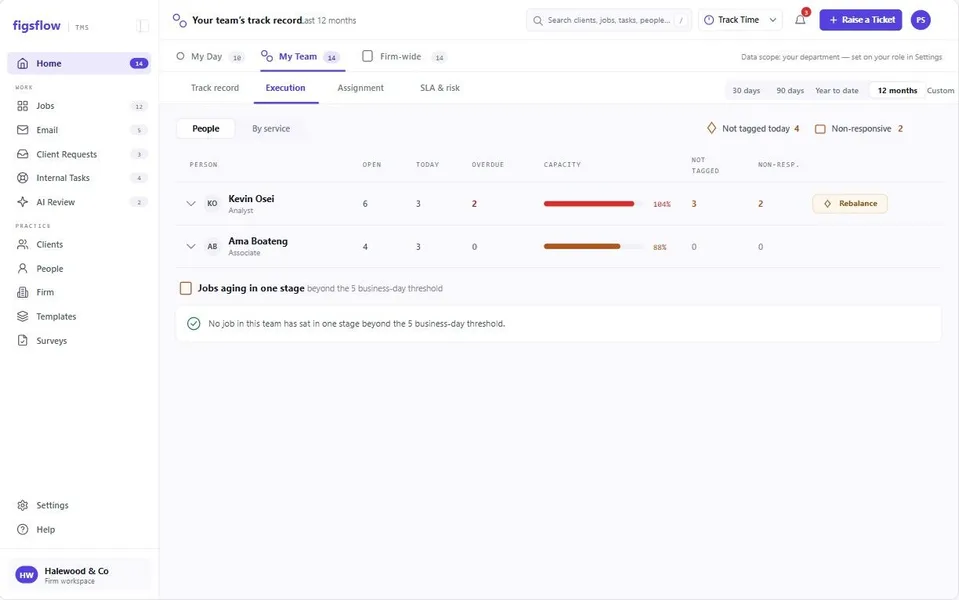
FigsFlow is capacity planning for accounting firms — every job, task and deadline your team already works from, totalled by person and by week. An assignment shows what it costs someone before you make it, and a week that will not fit is visible while there is still time to move it.
 G2 reviews
 Google reviews
Verified reviews
Google reviews
Verified reviews
The six-week average is 78%, which looks fine. The two weeks that matter are both over.
Trusted by the best





Product tour
Watch a week tip
Add one job to a week that already looks fine and watch it go over. Then move the same hours to the person who has room.
Nobody decided to overload him.
Four systems each said yes on their own.
The job list said he had capacity, because it counts jobs and not hours. The spreadsheet was accurate on the Monday it was built. The calendar held meetings but no work. The timesheets knew the truth and arrived a fortnight too late to use. Every one of those answers was reasonable, and together they put a hundred and nineteen per cent of a week on one person.

"Nobody asked what I was already carrying."
Where it sits
Hours come from the work, not from a plan
Capacity is not something anybody maintains. It is a read of work that already exists, and it updates when the work does.
- Template estimate
- Task assigned
- Hours land in a week
- Time logged
- Plan against actual
- Estimate reviewed
A loop, closed by a person
The estimate sits on the task. The task sits in a job. The job came from a template that already knew roughly what this service takes — and what actually happened tells you whether that estimate was right. Correcting it on the template is a decision somebody makes, not something the system does behind you.
Capacity is one read of the records five other modules are already keeping.
Practice dashboardTeam capacity
-
Person 185%
-
Person 2102%
-
Person 369%
-
Person 475%
-
Person 595%
The unit
Counted once, as hours somebody has to find
Not job counts. Not a percentage somebody typed. Hours, against a working week, for a named person — which is the only unit in which the question "can we take this on" has an answer.
6.5 hours above the line, in one week, for one person
6 open tasks · 41.5h against a 35h week · 2 due 13 Feb
Every step logged · non-editable · visible to senior managers
Timeline negotiation
The deadline is offered, not issued
When a manager assigns work, they set a tentative date. The assignee accepts it, or asks for a different one — and when they do, the system attaches their current open tasks and dates to the request automatically. Nobody has to make the case for their own workload. The manager can accept, hold the original date with a reason, or propose something in between.
A deadline can still be held. The value is not that the assignee always wins — it is that the decision is made once, in writing, with the workload visible, instead of three times in a corridor.
A tentative date is not the due date until it is accepted. If the manager does not respond, the request escalates rather than expiring.
Before you commit
See the load before you set the date
The same workload view the assignee would have sent you is available at the point of assignment, before you set a date at all. Most timeline conflicts are avoidable by looking first, and the reason nobody looks first is that it usually takes ten minutes to find out.
Plan against actual
The plan, and the week that actually happened
Logged time against planned hours, per person and per job. It tells you two things worth knowing: who is quietly absorbing more than the plan says, and which service the firm consistently under-estimates. The second one is worth more: it tells you exactly which template estimate to go and put right.
Seen enough? Bring the week that went wrong.
Book a demoThe difference
A snapshot, or a read of the work
Capacity planning software for accounting firms is only useful if the numbers maintain themselves. Anything that needs a person to update it is accurate on the day it is built and wrong by Thursday.
| When… | A capacity spreadsheetBuilt on Monday from job counts | A generic resource plannerBuilt for projects, not practices | FigsFlowCapacity read from the work |
|---|---|---|---|
| The numbers go stale | ✕By Thursday. Nobody has time to rebuild it. | !Somebody maintains the plan by hand. | ✓Nobody maintains it, because nobody built it. |
| You ask what someone is carrying | ✕A count of jobs, not hours. | !Hours, if they were entered. | ✓Hours from the tasks that already exist. |
| A manager sets a deadline | ✕Not the spreadsheet's job. | ✕Assigned. The date is the date. | ✓Offered. Tentative until the assignee accepts it. |
| Someone cannot take more on | ✕They have to say so, in person. | !A comment, if they are confident enough. | ✓A request with their workload attached automatically. |
| The deadline is held anyway | ✕Nothing is recorded. | !A status change. | ✓Recorded with the reason, either way. |
| Estimates were wrong all year | ✕You find out at billing. | !A report nobody opens. | ✓Actuals feed back into the template estimate. |
| You need next February's answer | ✕Rebuild the sheet. | !Re-enter the plan. | ✓Already there — the jobs are already scheduled. |
One is accurate on the day it is built. The other is a read of work that already exists.
Who uses it
What this looks like at your size
Pick the shape of your practice.
Your capacity is one person and you already know it is full. What you do not know is which week in February is the one that breaks, and that is knowable.

What you’ll see0:00 / 1:54
- 0:00 You know you are full. That is not the question
- 0:28 The jobs you have already accepted are already scheduled
- 0:58 Week commencing 9 February is at 128% That week was knowable in December
- 1:30 You move one job, or you say no to one client
Preview clock — no video source set
Two or three people, and the overload is always the same person because they are the one who says yes. The heatmap makes that visible without anyone raising it.

What you’ll see0:00 / 2:04
- 0:00 Three people. One of them is carrying the practice
- 0:34 Nobody has said anything, because saying it is awkward
- 1:04 The heatmap shows one row red and two rows amber Nobody had to raise it
- 1:36 Hours move to the person with room. No conversation needed
Preview clock — no video source set
This is the size at which taking on a client becomes a resourcing decision rather than a sales one. Hours in a week is the only honest basis for that call.

What you’ll see0:00 / 2:18
- 0:00 A prospect wants onboarding before the January deadline
- 0:36 Someone would normally say yes and work it out later
- 1:10 The six weeks that matter are already at 94% The answer is in the room
- 1:48 You take it with a later start, or you decline it honestly
Preview clock — no video source set
Load across offices and teams, and a documented record of every deadline that was negotiated rather than imposed.

What you’ll see0:00 / 2:30
- 0:00 Several offices, several teams, one set of deadlines
- 0:40 Load is visible across all of them in the same unit
- 1:18 Every negotiated date carries its reason and decision Documented, not remembered
- 2:00 Where requests cluster tells you where to hire
Preview clock — no video source set
Your stack
Works with what you already run
Hours come from jobs and timesheets already in the platform. Leave and meetings read from your calendar.
- Microsoft 365
- Outlook
- SharePoint
What this does not do yet
Proof
Built inside a working UK practice
Built inside working firms, by people who had watched one person carry a week that four systems said was fine.
 Coming soon0:51
 Coming soon1:04
 Coming soon0:57
 Coming soon1:12
Named practice references and review-platform ratings are not shown on this page yet. They will be added once the practices concerned have agreed in writing.
Pricing for this module
Team and capacity sits in Practice Management. Prices exclude VAT; monthly billing and every module are on the UK pricing page.
Practice Management
No minimum. One tier, nothing gated.
First 10 people, then £45 from the 11th · billed annually (£35 and £55 on monthly billing)
Start free- Unlimited jobs, tasks and templates
- Timesheets, capacity and job profitability
- Client portal, documents in your own SharePoint
- Email and deadline automation
- 20 AI actions a person a month, from January 2027
- No implementation fee
AI Assist
For Practice Management and the Suite, on the seats you choose. From 1 January 2027.
Billed annually (£12 on monthly billing)
Join the waitlist- Email triage and thread summaries
- Drafting you approve before anything sends
- Client and job summaries drawn from your own record
- Removes the 20-action monthly cap for that person
Not purchasable until AI goes live on 1 January 2027.
Related modules
What feeds capacity
Capacity is a read of four other things. These are them; the rest of the platform sits around them on the same shared record.
Jobs, tasks and deadlines
Where the hours come from — every task carries an estimate.
See the jobs moduleWorkflow templates
Where the estimates come from, and where corrected ones get set.
See the templates moduleTimesheets and billing
What actually happened, against what was planned.
See the billing modulePractice dashboard
Where capacity is read firm-wide rather than per person.
See the dashboard moduleResources
See it in practice
Case studies, short films and writing on resourcing a practice by hours rather than optimism.
 Coming soon
The week four systems approved
How one practice found a 119% week that every one of its tools had called fine.
Read the case study Coming soon
Reallocating after the heatmap
A five-person firm moved sixty hours in an afternoon, and nobody had to ask for help.
Read the case study Coming soon
Declining a client, with evidence
What changed when onboarding became a resourcing decision instead of a sales one.
Read the case study


Questions