
The whole practice on one screen, reported from the work itself
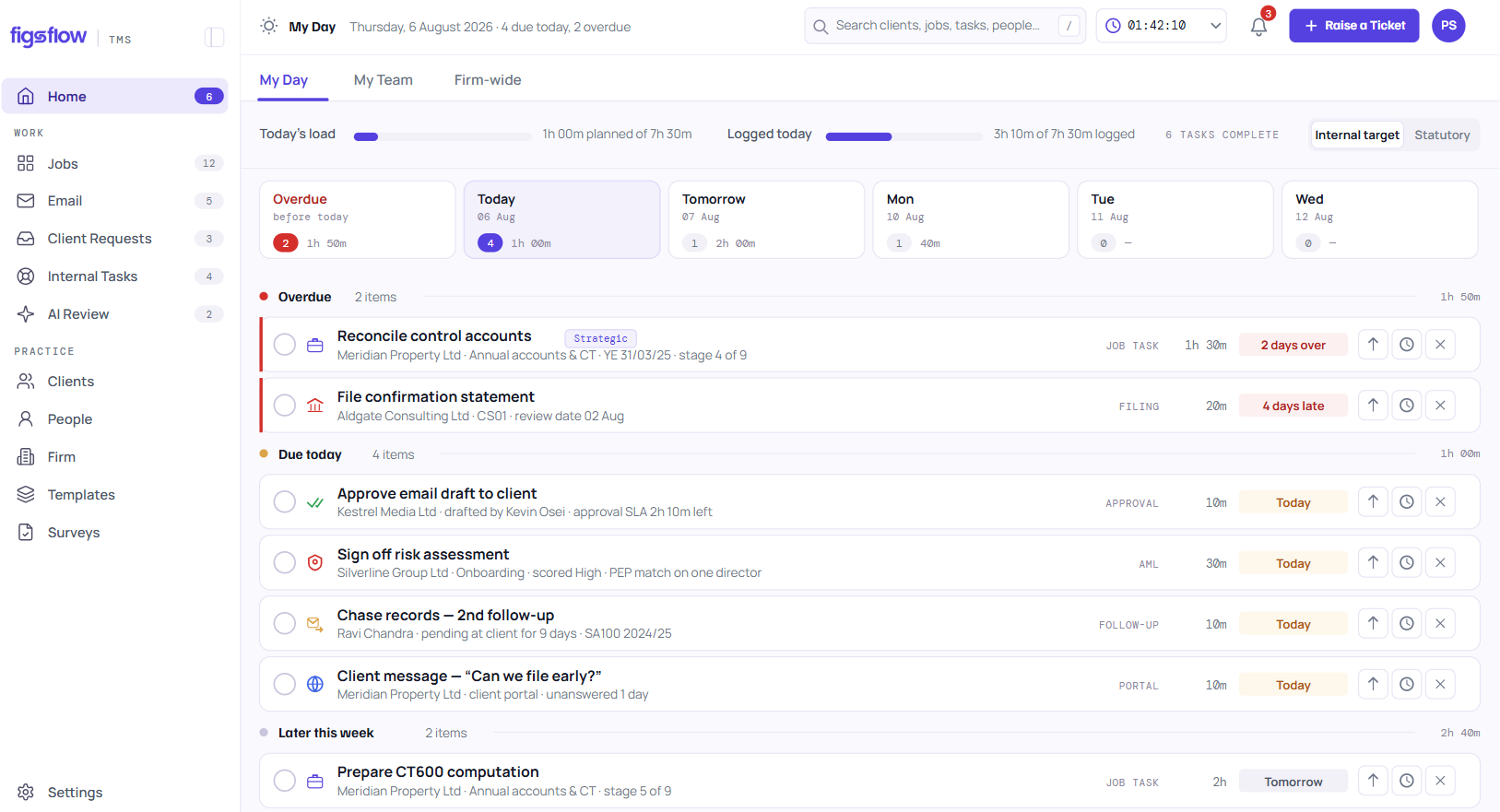
A practice dashboard for accountants that nobody assembles. It reads the jobs, tasks, allocations, reviews and time records your team is already keeping, and answers the five questions the working day turns on — what to do, what to chase, what to review, what the team is carrying, and what to assign. Current on Wednesday, not stale by Tuesday.
 G2 reviews
 Google reviews
 Verified reviews
Trusted by the best


Product tour
From a tile to the job
See the work at risk across the team, click through to the one that matters, and reassign it. The point is not the tile. The point is that acting on it takes one click and no context switch.
The Monday spreadsheet, rebuilt every Monday
Somebody exports the job list, pastes it into the sheet, colours the overdue ones red, and sends it round. It takes two hours, it is accurate until about Wednesday, and by the time anybody acts on it the thing that mattered has moved. The worst part is that it works — which is why nobody stops doing it.

What feeds the read, and what it sets off
A practice dashboard for accountants is only useful where it is wired into everything either side of it.
The work supplies the figures; the figure decides what happens next.
Feeds it
Sets off
The five
Five questions, and nothing that is not one
What to do today. What to chase. What to review or approve. What the team is carrying. What needs completing or assigning. A practice dashboard for accountants that answers forty questions answers none of them, because nobody reads forty tiles at nine in the morning.
Five panels. Every element on screen answers one of them.
One set of records. Filtered by who is looking, not rebuilt per role.
Two chairs
Two chairs, one screen
A partner opens it and sees the practice. A manager opens it and sees their week — what is due today, what came back from review, what is waiting on a client. Same underlying records, filtered by who is looking, so nobody is reading somebody else's dashboard and pretending it is useful.
Quality
Quality reported from the reviews themselves
Review outcomes are classified when the reviewer signs off — clerical, computational, omission, incorrect treatment, source data, compliance, blunder — and weighted accordingly. So the quality number on this screen is computed from what reviews actually found, not from anybody filling in a form about it afterwards.
Six → the six → the one → reassigned. No second screen.
Act on it
From the number to the thing
Every figure is a link. Six at risk becomes the six, becomes the one, becomes the reassignment — without opening another screen or asking anybody who owns it. A dashboard you cannot act from is a report.
Seen enough? Bring the spreadsheet you rebuild every Monday.
Book a demoThe difference
Assembled, or read
The difference is who maintains it. A practice dashboard for accountants that somebody has to rebuild is a report with a nicer font, and everything else follows from that one fact.
| When… | The Monday spreadsheetExported, pasted, coloured, sent | A reporting moduleBuilt from the month, after it ends | FigsFlowRead from the work itself |
|---|---|---|---|
| Somebody has to maintain it | ✕Two hours of somebody's week, every week. | !A month-end build, then it sits still. | ✓Nobody maintains it, because nobody built it. |
| You read it on Wednesday | ✕Accurate on the day. Wrong by midweek. | ✕Last month's position, not this week's. | ✓Current, because it is not a copy. |
| A figure looks wrong | ✕Go back to the source system and check. | !Drill to a report, not to the job. | ✓The figure opens the list behind it. |
| You want to act on what you see | ✕Message whoever owns it and hope. | ✕Read-only. Acting happens elsewhere. | ✓Reassign from the same screen. |
| You ask how quality is doing | ✕Not in the sheet at all. | !Self-reported on a form afterwards. | ✓Computed from classified review outcomes. |
| A partner and a manager both open it | ✕One sheet, everyone reads everyone's rows. | !A second report, built separately. | ✓Same records, filtered by who is looking. |
One is accurate on the day it is built. The other is a read of work that already exists.
Who uses it
What this looks like at your size
Pick the shape of your practice.
You are the practice, so the dashboard is mostly today's work and what you still need to chase. Those two will pay for it.
Poster · Sole practitionerFilm in production
What you’ll see0:00 / 1:42
- 0:00 Monday morning, and the list is still a spreadsheet
- 0:24 Today's work, read straight from the jobs
- 0:58 What to chase, without reopening the inbox Nothing was assembled to produce this
- 1:20 Open the figure, act on the one job
Preview clock — no video source set
Small enough that you think you know, big enough to be wrong about once a quarter. This is the size where the team execution view earns its place.
Poster · Small practice · 2–10Film in production
What you’ll see0:00 / 1:56
- 0:00 Two hours every Monday, rebuilding the same sheet
- 0:28 Five panels, read from the work itself
- 1:01 The team execution view, current on Wednesday Nobody exported anything
- 1:30 The review queue, before it becomes the bottleneck
Preview clock — no video source set
Partners stop asking managers for updates, which gives the managers back the afternoon they spent preparing them.
Poster · Growing · 10–50Film in production
What you’ll see0:00 / 2:06
- 0:00 The status meeting that exists to produce a number
- 0:30 A partner sees the practice, a manager sees their week
- 1:04 Same records, filtered by who is looking The update was already on screen
- 1:38 From the figure to the reassignment
Preview clock — no video source set
Consistency of view across offices, and a quality read computed from reviews rather than assembled by whoever is preparing the board pack.
Poster · Larger firm · 50+Film in production
What you’ll see0:00 / 2:14
- 0:00 Four offices, four versions of the board pack
- 0:32 One definition of each of the five questions
- 1:08 Quality computed from the review sign-offs Not from whoever wrote the pack
- 1:46 Comparable across sites, from the same records
Preview clock — no video source set
Your stack
Works with what you already run
Everything on the dashboard comes from inside the platform, and the documents behind the numbers stay where your firm already keeps them — in SharePoint, through Microsoft 365.
- Microsoft 365
- Outlook
- SharePoint
- Xero
- QuickBooks Online
- Stripe
- GoCardless
What this does not do yet
Proof
Built inside a working UK practice
Built by people who rebuilt the same Monday spreadsheet for years before deciding it was the product.
Reel 01Film in production
Reel 02Film in production
Reel 03Film in production
Reel 04Film in production
Named practice references and review-platform ratings are not shown on this page yet. They will be added once the practices concerned have agreed in writing.
What it costs
The practice dashboard is part of Practice Management — there is no reporting module to buy and no per-dashboard charge. Prices exclude VAT; monthly billing and every module are on the UK pricing page.
Practice Management
No minimum. One tier, nothing gated.
First 10 people, then £45 from the 11th · billed annually (£35 and £55 on monthly billing)
Start free- Unlimited jobs, tasks and templates
- Timesheets, capacity and job profitability
- Client portal, documents in your own SharePoint
- Email and deadline automation
- 20 AI actions a person a month, from January 2027
- No implementation fee
AI Assist
For Practice Management and the Suite, on the seats you choose. From 1 January 2027.
Billed annually (£12 on monthly billing)
Join the waitlist- Email triage and thread summaries
- Drafting you approve before anything sends
- Client and job summaries drawn from your own record
- Removes the 20-action monthly cap for that person
Not purchasable until AI goes live on 1 January 2027.
Related modules
What it reads
Four modules feed the five questions. The dashboard adds nothing of its own.
Jobs, tasks and deadlines
The risk tile — what is due, and what is about to be late.
See the moduleTeam and capacity
The capacity tile — what the team is carrying, per person and per week.
See the moduleTimesheets and billing
The unbilled tile — time logged against the work it belongs to.
See the moduleReporting and analytics
When five questions are not enough.
See the moduleResources
Go further
For firms comparing reporting approaches, or setting the dashboard up for their own team.
Blog
Practice reporting, in practice
How UK firms are moving from a weekly export to a live read of the work.
Read the blogChecklists
Compliance checklists
The standard checks a job runs against — the same records the dashboard reads.
Browse checklistsHelp docs
Guides and help docs
Setting the dashboard up for partners and managers, and what each role sees.
Visit supportFAQ
Questions worth answering here
DRAFT. Not today. The five questions — what to do, what to chase, what to review, what the team is carrying, what to assign — are a deliberate choice rather than a first version waiting to be extended: every element on screen has to answer one of them. What you can configure is who sees which of the five, and at what level — individual, team or whole practice. If your firm needs a view outside those five, that is what reporting and analytics is for.
DRAFT. A manager sees the practice-wide quality read and the breakdown by review type. A team member sees their own outcomes, not a ranking against colleagues — the breakdown exists so a manager can tell a clerical slip from a technical misunderstanding, which is a training signal rather than a league table. Whether an individual's breakdown is visible to their manager is a firm-level setting an administrator controls, not a default.