
Job management where nothing closes early
FigsFlow is job management software for accountants built on three levels — job, task and sub-task. A task cannot be marked done while a sub-task is open, and no job reaches filed without passing the review its service template requires. The gates are enforced, not advisory.
 G2 reviews
 Google reviews
Verified reviews
Google reviews
Verified reviews
Trusted by the best


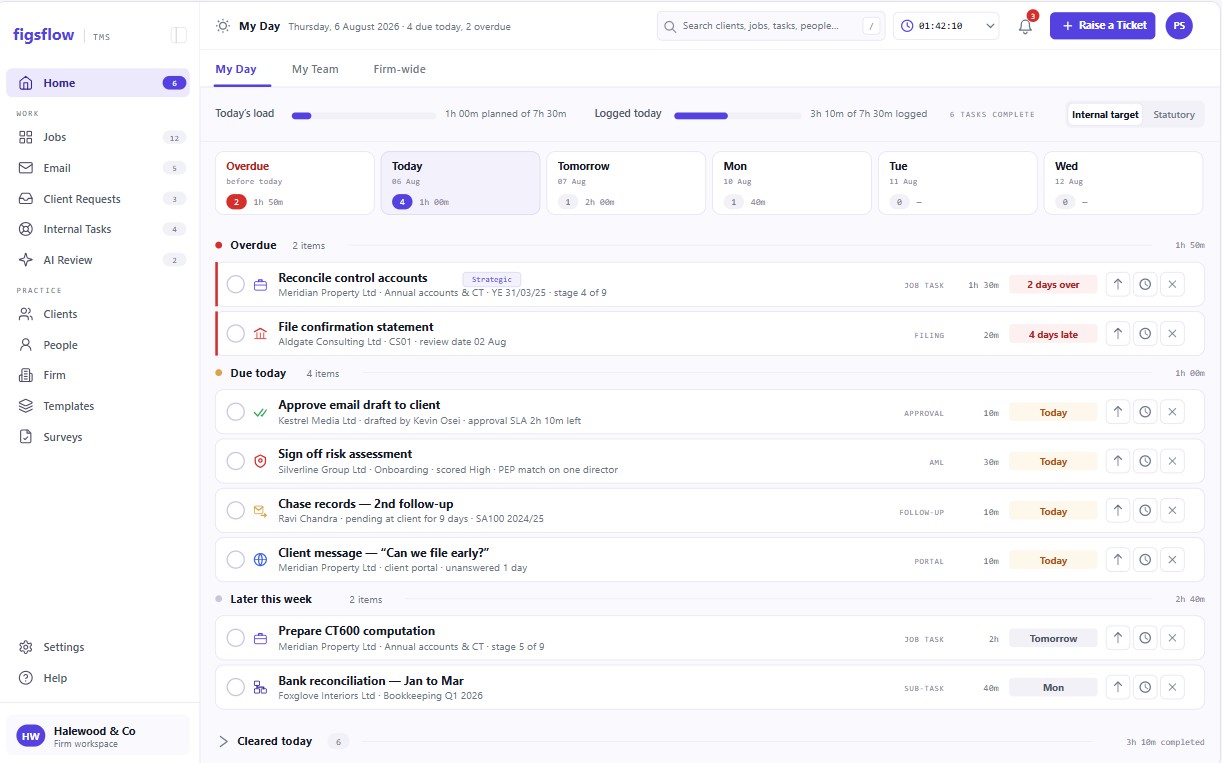
The jobs dashboard, in the product
A recorded walkthrough of the jobs dashboard in FigsFlow, with sample data. Press play when you are ready.
The full platform tourYou should not have to ask whether the CT600 review is actually done
Somebody marked the step complete. That tells you a box was ticked, not that the balance sheet was reviewed, the disclosure checklist was worked through, or the comparatives agreed to last year. So you ask. And the person you ask says yes, because they believe it, and neither of you can check without opening the file.

Three levels, and only three
One owner at each level. Stage is a field on the job, not a fourth owner.
Job
One instance of the work you deliver — the annual accounts for a client's year end, say.
Client managerTask
The actionable unit a person owns.
PreparerSub-task
The granular check inside a task — debtors to the aged list, cash to the bank statement.
Assignee- Engagement signed
- Job created from the service template
- Tasks generated
- Sub-tasks generated
- Review
- Filed
Most tools here nest four or five levels with an owner at each — which is how a firm ends up with a stage 80% complete and nobody accountable for the other 20%.
What does “done” actually mean here?
It means every sub-task inside the task is done, and every task inside the stage is done. The rule is enforced in the system rather than written in a procedure note. There is no manual override, which is the only version of a gate that is worth having.
No override available
What is this task waiting on?
Tasks carry dependencies — blocked by, blocks, linked to. A blocked task is visible and workable but cannot be marked complete, and when the blocker clears, the person waiting is told. Nobody has to notice.
What actually happened in the review?
Before a reviewer can sign off, they answer one question: was the work error-free? If not, every error is classified — clerical, computational, omission, incorrect treatment, source data, compliance, or blunder — with the area of work and the corrective action. The sign-off is gated behind it and cannot be skipped.
A blunder triggers an immediate, non-suppressable notification to the assignee's line manager.
7 error types · clerical · computational · omission · incorrect treatment · source data · compliance · blunder
Where did the time actually go?
Every task carries an estimate and a timer. Where actual exceeds estimate by more than a fifth, the task flags amber to the client manager while the job is still running rather than at billing. The same figures go back into the template, so next year's estimate is better than this year's guess.
Seen enough? Try it on one client.
Book a demoA checklist, or a gate
Every tool in this category records that work happened. The question is what happens when someone tries to close a step that is not finished.
| What happens when… | Checklist-driven toolsTask lists bolted onto a CRM | Workflow platformsStage pipelines with status fields | FigsFlowGate-driven |
|---|---|---|---|
| A step is closed with work still open inside it | ✕Closes. The tick is the only record. | !Warns, then closes anyway. | ✓Refused. No override exists. |
| The preparer approves their own work | ✕Permitted. | !Configurable, usually off by default. | ✓Refused where the template requires review. |
| A review finds errors | ✕A free-text comment, if anything. | !Recorded that a review occurred. | ✓Each error classified across seven types, with area and corrective action. |
| A serious error is found | ✕Nothing happens automatically. | ✕Nothing happens automatically. | ✓A blunder notifies the line manager immediately, non-suppressable. |
| A task is blocked by another | ✕Tracked in someone’s head. | !Flagged, but still completable. | ✓Workable, not completable. The waiting person is notified when it clears. |
| Time runs over the estimate | ✕Surfaces at billing. | !Visible in a report someone has to open. | ✓Flags amber at 20% over, while the job is still running. |
| Next year’s estimate is set | ✕From memory. | ✕Manually copied forward. | ✓Actuals feed back into the template automatically. |
| A reviewer asks what supervision actually happened | ✕Open the file and hope. | !A timestamp and a name. | ✓A classified record of what each review found. |
A checklist records an intention. A gate declines to let the work past until the thing is actually done — and the difference only shows up on the file that gets reviewed.
What this looks like at your size
Pick the shape of your practice.

What you’ll see0:00 / 1:52
- 0:00 One person, one job, no second pair of eyes
- 0:28 The job builds itself from the service template
- 0:56 You try to close with a sub-task still open The gate holds — against you
- 1:24 Filed, with a record of what you actually checked
Preview clock — no video source set

What you’ll see0:00 / 2:06
- 0:00 Preparer finishes and marks the task done
- 0:32 Sub-tasks are checked before anything moves
- 1:04 Self-approval is refused — the reviewer is notified The handover becomes a record
- 1:38 Signed off, with both names on the file
Preview clock — no video source set

What you’ll see0:00 / 2:14
- 0:00 Trainee prepares from the template
- 0:34 Manager reviews and declares the outcome
- 1:08 Every error classified across seven types What the review found, not that it happened
- 1:46 The same error across jobs shows up as a training gap
Preview clock — no video source set

What you’ll see0:00 / 2:31
- 0:00 The template sets one standard for every office
- 0:38 The gate enforces it — no local override
- 1:16 A blunder notifies the line manager immediately Non-suppressable — it cannot be buried
- 1:58 Findings roll up by office and area of work
Preview clock — no video source set
Works with what you already run
Documents stay in your own SharePoint. Time flows to billing without re-entry. Nothing here asks you to abandon the tools that do the actual preparation.
- Microsoft 365
- Outlook
- SharePoint
- Xero
- QuickBooks Online
- Stripe
- GoCardless
- Gmail
- Companies House
Built inside a working UK practice
Built inside working practices, not in a lab — by people who had returned their own work with review points on it.
 Placeholder
0:48
Placeholder
0:48
 Placeholder
1:02
Placeholder
1:02
 Placeholder
0:55
Placeholder
0:55
 Placeholder
1:14
Placeholder
1:14
Pricing for this module
Jobs, tasks and deadlines sit in Practice Management. Prices exclude VAT; monthly billing and every module are on the UK pricing page.
Practice Management
No minimum. One tier, nothing gated.
First 10 people, then £45 from the 11th · billed annually (£35 and £55 on monthly billing)
Start free- Unlimited jobs, tasks and templates
- Timesheets, capacity and job profitability
- Client portal, documents in your own SharePoint
- Email and deadline automation
- 20 AI actions a person a month, from January 2027
- No implementation fee
AI Assist
For Practice Management and the Suite, on the seats you choose. From 1 January 2027.
Billed annually (£12 on monthly billing)
Join the waitlist- Email triage and thread summaries
- Drafting you approve before anything sends
- Client and job summaries drawn from your own record
- Removes the 20-action monthly cap for that person
Not purchasable until AI goes live on 1 January 2027.
Everything a job connects to
A job does not sit on its own. These four touch it directly; the rest of the platform sits around them on the same shared record.
Workflow templates
Where the task set comes from — the service template that generates every task and sub-task.
See the workflow templates moduleTeam and capacity
Who has room for it, before the job is assigned rather than after.
See the team and capacity moduleHMRC deadlines
The date it has to clear, tracked against the job rather than a wall chart.
See the hmrc deadlines moduleAudit trail
What the review recorded, kept as evidence rather than a timestamp.
See the audit trail moduleSee it in practice
Case studies, short films and writing on how firms actually run the gate.
 Placeholder
Case study 1
How one gate caught a disclosure omission before it reached the client.
Read the case study Placeholder
Case study 2
Handover between preparer and reviewer, recorded rather than remembered.
Read the case study Placeholder
Case study 3
Three-tier review across 40 staff without three sets of spreadsheets.
Read the case study


