The way your best preparer does it, on every job
FigsFlow turns your practice's process into reusable workflow templates — the task list, who does which part, and due dates that count backward from the filing deadline instead of sitting in somebody's calendar. Apply one to a job and the whole schedule builds itself, including the parts where you have to chase the client.
Partner or principal, start with what a template actually contains in the tour below. Practice manager, go straight to what breaks when the deadline moves.
- AnchorFiling deadline · 12 months after year end
- Steps14 · 4 client-facing · 2 review gates
- RolesPreparer · Reviewer · Signer
- Budget6.5 hrs · rolls into capacity
- In use38 live jobs · 12 still on v3
edit the template once — the next job picks it up, the 38 in flight don't move unless you say so
One template, and the fourteen days it decides
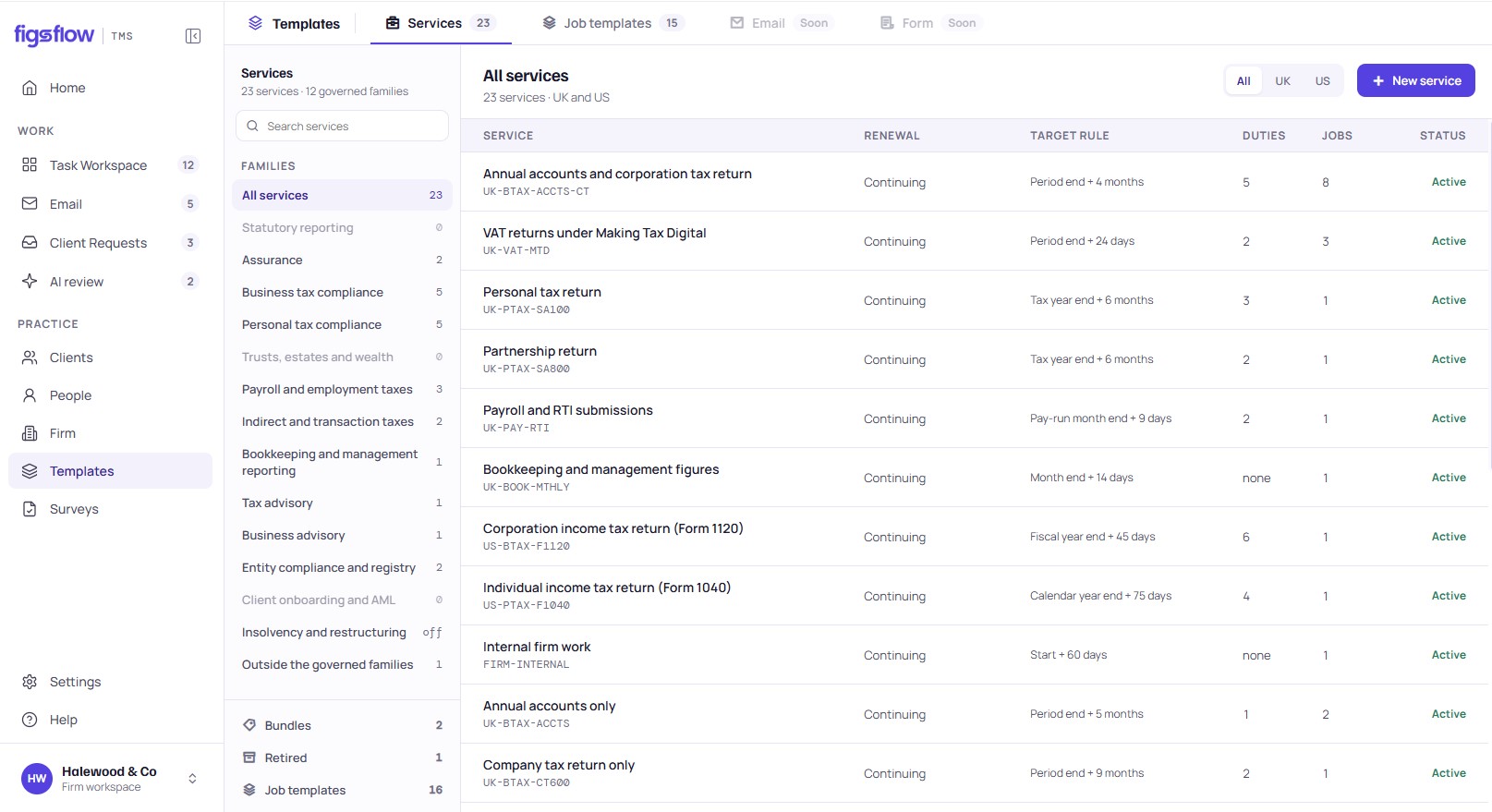
A workflow template is not a checklist somebody printed. It is the task list, the roles, the budgeted hours, the client requests and the due-date math for one piece of work — held in one place, versioned, and applied to a job in a single step. Move through the tabs to look around.
Every figure on this screen is illustrative sample data from a fictional practice. This is a read-only prototype.
24 templates across tax, bookkeeping, payroll and advisory — plus 18 in the starter library, built to be edited rather than used as they are.
| Template | Anchor | Steps | Budget | Live jobs | Version |
|---|---|---|---|---|---|
| CT600 — standard | Filing deadline · year end + 12m | 14 | 6.5h | 38 | v4 |
| Self Assessment — individual | Filing deadline · 31 Jan | 9 | 2.25h | 214 | v7 |
| Statutory accounts — Companies House | Filing deadline · year end + 9m | 11 | 4.5h | 61 | v3 |
| Partnership return (SA800) | Filing deadline · 31 Jan | 16 | 8.0h | 22 | v2 |
| Month-end close — management accounts | Period end + 10 working days | 12 | 4.0h | 46 recurring | v9 |
| Payroll — monthly RTI | Pay date − 3 working days | 7 | 1.5h | 18 recurring | v5 |
| VAT return — quarterly (MTD) | Filing deadline · period end + 1m 7d | 10 | 3.0h | 27 | v3 |
| New client onboarding | Engagement letter signed | 13 | 5.0h | 6 | v6 |
A template belongs to a service — which is what makes the right one get offered when the job is created.
CT600 — standard · v4. No step holds a date. Every step holds an offset from the anchor.
| # | Step | Role | Due | Type | Budget |
|---|---|---|---|---|---|
| 01 | Request prior-year accounts & trial balance | Preparer | Anchor − 45d | Client request | 0.25h |
| 02 | Confirm director and shareholder details | Preparer | Anchor − 40d | Client request | 0.5h |
| 03 | Chase outstanding records | Preparer | Anchor − 32d | Automatic, recurring | — |
| 04 | Import trial balance | Preparer | Anchor − 28d | Internal | 0.5h |
| 05 | Post adjusting journals | Preparer | Anchor − 24d | Internal | 1.0h |
| 06 | Prepare accounts and CT600 | Preparer | Anchor − 20d | Internal | 2.0h |
| 07 | Capital allowances review | Preparer | Anchor − 18d | Conditional · fixed asset additions | 1.0h |
| 08 | Self-review against checklist | Preparer | Anchor − 16d | Internal | 0.5h |
| 09 | Manager review | Reviewer | Anchor − 12d | Review gate | 1.0h |
| 10 | Clear review points | Preparer | Anchor − 9d | Internal | 0.5h |
| 11 | Send draft accounts to the directors | Preparer | Anchor − 7d | Client-facing | 0.25h |
| 12 | Partner sign-off | Signer | Anchor − 5d | Review gate | 0.25h |
| 13 | Client approval to file | Signer | Anchor − 3d | E-signature | — |
| 14 | File to HMRC and Companies House, archive to SharePoint | Preparer | Anchor − 1d | Internal | 0.25h |
14 steps · 6.5 budgeted hours · 4 client-facing · 2 review gates · 1 conditional
Change the anchor and all fourteen due dates move together. Weekends and bank holidays are skipped.
Six anchor types: filing deadline · accounting period end · company year end · pay date · engagement letter signed · fixed date
A template never names a person. It names a role, and the client record says who fills it — which is why the same template works for 214 clients.
| Role | Whitmore | Reed | Calder | Barrett |
|---|---|---|---|---|
| Preparer | Sofia | Sofia | Priya | James |
| Reviewer | Daniel | Aaron | Daniel | Aaron |
| Signer | Morgan | Morgan | Morgan | Unassigned |
Precedence: client default → group default → practice default → unassigned pool, which escalates to the manager on day one.
Editing a template creates a version. Jobs already running stay on the version they started on until you choose to migrate them.
| Version | Changed | By | What changed | Jobs on it |
|---|---|---|---|---|
| v4 current | 12/08/2026 | Morgan Grant | Added step 07 — capital allowances review, conditional | 38 |
| v3 | 02/02/2026 | Morgan Grant | Moved manager review from −8d to −12d | 12 |
| v2 | 04/11/2025 | Aaron Shaw | Split “prepare and review” into two steps | 0 |
| v1 | 19/07/2025 | Aaron Shaw | Created from the starter library | 0 |
Migration is a decision, not a side effect — you see how many jobs each option affects before you confirm.
A month-end close template does not get applied twelve times by a human. The schedule generates the next job when the period ends, carries unfinished items forward as flagged exceptions, and stops when the engagement does.
| Template | Clients | Next generation | Status |
|---|---|---|---|
| Month-end close — management accounts | 46 | 01/09 | 3 clients paused |
| Payroll — monthly RTI | 18 | 26/08 | Running |
| VAT return — quarterly (MTD) | 27 | 07/09 | Running |
No templates yet? Start from the 18 in the starter library, or build one from a job you have already finished.
This is the read-only tour. Editing a step, dragging the order, migrating live jobs and generating a recurring cycle all happen in the live product — we do those with your own service list on the call.
Due dates from the deadline
Steps carry offsets, not dates. Move the anchor and all fourteen move with it.
Roles, not names
One template serves every client because the client record decides who fills each role.
Client steps inside the flow
Record requests, draft accounts and approval to file are steps in the job, not a separate chase.
Versions you can see
Change the process once. Decide separately what happens to the jobs already running.
The process exists. It lives in four people's heads and a spreadsheet nobody owns.
It is the first week of December. A CT600 comes in for a client the practice has had for six years, and it goes to whoever has room. She does it the way she was shown, which is mostly the right way. She misses the capital allowances review, because the person who taught her always asked about fixed asset additions verbally and it never made it onto the checklist.
Nobody catches it until manager review, eleven days before the deadline, and by then the client is away. The claim is missed and the return goes in without it. Not because the work was hard, and not because anyone was careless — because the practice's process for a CT600 is a document from 2023, a partner's habits, and a tab in a spreadsheet called Tax_Season_Master_FINAL_v2.
The spreadsheet is not the problem. It is the symptom. The problem is that the practice's method and the practice's work are stored in two different places — so the method is only as good as whoever remembered to read it, and it silently stops being true the moment a deadline changes, a partner leaves, or somebody finds a better way and tells three people.
When HMRC moves a date or your review policy changes, you are not editing a template — you are hoping four things get updated, and finding out in January which one didn't.
The template is the bridge between what you sold and what gets done
A workflow template is not a standalone feature. It is what turns an agreed scope into a scheduled job — which is why it only works properly when the scope, the job, the timesheet and the client requests are already on one record.
- 01The scope is agreed
The engagement letter says what the practice is doing this year. That service decides which template applies.
Engagement letters - 02You are hereThe template is applied
One action. Task list, roles resolved from the client record, budgeted hours, and fourteen due dates counted back from the deadline.
- 03The job runs
Tasks appear in the right person's queue on the right day. A step that slips is visible as a slipped step, not a job that is vaguely behind.
Jobs and deadlines - 04The client's part is a step
Record requests, draft accounts and the approval to file sit in the same sequence. A late client marks the job blocked, not late.
Forms and requests - 05January is visible in October
Budgeted hours per step, times every job the template will create, is a capacity forecast nobody had to build.
Team and capacity
What feeds a template
- Your service catalogue — a template belongs to a service, so the right one is offered when the job is created
- The starter library — 18 templates for common UK filings and recurring cycles, built to be edited
- A job you already finished — FigsFlow reads its tasks and drafts a template from real work
- HMRC and Companies House deadline data — the anchors, including working-day and bank-holiday handling
What a template feeds
- The job — tasks, sub-tasks, roles, due dates and budget, created in one action
- Capacity — budgeted hours land in the right person's week before the work starts
- The client portal — client-facing steps become visible requests with their own due dates
- The firm dashboard — every job of a type has the same shape, so “stuck at review” becomes a number
Four things that stop being somebody's job
Dates that come from the deadline, not from a calendar invite
Every step holds an offset — thirty-two days before the anchor, ten working days after period end — and never a date. When the job is created, the anchor supplies the date and the whole chain lands at once.
This is the part that pays for itself the first time a client changes their accounting reference date. Move the year end by three months and all eleven remaining steps recalculate against the new filing deadline, weekends and bank holidays skipped. Nobody re-types a schedule, and nobody discovers in September that the tracker still says March.
One template, two hundred clients, no duplicated versions
Templates assign a preparer, a reviewer and a signer — roles, resolved from the client record when the job is created. Change who reviews a client's work and the next job picks it up. There is no “Self Assessment template — Sofia's clients.”
Where a client has no default, the role resolves to the unassigned pool and escalates to the manager on day one rather than sitting quietly with nobody's name on it. Review gates are their own step type: work cannot be marked complete past a gate that has not been cleared.
| Role | Whitmore | Reed | Calder | Barrett |
|---|---|---|---|---|
| Preparer | Sofia | Sofia | Priya | James |
| Reviewer | Daniel | Aaron | Daniel | Aaron |
| Signer | Morgan | Morgan | Morgan | Unassigned |
The chasing is part of the process, or it is nobody's job
Four of the fourteen steps in a CT600 template are things the client has to do. In most practices those steps live outside the workflow entirely — in an inbox, in a “have you had a chance” email, in the head of whoever feels responsible.
In a FigsFlow template they are steps: a records request with its own due date, draft accounts to review, an approval to file. A late client step marks the job blocked by the client rather than late — which decides whether a late filing penalty is your fault or theirs, and whether the fee conversation in February is a difficult one.
- 01 · RecordsDue 16 NovReturned
- 02 · Director detailsDue 21 NovChasing
- 11 · Draft accountsDue 24 DecNot started
- 13 · Approval to fileDue 28 DecNot started
Job status: Blocked by client — not “late”.
Improve the process without breaking the season
The moment a template is genuinely used, editing it becomes a risk: thirty-eight jobs are already running on it, and half are past the step you want to change. Most tools handle this by either freezing the template or silently rewriting live work. Both are wrong.
FigsFlow versions the template. Editing creates a new version, which applies to every job created from that point. Jobs already running stay where they are, and you decide — explicitly — whether to migrate them. The improvement a senior found in January gets into the template in January.
- Added07 · Capital allowances review (conditional)
- Unchanged13 of 14 steps
- RemovedNone
38 jobs on v3 · migrating all would add step 07 to 12 jobs · 0 would lose a completed step
The same eleven decisions, made once
Nothing here is a saving we can promise you. Below are the things a template makes structurally true — and one worked example using a practice's own numbers rather than ours.
- 6anchor date typesfiling deadline, period end, year end, pay date, letter signed, fixed
- 1action to schedule a jobtask list, roles, dates and budget together
- 18starter templatesUK filings and recurring cycles, built to be edited
- 0dates typed by handoffsets resolve from the anchor
A worked example — your numbers, not ours. A practice filing 214 Self Assessment returns, where setting up each job by hand takes four minutes: 14.3 hours of setup per season, before anyone starts a return. Change the 214 or the four minutes and the arithmetic changes with it — which is the point. We are showing you the calculation, not a claim.
214 returns × 4 min setup = 14.3 hrs 214 returns multiplied by 4 minutes of setup equals 14.3 hours.A new starter is productive on day one
The template is the training. They see the steps, the order, the review gates and the deadline math on their first job rather than learning it over two seasons.
The deadline change is one field
A changed accounting reference date, an HMRC date change and a client's new year end move the whole chain instead of thirteen calendar entries.
Review points stop being a surprise
A review gate is a step with a date and an owner, so waiting on the manager is visible three days in, not on the 28th.
Capacity is a by-product, not a project
Budgeted hours per step, times the jobs the template will create, is next January's workload — available in October.
Improvements survive the person who found them
A better way of doing something becomes v5 of the template rather than a habit two people picked up.
“Where is my return” has one answer
Because every job of a given type has the same shape, anyone in the practice can answer the question from the same place.
Everyone has checklists. Almost nobody has the deadline math.
Every practice tool on the market lets you save a task list and re-use it. That is table stakes, and it is not what makes templates work. The difference shows up in four places: where the dates come from, whether the client's steps are inside the workflow, what happens when you improve the template mid-season, and whether budgeted hours reach a capacity view. Judge practice workflow software on those four, not on whether it has templates.
You are the preparer, the reviewer and the signer. The template is not about delegation — it is about not re-deciding the sequence in January when you are tired.
The first size where two people do the same service differently and nobody has noticed. One template forces the conversation about which way is right, which is worth more than the template.
Review capacity is the bottleneck, and review gates are the only part of the process nobody can see. This is the size where gate dates start deciding your season.
Several offices, several house styles, one filing standard. Versioning and migration scope stop being conveniences and start being governance.
A spreadsheet and a shared drive
What most practices are actually running
Gap: every date, every yearFree, readable by everyone, and never broken in a way you can't fix yourself. What it cannot do is arithmetic that survives a changed year end, or tell you a job has been sitting at review since Tuesday. Dates are typed, so dates are wrong.
A generic project management tool
Asana, Monday, ClickUp and the rest
Gap: the deadline, and the clientGenuinely good software with real templating and recurrence. But the anchors are project start dates, not filing deadlines, so the offset logic gets rebuilt with automations — and your clients are not going to log into your project tool.
A practice suite with checklists
Where the jobs already live
Gap: versioning, and the client stepsTemplates exist and dates often work. The usual limits are what happens after: editing mid-season either rewrites live jobs or is blocked entirely, and the client's part of the process still runs over email.
FigsFlow
Built by accountants — templates, and the job they create
Gap: nil on these fourOffsets against six anchor types with working-day handling. Client-facing steps in the same sequence, visible in the portal. Versioned templates with an explicit migration decision. Budgeted hours that reach capacity without a second entry.
| The test | Spreadsheet | Generic PM tool | Practice suite | FigsFlow |
|---|---|---|---|---|
| Dates from a filing deadline | Typed by hand | Rebuilt with automations | Usually yes | Six anchors, working days |
| Client steps inside the workflow | No | No | Partly | Yes, in the portal |
| Edit mid-season safely | Not applicable | Overwrites | Blocked or overwrites | Versioned, you choose |
| Budget reaches capacity | No | Separate system | Sometimes | Same record |
And where we are narrower, on purpose. There is no free-form flowchart canvas — steps are a sequence with conditions, not a diagram with branches and loops, and if you want to model a process as a graph this is not that product. Cross-template dependencies (“don't start the CT600 until the bookkeeping close is done”) are not in this release; you can sequence them by anchor, but the system won't enforce it. And the starter library is a starting point, not a compliance product — the eighteen templates are built to be edited by your practice, and we would rather you did than trusted ours.
The first template a practice builds is different every time
Templates get switched on at the point where the same work is being done more than about twenty times a year, or by more than one person. Which template a practice should build first depends almost entirely on its size — and the wrong first template is the reason most rollouts stall.
Same choice as the comparison above — pick once, both sections follow
A template never becomes mandatory. A job created from one can still have a step added, removed or reassigned — the template is the default, not a lock. Practices that enforce templates rigidly end up with staff creating jobs outside the system, which is a worse outcome than an edited task list.
What a template can reach, and what it can't
Templates touch three things outside FigsFlow: your calendar, your document store, and the deadline data the dates are built on. Everything else here is what is not connected — because a practice finding that out in January is a much worse experience than reading it now.
Live today
ShippingMicrosoft 365
Steps with a date can write to Outlook calendars, review gates can raise a Teams notification for the reviewer, and the documents a step produces are filed to your SharePoint under the client's folder structure. Sign-in is the identity your practice already administers.
Your SharePoint tenant
A template can specify where a step's output goes — folder path, naming convention, and which client folder — so archiving is a step's behaviour rather than someone's habit. Files never leave your tenant.
HMRC and Companies House deadline data
The anchor dates behind the offsets: Self Assessment and corporation tax filing deadlines, Companies House accounts and confirmation statement dates, VAT periods, and bank holidays for England & Wales, Scotland and Northern Ireland. Maintained by FigsFlow, not by your admin.
The client portal and forms
Client-facing steps become portal requests with the step's own due date, and the chase cadence runs from the step. A returned document completes the step and releases the next one.
Not yet
And we would rather say soUK tax and accounts production software
No integration with TaxCalc, IRIS, Sage, Taxfiler, BTCSoftware or the rest. A template schedules and tracks the work around the return; it does not know the return's status inside your tax software, and a step is marked complete by a person.
Two-way calendar editing
Step dates write to Outlook. Moving the event in Outlook does not move the step — the job is the source of truth, deliberately, because a dragged calendar entry is not a decision about a deadline.
Cross-template dependencies
A template cannot wait on another template's job. “Don't start the CT600 until the close is done” has to be handled with anchors and a human, for now.
Visual flowchart builder
Templates are an ordered list with conditions, not a canvas. There is no branching diagram, and there won't be one in this release.
Why the list is short. A workflow integration that half works costs a practice more than one that does not exist, because somebody still checks both systems — and in a template, a half-working integration means a date that is wrong rather than a field that is empty. See every integration FigsFlow supports today
We are early, and we would rather you knew what that means
Built inside working practices
The starter templates and the anchor logic came out of practices doing this work — a UK practice filing Self Assessment, CT600 and quarterly VAT, and a practice running month-end close. The CT600 sequence on this page is a real practice's sequence with the names removed.
Founding-customer programme
Practices joining now get their first three templates built with a practice specialist from their existing checklists, and direct access to the team shipping the module. In exchange we ask for honest feedback and permission to fix things quickly.
What we don't have yet
No published customer outcome numbers for this module, no case studies, and no independent review corpus for workflow templates specifically. When we have them they will appear here with the practice named and the number sourced. Anything on this page you can't verify in a demo, ask us to show you live.
Included, not an add-on
Workflow templates are part of the FigsFlow platform, not a separately priced module. If your plan includes jobs, it includes templates — unlimited templates, unlimited versions, and the starter library.
- In every plan with jobs
- Unlimited templates and versions · the 18-template starter library · all six anchor types · roles and review gates · recurring schedules
- Depends on your modules
- Client-facing steps need the client portal · e-signature steps need e-signature · budgeted hours reach capacity planning if you have team and capacity
- Setup
- Your first three templates are built with a practice specialist during onboarding, from the checklists you already use.
Templates only pay off when the job, the client and the clock are on one record
Jobs, tasks and deadlines
What a template creates. Every job's tasks, sub-tasks and deadlines in one place.
HMRC deadlines
The anchor dates behind every offset, maintained for you rather than by your admin.
Team and capacity
Where budgeted hours land. Next January's workload, visible in October.
Forms and requests
How the client-facing steps actually reach the client.
E-signature and approvals
The approval-to-file step, inside the workflow rather than beside it.
Audit trail
Who changed the practice's method, and when. Version history that survives a review.
The things that decide whether a template survives January
What is a workflow template in accounting software?
A saved definition of one piece of recurring work: its task list and sub-tasks, who does each part by role, budgeted hours, which steps the client has to complete, and how each step's due date is calculated from a deadline. Applying it to a job creates the whole schedule in one action, rather than someone re-creating a task list per client.
What happens when a client changes their year end?
The steps hold offsets, not dates. Change the job's anchor to the new accounting reference date and every remaining step recalculates against the new filing deadline, skipping weekends and bank holidays. Completed steps stay completed.
What happens to jobs already running when I edit a template?
Editing creates a new version. Jobs created after the edit use it; jobs already running stay on the version they started on until you choose to migrate them. You see how many jobs each option affects before you confirm.
Can one template work for clients that aren't identical?
Up to a point, and that point is conditional steps. A step can be set to appear only when a condition is met — a capital allowances review that appears only for clients with fixed asset additions, for example. Beyond that, build a second template. Two clear templates beat one template with fifteen conditions.
Does a template lock the job?
No. A job created from a template can have steps added, removed, reassigned or re-dated. The template is the default, not a constraint. Practices that enforce templates rigidly end up with work being tracked outside the system.
Do templates work for month-end close and other recurring work?
Yes, and recurring work is where they pay back fastest. A close template anchors on period end plus a number of working days, generates the next job when the period closes, and carries unfinished items forward as flagged exceptions rather than silently dropping them.
Can the client see their steps?
The client-facing steps appear in the client portal with the step's own due date, and the chase runs from the step. The client does not see your internal steps, your budgeted hours or your review gates.
Do I have to build templates from scratch?
No. There are 18 starter templates for common UK filings and recurring cycles, and FigsFlow can draft a template from a job you have already completed by reading its tasks. During onboarding a practice specialist builds your first three from your existing checklists.
Does this integrate with my tax and accounts production software?
Not in this release. There is no integration with TaxCalc, IRIS, Sage, Taxfiler or BTCSoftware. Templates schedule and track the work around the return; a preparation step is marked complete by a person, not by your tax software.
How long does it take to get the first template running?
The first one is built during onboarding with a specialist, from checklists you already have. The realistic constraint is not the software — it is agreeing internally on the sequence, which is usually the more valuable half of the exercise.
Bring the checklist you actually use
Not the written procedure — the spreadsheet tab or the Word document your team really works from, however scruffy. In thirty minutes we will turn one of them into a working template with real anchor dates, and you will see immediately whether the sequence you have been running is the sequence you thought you had.
30-minute session · your own checklist · no credit card