
How to Complete Form W-2 (2026): Box-by-Box Instructions for Employers
Confused about what goes where on the 2026 Form W-2? This guide walks through every single box, filing deadlines, and common errors to avoid.

You have got dozens, if not hundreds, of employees. For each one, the IRS and SSA require a completed Form W-2. You are overwhelmed, confused about what goes where, and not entirely sure you are doing it right. Yet the deadline is February 1, 2027, and it is not moving.
If that sounds like you, this guide is for you.
In this guide, we walk you through every single box on the 2026 Form W-2, one at a time, in plain English. By the end, you will have completed your first Form W-2.
Sounds good? Let’s start.
What Is Form W-2?
Form W-2, also called the Wage and Tax Statement, is:
The annual form employers are required by federal law to complete for every employee, reporting how much they earned and how much was withheld in taxes over the course of the year.
It reports wages, tips, and other compensation alongside federal, state, and local tax withholdings, Social Security, and Medicare.
As an employer, you complete all applicable fields on the form. Once complete, you distribute copies to the employee and file with the SSA, and if required, your state, city, or local tax department. The employee then uses their copies to file their personal income tax return.
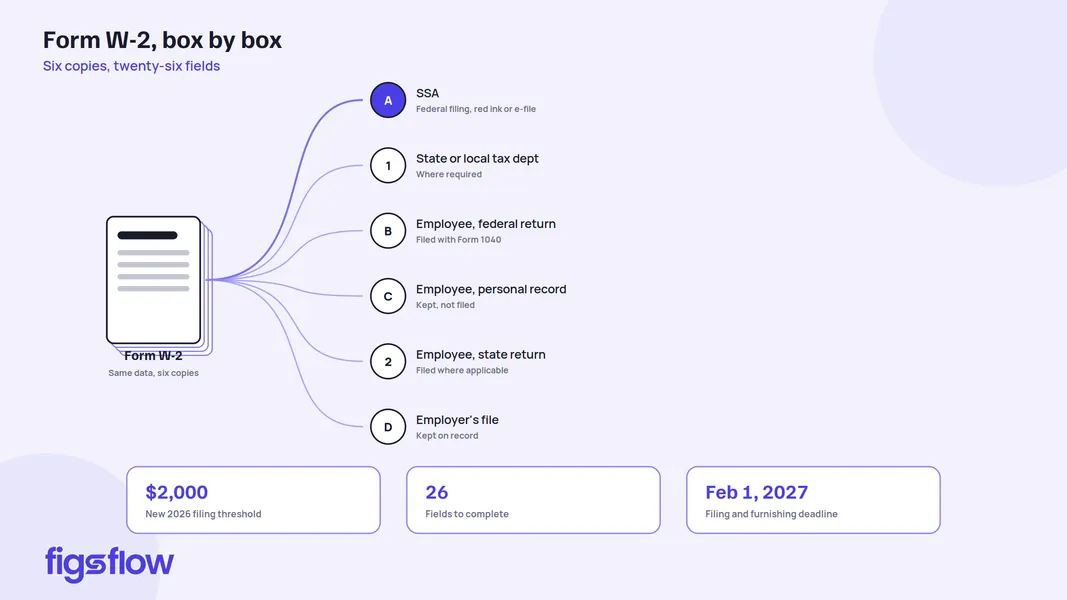
All six copies of Form W-2 carry the same data. Copy A is printed in red ink so it can be scanned by SSA machines, while all other copies are printed in black. The label at the bottom of each copy tells you where it goes. We cover that in the next section.
Who Must File Form W-2?
Employers must file a Form W-2 for each employee they paid during the tax year. The requirement kicks in when any of the following conditions are met.
- You withheld federal income tax, social security tax, or Medicare tax from their wages, regardless of how much you paid them
- You paid them $2,000 or more in wages, even if you did not withhold any tax
- You would have had to withhold income tax if the employee had not claimed exemption from withholding on Form W-4 or if they had claimed no more than one withholding allowance on a 2019 or earlier Form W-9
The $2,000 threshold is new for 2026. Prior to this year, the threshold was $600. It applies only in situations where no federal income, social security, or Medicare tax was withheld.
There are narrow exceptions to the filing requirement overall, including certain election workers and foreign agricultural workers paid below the threshold, but for most employers, if someone worked for you during the tax year, they are getting a form W-2.
One Rule That Applies to Every Form W-2 You File
An ITIN (Individual Taxpayer Identification Number, a tax processing number issued to individuals not eligible for a Social Security Number) is never acceptable in place of an SSN (Social Security Number) on Form W-2.
If an employee presents an ITIN, they need to obtain an SSN from the SSA; however, if the number is not received in time for filing, you can still complete the W-2 by entering ‘Applied For’ on paper forms or zeros for electronic filing in Box A.
A Look at the 2026 Form W-2
Form W-2 comes in six copies that carry the same data, and each one goes to a different destination.
- Copy A goes to the SSA
- Copy 1 goes to your state, city, or local tax department where required
- Copy B is filed by the employee with their federal tax return
- Copy C is the employee’s personal record copy
- Copy 2 is filed by the employee with their state or local tax return
- Copy D is your copy to keep on file
Here is how it looks.
As you can see, each copy of Form W-2 has two sections. The lettered fields, boxes A through F, capture identifying information for both you and your employee. The numbered boxes, 1 through 20, capture the actual wage and tax figures. Those are all the fields you are required to fill, 26 in total.
Also Note: you cannot print Copy A from IRS.gov and file it with the SSA. The SSA only accepts e-filed submissions or the official red-ink printed version. Filing a downloaded Copy A can trigger a penalty.
How to Complete Form W-2: Box by Box
The boxes below are covered in the order they appear on the form, starting with the lettered identifying fields and moving through the numbered boxes. Each one tells you what to enter, what to watch out for, and where most employers go wrong.
Box A: Employee’s Social Security Number
Enter the nine-digit SSN exactly as it appears on the employee’s Social Security card. If the employee has applied for a card but has not yet received their number, enter “Applied For” on paper forms. If you are e-filing, enter zeros.
On the copies you give to the employee, you are permitted to mask the first five digits of the SSN with asterisks or Xs, for example, XXX-XX-1234, to protect their personal information. Do not mask the SSN on Copy A filed with the SSA. That copy must show the full nine-digit number.
Box B: Employer Identification Number
Enter your EIN (Employer Identification Number, the nine-digit number the IRS assigns to your business, formatted XX-XXXXXXX). This must match the EIN you used on your employment tax returns, such as Form 941 (Employer’s Quarterly Federal Tax Return) or Form 944 (Employer’s Annual Federal Tax Return).
Your EIN must appear in full on every copy of the form. Never substitute your personal Social Security Number here if you do not yet have an EIN. If you are filing on paper and your EIN is still pending, write “Applied For” in the field. If you are e-filing, enter zeros and correct the record once your EIN is assigned.
Box C: Employer’s Name, Address & ZIP Code
Enter your business name and address exactly as they appear on your employment tax returns. The US Postal Service recommends no commas or periods in the address. If you use a payroll agent to file on your behalf, the agent’s name and address go here with a note identifying them as an agent for your business.
Box D: Control Number
This is an optional internal reference field. If your payroll system assigns control numbers to individual W-2 forms for tracking purposes, enter them here. If not, leave it blank.
Box E: Employee’s Name
Enter the name exactly as it appears on the Social Security card; however, if the name is too long to fit, you may use initials for the first and middle names, followed by the full last name.
The first name and middle initial go in the first field, and the last name in the second; while there is a third field for suffixes (such as Jr. or Sr.), the SSA prefers that you leave this field blank on Copy A.
If the employee has a compound surname such as Garcia-Rivera, enter it as “Garcia-Rivera” or “Garcia Rivera” in the last name field. Do not merge it into a single word such as “GarciaRivera.”
If the employee’s name has changed and they have not yet updated their Social Security card, use the name on the original card until you see the corrected one.
Box F: Employee’s Address & ZIP Code
Enter the employee’s current mailing address. This is where their copies of the W-2 will be sent.
If the employee has a foreign address, list it in this order: city, province or state, then country. Do not abbreviate the country name.
Box 1: Wages, Tips, Other Compensation
This is the total taxable compensation you paid the employee during the tax year. Box 1 does not include most elective deferrals (pre-tax contributions), with the exception of section 501(C)(18)(D) contributions, which must be included as taxable wages. It does include:
- Wages and salaries
- Bonuses and signing bonuses
- Tips reported by the employee
- Taxable fringe benefits
- Designated Roth contributions (after-tax contributions made to a Roth account within a 401(K) or similar plan)
- Taxable cost of group-term life insurance above $50,000
- Nonqualified moving expense reimbursements
If you are unsure whether a payment belongs in box 1, the general rule is: if it is taxable compensation, it goes here.
Box 2: Federal Income Tax Withheld
Enter the total federal income tax withheld from the employee’s wages across all paychecks during the tax year. Pull this directly from your payroll records. Do not calculate it fresh from the box 1 figure.
Box 3: Social Security Wages
Enter the total wages subject to social security tax. This is where box 3 and box 1 commonly differ. Box 3 includes elective deferrals that box 1 excludes, because the social security tax applies before those deductions are taken.
The 2026 Social Security wage base is $184,500. Box 3 cannot exceed that figure, and the combined total of boxes 3 and 7 cannot exceed it either.
Box 4: Social Security Tax Withheld
Enter the employee’s share of social security tax withheld. This is 6.2% of the total of the social security wages and tips reported in boxes 3 and 7. Since box 3 cannot exceed the 2026 social security wage base of $184,500, the maximum amount in this Box is $11,439. If box 4 exceeds that figure, there is an error in either box 3 or your tax calculation.
Enter the employee’s share only. Never include your matching employer contribution here.
Box 5: Medicare Wages & Tips
Enter the total wages and tips subject to Medicare tax. Unlike box 3, there is no wage base ceiling for Medicare, which means box 5 must be equal to or greater than the sum of boxes 3 and 7.
For employees earning above $200,000, you are required to withhold an Additional Medicare Tax (an extra 0.9% on wages above that threshold). That additional withholding is reported in box 6, not here.
Box 6: Medicare Tax Withheld
Enter the employee’s total Medicare tax withheld, including any Additional Medicare Tax withheld on wages above $200,000. This is the employee’s share only. Do not include your matching employer contribution.
Box 7: Social Security Tips
Enter the tips the employee reported to you during 2026. This is separate from box 3, but the combined total of boxes 3 and 7 still cannot exceed the $184,500 social security wage base. Tips reported here must also be included in box 5.
If you are reporting cash tips using the new code TP in box 12, the figure in box 7 feeds into that reporting. See box 12 below.
Box 8: Allocated Tips
This Box applies only to large food or beverage establishments. If you operate one and the tips your employees reported fall below a set percentage of your gross receipts, you are required to allocate the shortfall among your employees and report the allocated amount here.
Allocated tips are not included in boxes 1, 3, 5, or 7. The employee is responsible for reporting them on their own return using Form 4137.
Box 9
Leave this blank. Box 9 was reduced in size on the 2026 form to make room for the expanded Box 14A. It has no reporting function.
Box 10: Dependent Care Benefits
Enter the total dependent care benefits (employer-provided assistance for childcare or care of a qualifying dependent, typically offered through a workplace benefits program) paid or incurred on behalf of the employee during the tax year. This includes amounts provided through a cafeteria plan (a benefits program that lets employees choose between taxable cash and pre-tax benefits such as health insurance or dependent care).
Report all amounts here regardless of whether they exceed the exclusion limit. Any amount above the limit must also be included in boxes 1, 3, and 5.
Box 11: Nonqualified Plans
Enter any distributions made to the employee from a nonqualified deferred compensation plan (or nongovernmental section 457(B) plan) or any prior-year deferrals that became taxable this year due to the lapse of a substantial risk of forfeiture.
Distributions reported here must also appear in box 1, while taxable prior-year deferrals (vesting) must also appear in boxes 3 and 5.
There is one exception to be aware of. If the employee received a distribution and also had deferrals reportable in boxes 3 or 5 during the same year, do not complete box 11 at all. Leave it blank and file Form SSA-131 (Employer Report of Special Wage Payments) with the SSA instead.
Boxes 12A through 12D: Coded Items
Boxes 12A through 12D are four identical slots, each holding a single coded entry. In each slot, enter the IRS-designated letter code to the left of the vertical line and the corresponding dollar amount to the right. Use capital letters for codes. No dollar signs or commas, but do include the decimal point.
The 2026 form introduces three new codes under the One Big Beautiful Bill Act (P.L. 119-21, enacted July 4, 2025).
Code TA: Trump Account Contributions
Employer contributions to a Trump account (a new type of traditional individual retirement account that can be established for a child under age 18). Employers may contribute up to $2,500 per year beginning July 4, 2026. The contribution is excluded from the employee’s gross income if made under a qualifying Trump account contribution program.
Code TP: Cash Tips Reported
The total amount of cash tips the employee reported to you. Cash tips include tips received in cash, by card, or through tip-sharing arrangements. Mandatory service charges added to the bill do not qualify. When you use code TP, you must also enter a Treasury Tipped Occupation Code in box 14B.
Code TT: Qualified Overtime Compensation
The total amount of qualified overtime compensation paid during the year. Qualified overtime means the premium portion of time-and-a-half pay only. It applies only to overtime required under the FLSA (Fair Labor Standards Act, the federal law that sets minimum wage, overtime eligibility, and related employment standards). Salaried employees classified as exempt under FLSA do not qualify.
For a complete list of all Box 12 codes, refer to the Form W-2 Reference Guide for Box 12 Codes in the 2026 General Instructions for Forms W-2 and W-3.
Box 13: Checkboxes
Box 13 has three checkboxes. Check all that apply.
Statutory Employee applies to workers who are treated as employees for social security and Medicare tax purposes under federal law, even though they would otherwise be classified as independent contractors. Examples include certain commission-based drivers and full-time life insurance sales agents.
Retirement Plan should be checked if the employee was an active participant in a qualifying retirement plan at any point during 2026. This includes 401(K) plans, 403(B) plans, SEP plans, and SIMPLE IRA plans, among others.
Third-Party Sick Pay is checked only if you are a third-party insurer filing a W-2 on behalf of an employer, or an employer reporting sick pay that was paid by a third party.
Common Error: Retirement Plan Checkbox
Eligibility alone does not make someone an active participant. If the employee was eligible to contribute to a defined contribution plan but chose not to, and you made no contributions on their behalf during the year, leave this Box unchecked.
Box 14A: Other
Box 14A is a catch-all for additional information you want to pass on to the employee that does not belong in any other box. Common examples include state disability insurance taxes withheld, union dues, uniform payments, health insurance premiums deducted from the employee’s pay, and a minister’s parsonage allowance and utilities.
Label each item you enter here so the employee knows what it refers to.
Railroad employers use this Box to report RRTA compensation (including tips reported by the employee to the employer), Tier 1 tax, Tier 2 tax, Medicare tax, and Additional Medicare Tax.
Box 14B: Treasury Tipped Occupation Codes
Box 14B is new for 2026. You only complete it if you reported cash tips in box 12 using code TP.
Enter up to two Treasury Tipped Occupation Codes identifying the occupations in which the employee received those tips. If the employee received tips in more than two occupations, enter codes for any two. If any tips came from an occupation that does not qualify for the tip deduction, you must enter code 000 as one of the entries.
To qualify, the occupation must be one that customarily and regularly received tips on or before December 31, 2024. Occupations that only began receiving tips after that date do not qualify.
The full list of qualifying occupation codes is available at IRS.gov/TippedOccupations.
Box 15: State & Employer’s State ID Number
Enter the two-letter abbreviation for the state you are reporting wages for, along with your state-assigned employer ID number. If you are reporting wages for more than one state, use a separate row for each. If you need to report more than two states, prepare a second Form W-2.
Box 16: State Wages, Tips, & Other Compensation
Enter the total wages subject to state income tax. This figure may differ from box 1 depending on your state’s tax rules.
Box 17: State Income Tax
Enter the total state income tax withheld from the employee’s wages. If the employee works in a state with no income tax, leave this blank.
Box 18: Local Wages, Tips, & Other Compensation
Enter wages subject to local income tax where your city or county imposes one. Not all localities have a local income tax. If yours does not, leave this blank.
Box 19: Local Income Tax
Enter the total local income tax withheld. As with box 18, this only applies where a local income tax exists.
Box 20: Locality Name
Enter the name of the city, county, or locality for which you withheld local income tax. If more than two localities apply, prepare a second Form W-2.
Filing Deadlines & Distribution Rules
For 2026 Forms W-2, you have two obligations and one date to remember: February 1, 2027. Miss it, and the penalties start running. Here is everything you need to know.
| Obligation | Details |
|---|---|
| Furnish Copies B, C, and 2 to employees | February 1, 2027 |
| File Copy A and Form W-3 with the SSA | February 1, 2027 |
| Employee requests their W-2 separately | 30 days from the request or 30 days from the final wage payment, whichever is later |
| Extension to furnish copies to employees | File Form 15397 on or before February 1, 2027. Not automatic. Maximum 30 days if approved |
| Extension to file with the SSA | File Form 8809 before the due date. Granted only in extraordinary circumstances. Do not count on it |
| E-filing requirement | Mandatory if you file 10 or more information returns in aggregate during the tax year, including W-2s and 1099s combined. E-file through BSO at SSA.gov/employer. Form W-3 is generated automatically when you e-file |
How to Correct a Form W-2: Form W-2C
If you discover an error on a Form W-2, how you correct it depends on when you catch it.
Caught the Error Before Sending the Form to the SSA
Void the incorrect form, prepare a new one with the correct information, and write “CORRECTED” on the employee’s new copies.
Caught the Error After Sending the Form to the SSA
File Form W-2C (Corrected Wage and Tax Statement) with the SSA and provide a corrected copy to the employee as soon as possible. Include Form W-3C (Transmittal of Corrected Wage and Tax Statements) with any submission to the SSA; however, if you are only correcting state or local data, do not send Copy A or Form W-3C to the SSA, but file with the state or local agency instead.
Correcting Only the Employee's Name or SSN
Complete identifying boxes A, B, and C, as well as boxes D through I; leave the wage and tax boxes (1 through 20) blank unless those also need correcting.
Employee's Name & SSN Were Both Previously Reported As Blank
Do not use Form W-2C. Contact the SSA directly at 800-772-6270 for instructions.
Originally Required to e-file Your Forms W-2
You must also e-file any Forms W-2C correcting them.
Penalties for Late or Incorrect Filing of Form W-2
Missing the deadline or filing an incorrect Form W-2 carries real consequences. The penalties below apply to returns due after December 31, 2026, and cover both failure to file with the SSA and failure to furnish copies to employees. Both are treated as separate penalties, meaning you can be hit with both for the same form.
| When You File | Penalty Per Form | Annual Maximum | Small Business Maximum |
|---|---|---|---|
| Within 30 days of the due date | $60 | $698,500 | $244,500 |
| More than 30 days late, but by August 1, 2027 | $130 | $2,095,500 | $698,500 |
| After August 1, 2027, or not filed at all | $340 | $4,191,500 | $1,397,000 |
| Intentional disregard | $690 minimum | No cap | No cap |
A small business is defined as one with average annual gross receipts of $5 million or less over the three most recent tax years.
Exceptions to the Penalty
The penalty does not apply if you can demonstrate reasonable cause, meaning the failure was beyond your control, and you acted responsibly. An inconsequential error that does not prevent the SSA or IRS from processing the form also does not trigger it. Note that errors involving TIN, surname, and money (exceeding the 100/25 de minimis limits) are never inconsequential.
Common W-2 Filing Errors to Avoid
These are the errors that cause the most processing delays and penalties.
- Printing Copy A from IRS.gov. The SSA cannot scan it and will reject it. Use the official red-ink form or e-file through BSO.
- Entering an ITIN in Box A instead of an SSN. An ITIN is never acceptable for Form W-2 reporting purposes.
- Omitting or masking the EIN in Box B. Your EIN must appear in full on every copy.
- Incorrectly checking the retirement plan box in box 13. Eligibility alone does not make someone an active participant.
- Omitting the decimal point and cents from dollar entries. Every dollar amount must include cents, for example, 52130.63, not 52130 or $52,130.63.
Get these right, and you eliminate the majority of rejections and penalties before they happen.
Conclusion
The 2026 Form W-2 has more moving parts than most years. New box 12 codes, a split box 14, an updated wage threshold, and new PFML reporting requirements all mean there is more to get right before February 1, 2027.
But you have walked through every box, every rule, and every change in this guide. None of it is guesswork anymore.
Before you begin processing, confirm your payroll setup reflects the 2026 changes, particularly the new codes TA, TP, and TT. Get that right at the start, and the rest follows.