
Client portal · Canada
The client portal for accountants your clients will actually use
FigsFlow's client portal gives each client one secure place to see what you need from them. They can upload against the right job, sign, approve drafts, ask questions and pay. They log in from a one-time email link, with no new password, and every action lands on the same client record your team works from.
✓Free until February 28, 2027 · no card needed · see pricing ↓Built for CPA firms across Canada, from solo practitioners to multi-office practices.
Messages
4 unread · every thread linked to a job
The Q3 return shows $11,505.00 payable by October 31. Please review and approve so we can file.
Was the August HVAC replacement a repair or a new system? It changes how we treat it on the T2.
Everything looks fine. Could you also upload your RRSP contribution slips when you have them?
Both receipts are filed against your return. Nothing else is needed from you for now.
Both trustees need to sign the updated engagement letter before we start the T3.
Thanks for paying invoice 1042. Your receipt is saved in Documents.
The portal tour
What your client sees, in four short chapters
Click through the portal from your client's side. The firm side, where requests are built, chased and filed, is what we walk through properly in a demo.
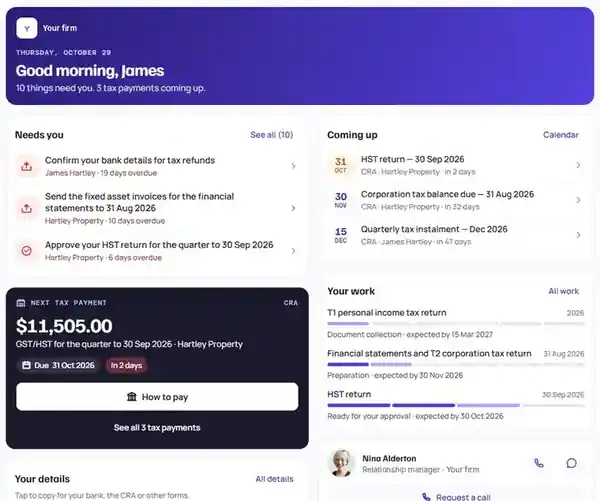
One list of what you need from them
Clients land on a short list, not a filing cabinet. Overdue items rise to the top and each one has a single button.
- Countdown and priority on every task
- Each task linked to its job
- Push, in-app and email nudges
To do · 4 open
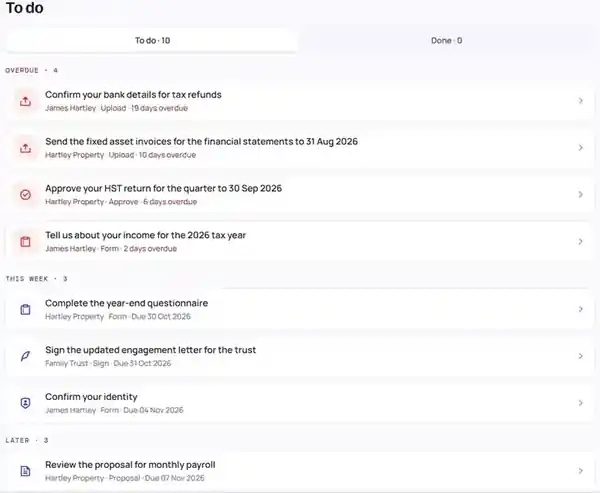
A labelled slot for every document
No more "here's everything" in one attachment. Each requested item has its own slot, so you can see at a glance what's arrived and what hasn't.
- Camera upload from a phone
- Named and tagged against the right job
- Stored in your own Microsoft 365 tenant
2025 personal return · documents
Questions stay with the job
Clients message their client team from inside the portal. The conversation sits on the client record, not in one person's inbox.
- Chat with the team, not one mailbox
- Internal notes never visible to the client
- Answers logged against the job
Messages · 2025 T1
Logged to: Priya S. · 2025 T1 · Documents
Approve, sign and pay in one sitting
Drafts come back to the portal for sign-off. When two people need to sign, each signs as themselves, and the job moves on as soon as they've both signed.
- E-signature and approvals with an audit trail
- Joint signing, one identity per signer
- Pay Now by card, Apple Pay or Google Pay
Financial statements · year ended June 30, 2026
Director approvalSecond week of March, and still no client portal. Sound familiar?
A T4 arrives on WhatsApp. A T5 turns up as a blurry photo with no name on it. A client insists she sent her RRSP receipts "weeks ago", and it's your word against her inbox.
The only person who knows what's still outstanding is the one who keeps the spreadsheet. She's on holiday.
That isn't really a document problem. It's a request problem.
Nobody, client or staff, can see in one place what's been asked for, what's arrived and what's still holding the return up. See how one request list fixes it
Where the portal sits
One client record, from signed letter to paid invoice
The portal isn't a separate tool bolted onto your practice. It's the client-facing side of the same record your team works from.
- Letter signed
- Records requested
- Uploads filed
- Draft approved
- Invoice paid
A year-end, closed on one record
The engagement letter creates the T2 and financial statements job. A portal form asks for every record with its own slot, uploads file themselves in your SharePoint, the director signs off the statements, and the agreed fee is paid in the same session. Nobody re-keys anything, and nothing waits for someone to notice it.
Worth knowing: the return itself is still prepared and filed in your own tax software. FigsFlow tracks and evidences the work around it.
Time and billingMaple Ridge Joinery Ltd. · T2 year-end
What it does
Seven questions every client asks, answered before they call
Each part of the portal is built around a question your team would otherwise answer by phone or email, usually more than once.
"What do you need from me?"
One obvious button, not a filing cabinet
The portal opens on a dashboard of to-do tasks, not a folder tree. Anything overdue or due within 48 hours sits in an action-required banner at the top.
- A countdown and priority badge on every task
- Each task linked to the job it belongs to
- Push, in-app and email notifications
"Where do I upload this?"
A slot for every document, filed where it belongs
Requests arrive as labelled slots: T4, T4A, T5, RRSP receipts, whatever the job needs. Clients upload one item to one slot, from a laptop or straight from their phone's camera.
- See at a glance what's arrived and what hasn't
- Uploads named, tagged and filed against the job
- Stored in your firm's own Microsoft 365 tenant
"Where's my return?"
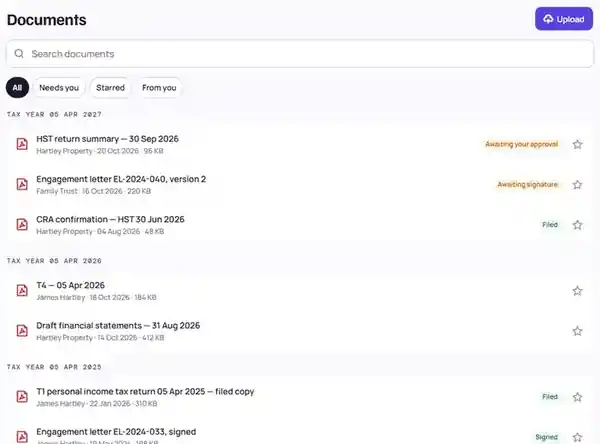
Status they can check without calling you
Each job shows its stage, progress, who's handling it and the date you agreed with the client. Your internal target date and team notes stay on your side.
- Plain-language stages, not workflow jargon
- Deadlines by authority: CRA, Revenu Québec, provincial
- Colour-coded by status, always with a label too
"When is it due, and how much?"
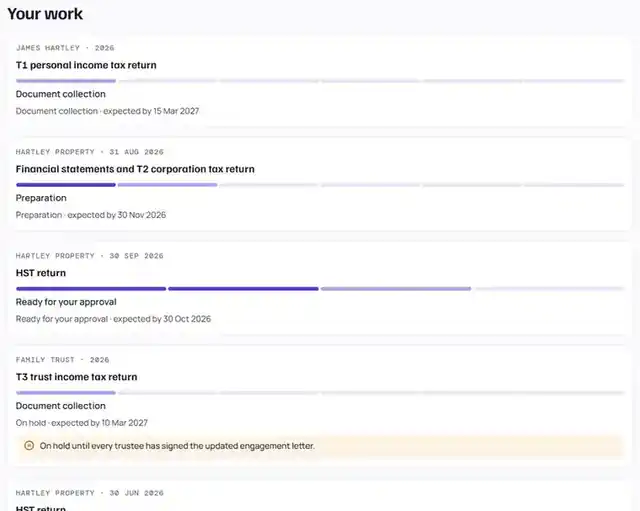
Every deadline and payment, in one place
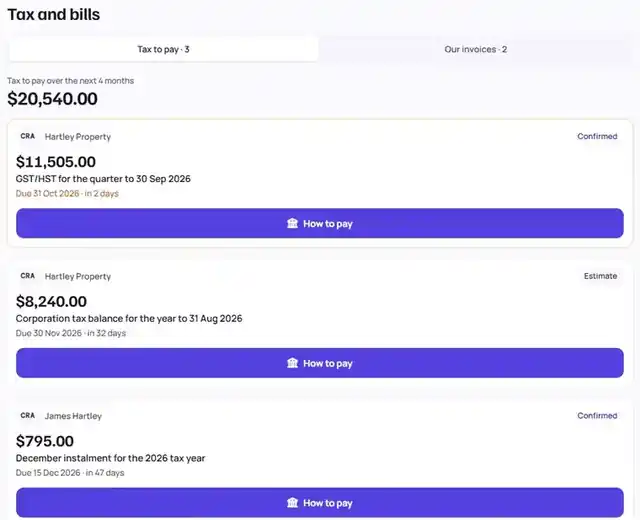
A calendar shows each filing and payment date for the client's own jobs. Tax and bills lists what's coming up, with the amount, the due date and a How to pay button on each.
- CRA and provincial dates on one calendar
- Upcoming payments with days left to pay
- Confirmed and estimated amounts clearly marked
"Can I just sign and pay now?"
Approve, sign and pay in the same session
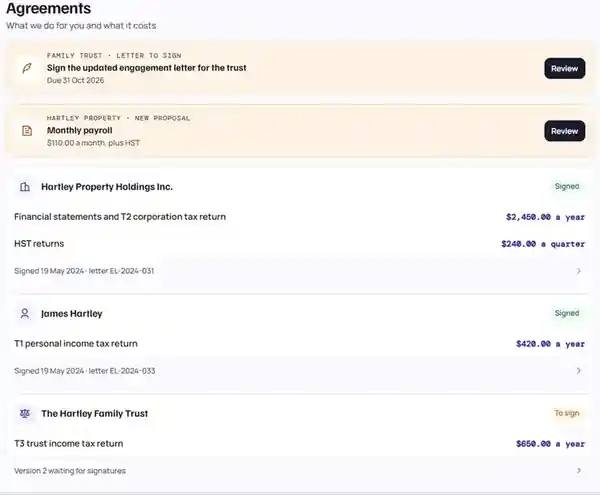
Drafts come back to the portal for approval. Where two people need to sign, such as spouses or co-directors, each signs as themselves. The invoice is right there, payable by card or wallet.
- E-signature and approvals, with an audit trail
- Joint signing, each signer's identity kept separate
- Pay Now by card, Apple Pay or Google Pay, via Stripe
"Who do I ask about this?"
Questions land on the job, not in a lost inbox
Clients message your team from the portal. Each thread is linked to the job it's about, so the question, the answer and the context stay together on the client record.
- Every thread linked to a job
- Unread count right on the menu
- Push, in-app and email notifications
Please review and approve so we can file before October 31.
Was it a repair or a new system? It changes how we treat it.
Your receipt is saved in Documents.
"Do you have my details right?"
Their details and preferences, in their hands
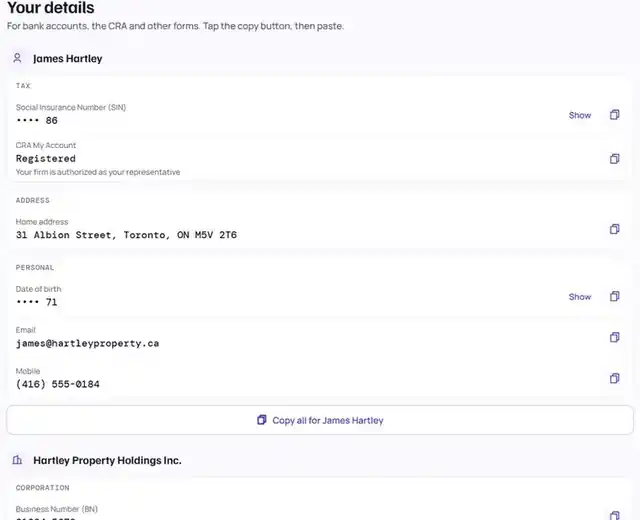
Clients can check the details you hold, with tax numbers masked, and choose how and when they hear from you, including quiet hours.
- Tax numbers masked by default
- Notification preferences and quiet hours
- Account access managed in one place
The difference
Email and file-share links, or one secure client portal
Most firms still collect slips, receipts and sign-offs by email and shared-folder links. It works until a document goes to the wrong person, sits in a departed colleague's inbox, or arrives as the fourth "final" version.
“Unencrypted and unsecured”
That's how the CRA describes its own email notifications, which it warns "could be lost or intercepted." The mail itself waits in My Account.
Source: CRA, terms of use for email notifications39%
of the breach records the Office of the Privacy Commissioner sampled from businesses were caused by human error.
Source: OPC, 2019–20 breach record inspections686
breach reports filed with the Privacy Commissioner under PIPEDA in 2024–25, affecting about 20 million Canadian accounts.
Source: OPC, 2024–25 annual report| Email and file-share links | FigsFlow client portal | |
|---|---|---|
| Where requests live | Scattered across inboxes, texts and voicemail | One to-do list per client, linked to the job |
| Wrong recipient | One mistyped address and a T4 lands with a stranger | Clients sign in to their own record; files stay in the portal |
| Versions | IMG_4471 (2).jpg, final_v3, final_FINAL | One named slot per item, filed against the job |
| What's outstanding | Known only to whoever keeps the spreadsheet | Visible to the client and the whole team |
| “I sent it weeks ago” | Your word against their inbox | Every request and upload is time-stamped |
| When someone leaves | The thread leaves with their mailbox | Requests and replies stay on the client record |
| Sign-off | Print, sign, scan, send back | Approve or e-sign in the portal, with an audit trail |
| Getting paid | A separate invoice email, chased later | Pay Now, straight after approval |
To be clear: a portal doesn't take your privacy obligations off your plate. It removes the step where a client's slips travel as email attachments, and it gives you a time-stamped record of who asked for what, and when.
Who uses it
What this looks like at your size
Pick the shape of your practice. The same client portal works for a sole practitioner and a firm of 50 or more.

What you’ll see4 steps
- Step 01Every request goes out from you, and so does every chase
- Step 02One portal link replaces the WhatsApp, email and voicemail mix
- Step 03Reminders chase on a schedule while you get on with the workYou stop being the chaser
- Step 04A job only comes back to you when a client goes quiet
Recorded walkthrough coming soon. Book a demo to see it live today.

What you’ll see4 steps
- Step 01Three people, three inboxes, one client
- Step 02Requests move out of inboxes and onto the client record
- Step 03Anyone in the team can see what is still outstandingNo more asking who has it
- Step 04Holiday cover without a handover email
Recorded walkthrough coming soon. Book a demo to see it live today.

What you’ll see4 steps
- Step 01T1 season: hundreds of returns, the same slips in a different mix
- Step 02Each return gets a portal form with a slot for every item
- Step 03Status answers “where’s my return?” before the phone ringsThe question answers itself
- Step 04After five unanswered reminders, the job comes back to the team
Recorded walkthrough coming soon. Book a demo to see it live today.

What you’ll see4 steps
- Step 01Several offices, one way for clients to send documents
- Step 02Uploads land in the firm’s own Microsoft 365 tenant
- Step 03Staff sign in with Entra ID single sign-on and MFAInside your IT policy
- Step 04Every request, upload and signature is time-stamped
Recorded walkthrough coming soon. Book a demo to see it live today.
Stripe
Card, Apple Pay or Google Pay, with the receipt emailed for you.
Microsoft 365
Uploads land in your own SharePoint and OneDrive.
Outlook and Entra ID
Your team signs in with single sign-on and MFA.
No tax preparation software integrations yet. The portal doesn't push data into your T1 or T2 package.
Founding-customer program · open now
Judge our client portal on the product, not on our adjectives
We're onboarding a small group of Canadian firms as founding customers. See the product for yourself and ask what founding customers get.
Ask about the programPricing in Canadian dollars
Client portal pricing: included, not an add-on
The client portal comes with Practice Management and with the Practice Suite. Priced per person, in Canadian dollars.
Everything is free until February 28, 2027. No card needed.
Launch offerRun the work
Practice Management
Then C$79 per person after 10. No minimum. Plus GST/HST.
- Client portal on your FigsFlow subdomain
- Unlimited jobs, tasks and templates
- Timesheets, capacity and profitability
Includes 20 AI actions a person a month.
Everything in one plan
Practice Suite
Then C$105 for each person after that. No minimum. Plus GST/HST.
- Client portal on your own FigsFlow subdomain
- Jobs, tasks, timesheets and capacity
- Proposals and engagement letters, with the pricing engine
- CRM Core on every seat, unlimited e-signatures and documents
AML checks are billed separately, per check.
Live today
- Client dashboard and to-do tasks
- Job status tracking
- Push, in-app and email notifications
- Document library with camera upload
- Form-guided document intake
- E-signature and approvals
- Chat with your client team
- Invoice view and Pay Now
Coming next
- Financial insights from Xero or QuickBooks Online
- Document lock to invoice
- OCR and full-text document search
- Recurring and subscription billing
- Native iOS and Android apps
On the roadmap
- Trend and variance analysis
- Time tracking and billable hours in the portal
- In-portal voice and video calls
- AI-drafted financial commentary
Related modules
Next in the platform
The portal is where your client acts. These four do the work behind it, on the same record.
More of the platform
Forms and requests
Builds the requests that fill the portal’s upload slots, and runs the reminders.
See the forms moduleE-signature and approvals
Where drafts, statements and letters get signed off, each signer as themselves.
See the e-signature moduleClient mobile app
The portal in your client’s pocket, with camera upload for slips and receipts.
See the mobile appDocuments in your SharePoint
Where every upload ends up: your firm’s own Microsoft 365 tenant.
See the documents module