
FINTRAC compliance for Canadian accounting firms
From the first ID check to the next review, on one client record. FigsFlow runs FINTRAC client due diligence for Canadian accounting firms: KYC and ID checks, KYB with ownership from Corporations Canada, compliance officer sign-off and review dates set by risk.
Built so the evidence sits in the order it happened. Verify the directors, pull the owners at 25% or more, send the risk rating to your compliance officer and set the next review date — without an inbox, a shared drive or a chat thread holding the file together.


Happy on FigsFlow






See it run
One corporate client, from “Start CDD” to cleared
A holding company goes from registry lookup to compliance officer sign-off in five short chapters. Each step writes to the same client file, so the evidence sits in the order it happened.
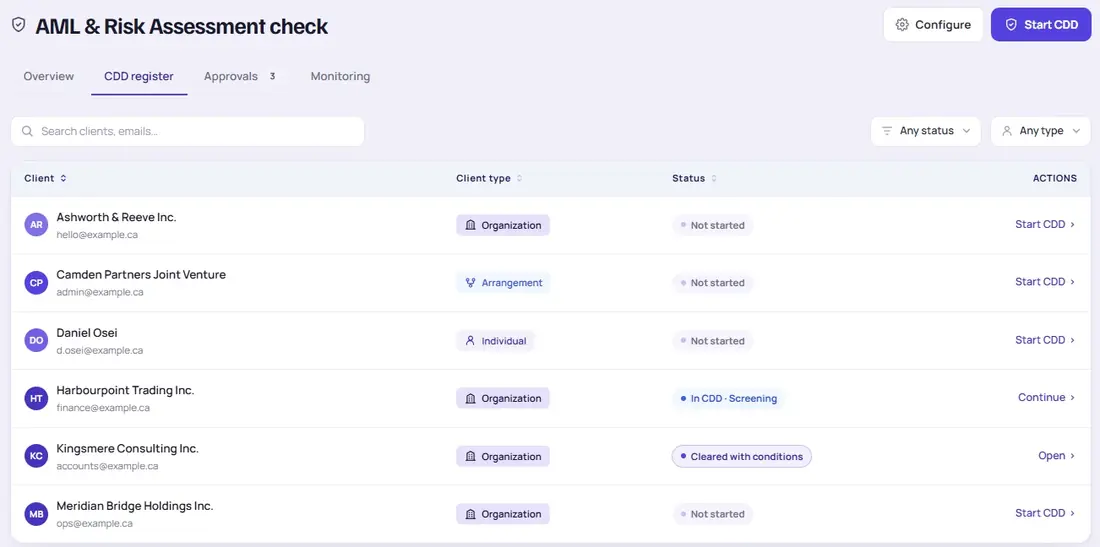
The client type picks the flow
Choose the client from the CDD register. Individuals, organizations and arrangements such as joint ventures each run their own flow, so nobody has to remember which questions apply.
- Individual: ID check on the person
- Organization: KYB, then every director and owner
- Arrangement: the parties to the joint venture or trust
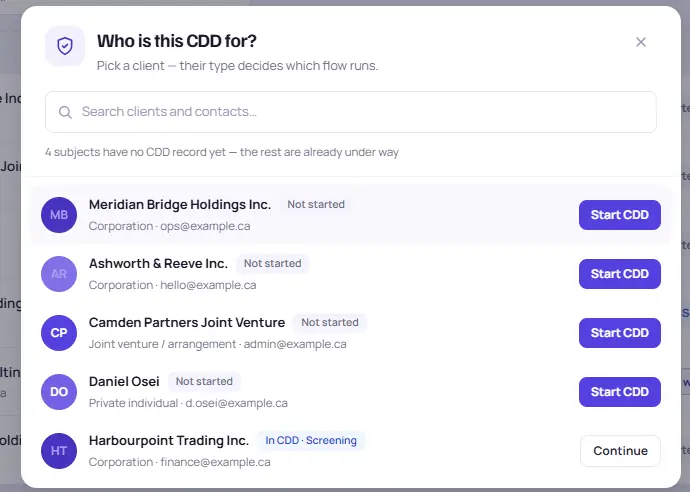
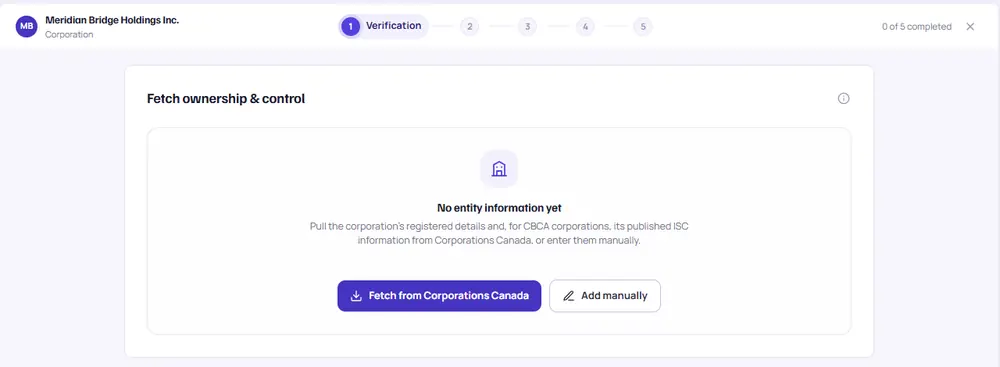
Registry record and owners, from Corporations Canada
For a federal corporation, FigsFlow pulls the registry record and the published ISC information. The people it finds become your verification list.
- Registry record saved to the client file
- Owners at 25% or more in one view
- Provincial corporations added manually
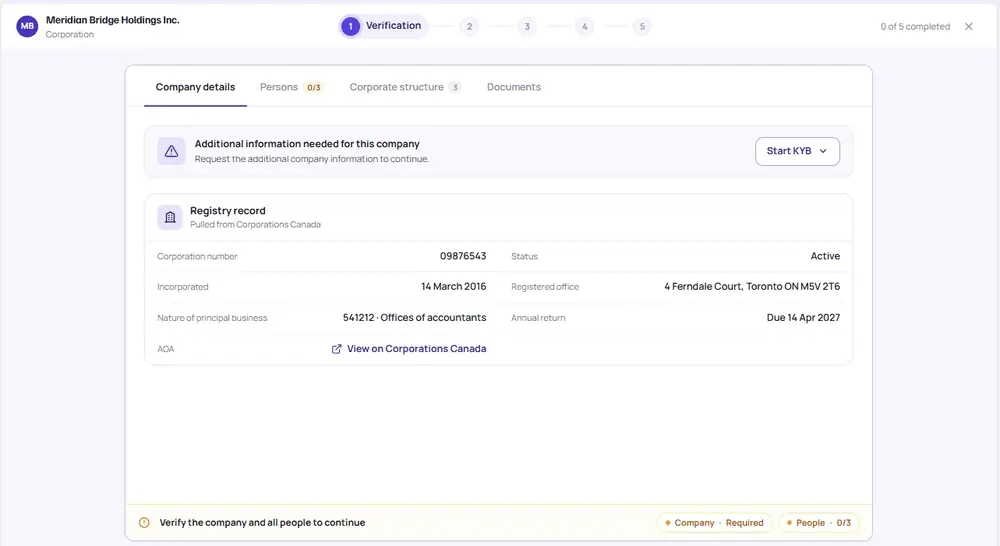
Every director and owner, verified and dated
Use any FINTRAC method. FigsFlow records the method, the details, who checked and when, for every individual and every owner.
- Government photo ID: client checks ID and selfie by phone
- Credit file: bureau, reference and date recorded
- Dual-process: both sources and the date recorded
Meridian Bridge Holdings Inc.
Still held. CDD can’t clear until every person on the list is verified.
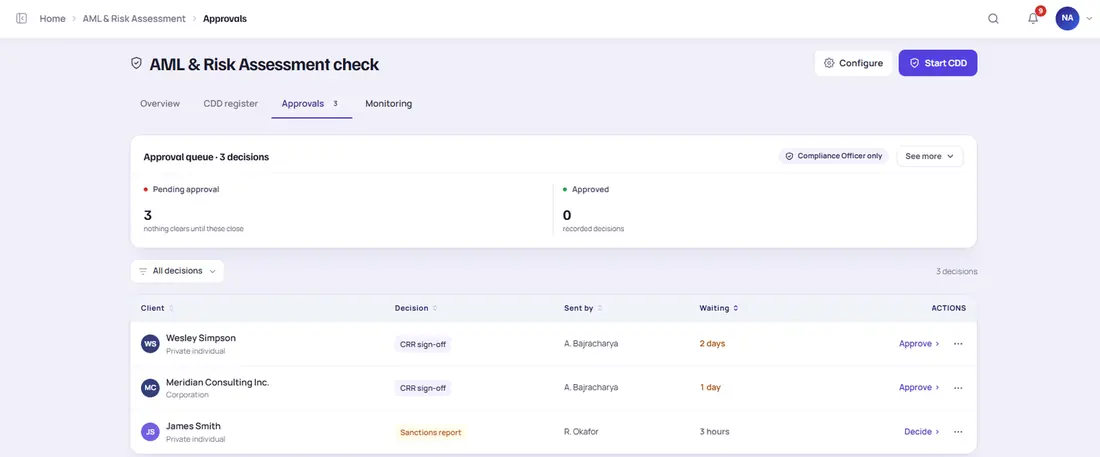
Only the compliance officer can clear it
Each client is scored on your firm’s risk factors. The rating, and any sanctions or PEP match, goes to a queue only the compliance officer can act on.
- Decision, person and reason recorded
- Screening matches decided, not dismissed
- Higher risk means enhanced measures
A review date set by the risk band
Once cleared, the client gets a review interval and a dated next review. Any staff member can log a trigger, and the engagement carries on while the recheck runs.
- Due soon, overdue and under review
- Triggers logged by any staff member
- Review data exportable for an examination
Screens show sample data. Click any screen to enlarge.
The FINTRAC file is complete. It’s just in six different places.
A practice inspection asks for one client file: who verified the directors, who owns 25% or more, who approved the risk rating, and when.
The answers exist, in an inbox, a shared drive, a spreadsheet and a chat thread. None of them proves the order it happened in.
The work was done. Proving it is the hard part.
Nobody, partner or staff, can open one place and see what was checked, who decided, and when the client is next due for review. See how one CDD record fixes it
How it works
One CDD record, six steps, nothing cleared from memory
Client due diligence isn’t a separate tool bolted onto onboarding. It sits on the same client record as the proposal and the engagement letter, so the letter can’t go out before the checks are done.
- Start CDD: verification and screening
- Risk assessment
- EDD
- Risk rating
- Compliance officer approval and sign-off
- Letter released
The gate: no letter until CDD clears
Where FINTRAC checks are switched on, the engagement letter is held until client due diligence clears. Each step writes to the same client file, with the person and the date, so the record answers “who, how and when” without anyone remembering.
Worth knowing: FigsFlow doesn’t file reports with FINTRAC or decide whether your steps meet the PCMLTFA. That stays with your firm and its compliance officer.
FINTRAC guideMeridian Bridge Holdings Inc. · CDD
What it does
Six questions a reviewer will ask, answered on the client record
Each part of the CDD module answers a question your compliance officer would otherwise piece together from inboxes, drives and memory.
“Does this corporation exist, and who controls it?”
KYB with ownership from Corporations Canada
FigsFlow pulls the registry record from Corporations Canada, including ISC information for CBCA corporations. The people it finds become your verification list.
- Registry record saved to the client file
- KYB by client link or manual upload
- Provincial corporations added manually
“How did you verify this person?”
Any FINTRAC method, recorded the same way
For every individual and every owner, FigsFlow records the method used, the details, who checked and when.
- Method and date on every person
- CDD held until everyone is verified
- Client completes photo ID by phone
FINTRAC method → in FigsFlow
“Who signed off this client’s risk?”
Scored on your factors, decided by your officer
Each client is scored on the risk factors your firm configures, such as client type, geography, services and delivery channel. The score and the reasons are saved together, and the rating goes to the compliance officer.
- Factors set once, by your firm
- Reasons kept with the score
- Decision, person and reason recorded
Client risk rating · sample
“When is this client next reviewed?”
Scheduled reviews by risk band
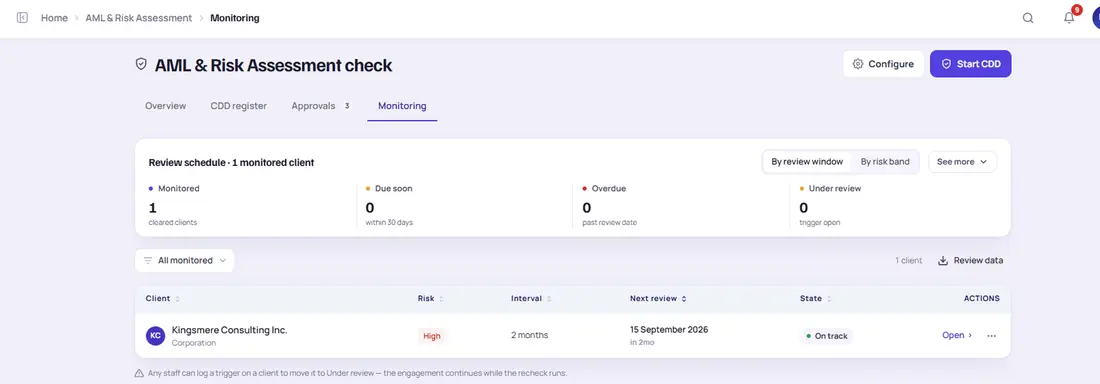
Each cleared client gets a review date set by its risk band. Any staff member can log a trigger, and the work carries on while the recheck runs.
- Viewable by review window or by risk band
- Overdue reviews flagged across the firm
- Client moves to “under review” on a trigger
Review schedule · sample
“What changed when the rules did?”
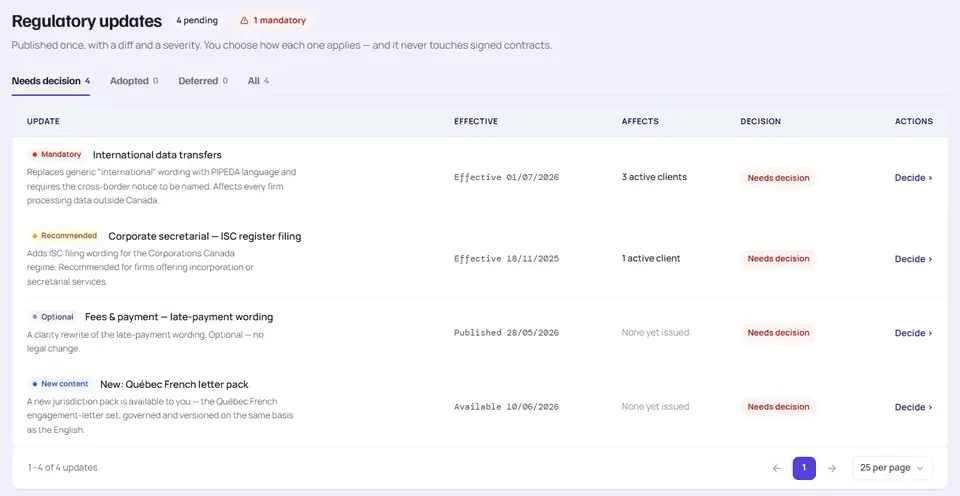
Rule updates you adopt or defer
FigsFlow publishes each update once, with the wording change and a severity. You adopt or defer it, and signed engagement letters are never touched.
“What happens when someone has a concern?”
Escalation to the compliance officer, on the record
Staff can escalate a concern to the compliance officer inside FigsFlow, and the decision is recorded. Any report to FINTRAC is made by your firm.
- Escalations go to one permission-gated queue
- Waiting time visible on every item
- Reporting stays with your firm
Escalation · sample
The rules, in plain terms
What FINTRAC asks of accounting firms, and where it lives
Accountants have FINTRAC obligations under the Proceeds of Crime (Money Laundering) and Terrorist Financing Act (PCMLTFA, S.C. 2000, c. 17) when they carry out a triggering activity for a client. Here they are in short, against an inbox-and-spreadsheet setup.
Last reviewed 2026-10-27 · summary only, not legal advice25%
Owners and controllers at 25% or more are the beneficial owners your file needs to identify.
FINTRAC guidance for accountants (sources below)C$3,000+
in funds, or C$10,000+ in cash, are among the points where FINTRAC expects identity to be verified.
FINTRAC: when to verify identity (sources below)5 years
is the minimum time records must be kept, alongside a compliance program reviewed every two years.
FINTRAC: compliance program requirements (sources below)| Inbox, drive and spreadsheet | FigsFlow CDD record | |
|---|---|---|
| Compliance program | A policy document nobody can tie to a client | Officer role, approvals and risk ratings on every file |
| Verify identity | A photo ID attached to an email | KYC and KYB with method, person and date |
| Beneficial ownership | A hand-drawn chart in a PDF | ISC pull and corporate structure on the record |
| Risk assessment | One spreadsheet column, one owner | Scored on your factors, with the reasons kept |
| Sign-off | “Looks fine” in a chat thread | Compliance officer decision, person and reason |
| Periodic reviews | Somebody’s memory | Review dates by risk band, and logged triggers |
| Records | Spread across systems with no order | Dated on the client record, in the order it happened |
| Reporting | A concern raised in a corridor | Escalation to the compliance officer, recorded |
Does this engagement involve a triggering activity?
Tick what your firm will do. Orientation only: your compliance officer decides.
To be clear: FigsFlow doesn’t file reports with FINTRAC or decide whether your steps meet the PCMLTFA. That stays with your firm and its compliance officer.
Sources: FINTRAC: Accountants · When to verify identity: accountants · Methods to verify identity · Compliance program requirements
Founding-customer program · open now
Founding Canadian firms: judge FINTRAC compliance on the product
Built inside a working accounting practice and used day to day by the accountants who built it. See the product for yourself and ask what founding customers get.
Ask about the programPricing in Canadian dollars
FINTRAC compliance pricing: per check, no commitment
ID checks are priced per check in Canadian dollars. Prices are plus GST/HST. The full plan list is on the Canadian pricing page.
Free for every Canadian firm until February 28, 2027; ID checks are billed as used.
AvailabilityPay as you go
Per ID check
Everything included. Buy credits in packs of 10; they never expire. No monthly fee.
- ID and address verification
- PEP and sanctions screening
- 24 months of ongoing screening
Plus GST/HST.
Compliance Program
Per ID check
C$5.50 per check from your 100th check. Plus C$29 a month per firm (C$35 on monthly billing), free until February 28, 2027. Included in the Practice Suite and the Onboarding Team and Practice plans.
- ID and address verification
- PEP and sanctions screening
- 24 months of ongoing screening
- Client and firm-wide risk assessment
- Enhanced due diligence workflow
- Policies, controls and compliance officer role
- Monitoring alerts and training log
Plus GST/HST.
Related modules
Next in the platform
Client due diligence is where the checks happen. These four do the work around it, on the same record.
More of the platform
Onboarding suite
Proposal, ID checks and the engagement letter in one gated flow.
See the onboarding suite