
Onboarding suite · Canada
Client onboarding software for accountants, from yes to first job
FigsFlow’s client onboarding software takes a Canadian practice from accepted proposal to client identification, engagement letter, signature and first job, all on one client record. The fee is keyed once, and the letter waits until the checks clear.
✓Launch offer to February 28, 2027 · free, no card · see the plans ↓Made for Canadian CPA practices, whether one partner signs every letter or twelve do.
Happy on FigsFlow






See it work
Watch one new client go from
yes to engaged
A short tour of the client onboarding platform, carrying one accepted proposal through the identity check and the signed engagement letter to a set of open jobs.
A short product tour of the FigsFlow onboarding suite for Canadian accounting firms.
Where new clients stall
Every one of these is a new client waiting on you right now.
Nobody here is careless. A proposal tool, an ID spreadsheet, a letter template and an inbox simply don’t talk to each other.
Flip a card to see how it is solved, or switch all six with the toggle.
“I thought you ran the ID check.”
Three people saw the new client come in. Each assumed one of the others had verified the director’s identity. Nobody had, and nobody can show when it would have happened.
The fix. The identity check is a step on the client record with one named checker and a due date, so nobody is left assuming somebody else did it.
“The passport scan is somewhere in the inbox.”
A reviewer asks for the evidence behind last March’s identity check. The scan is an attachment in someone’s mailbox, the signed letter is a PDF on a desktop, and nobody can say which version the client signed.
The fix. The proposal, the identity evidence and the signed letter sit on one client record, stored in your own SharePoint, so the answer never depends on whose mailbox it landed in.
They said yes. Your letter took a week.
The proposal was accepted on Monday. Someone had to copy the scope and fee into a letter template, find the right clauses and get a partner to look at it. By then the client had signed somewhere else.
The fix. The letter populates from the accepted proposal, scope and fee included, so it is ready to release the moment the checks clear.
Onboarding status lives in one person’s spreadsheet.
It is colour-coded, saved to one laptop, and stale the day its owner goes on vacation. Nobody else can say which new clients are still waiting on ID, a signature or a first job.
The fix. Every new client sits at one named step, updated as the work happens: proposal, compliance, letter, jobs, onboarded. Nobody’s time off hides it.
Signed, and then nothing happened.
The letter came back signed and went into a folder. Nobody set up the T2 job or its deadline, because opening the work was never written down as anyone’s step. The client found out first.
The fix. The signed letter creates the jobs from the agreed services automatically, so the work exists the moment the client commits.
The fee was typed three times. Twice correctly.
CA$3,400 in the proposal, CA$3,040 in the letter, CA$3,400 on the invoice. The client noticed the difference before you did, and now the first conversation is about money.
The fix. The proposal sets the fee once. The same figure populates the letter and carries to the invoice, so there is no second number to keep in step.
Every stall above lives in the gap between two tools. Close the gaps with one client record and all six go away.
The client onboarding process, start to finish
The client says yes. Onboarding runs from there.
A contractor accepts a proposal for a corporate year-end. Here is how the client onboarding process runs from there, and what nobody on your team has to remember.
- Minute zero
The client accepts a fixed-fee proposal for a T2 return and a bookkeeping catch-up. The services, the fee and the corporation’s details are already on the client record.
- Minute zero
Where your FINTRAC obligations apply, client identification is raised on the same record with a named checker. Nobody has to remember to start it.
- Day one
Scope and fee populate the engagement letter from the accepted proposal. The CA$3,400 the client agreed is the figure in the letter and on the first invoice.
- Day two
Identity verified, screening clear, risk assessment recorded. Only then is the letter released for signature. The gate holds without anyone checking a spreadsheet.
- Day four
Nobody sets up jobs by hand. The signed letter creates the jobs from the agreed services and gives the client access to the portal, on the same record.
The compliance gate
The letter only releases once the checks clear. Nobody has to remember to look.
When FINTRAC compliance is switched on, the engagement letter is gated behind identity verification, screening and the risk assessment. Each step is on the client record, and finishing it is what unlocks the next.

Each step unlocks the next
Identity, screening, risk, letter, signature, jobs. Clear one and the next appears. The letter cannot go out ahead of the checks it depends on.
- $T2 return · MaplewoodCA$2,400
- $T1 personal · LakeviewCA$450
- $Bookkeeping catch-up · BirchlineCA$1,000
- ↻Bookkeeping · NorthlineCA$650/mo
- ↻Payroll · Prairie DentalCA$420/mo
- ↻GST/HST returns · Cedar & PineCA$180/qtr
- ⏱Advisory · Ridgeway DentalCA$220/h
- ⏱CRA review support · Aspen PhysioCA$195/h
- ⏱Reorganisation · MaplewoodCA$240/h
Fixed, recurring or hourly
Every proposal line carries its fee type in Canadian dollars, and that is the line the letter and the jobs inherit. Nothing is reinterpreted on the way.
A partner sees it first
Route letters for approval and firm countersigning before they reach the client. Who approved, and when, stays on the record.
Screening doesn’t stop at signature
Every check includes 24 months of ongoing PEP and sanctions screening, so a change after onboarding reaches the right person.
Signatures on both sides
The client signs electronically and the firm countersigns where your approvals require it. E-signatures are unlimited on every plan.
Every check recorded
Method, checker, result and time, on the record and exportable. That record is what your compliance programme looks like in practice.
 4.6 / 5
88 reviews
Not a lack of new clients. Onboarding that lives in five tools and one person’s memory.
The client’s side
Your new client meets a person, not a process.
Behind that first conversation, the proposal, the identity check, the letter and the jobs follow one another on the same record. The client is asked for each thing once.
- One client onboarding portal on your own FigsFlow subdomain. The client accepts, uploads, signs and sets up payment in one place.
- Every signatory, in order. Directors sign, the firm countersigns, and each signature is recorded.
Our fee for the services set out in the schedule is CA$3,400, as agreed in the proposal you accepted on October 6, 2026.
Engagement letters
The letter writes itself from the proposal.
Scope, services and fee come straight from what the client accepted. The engagement letter software picks clauses from the practice’s own library rather than editing last year’s Word file.
- A governed clause library. The wording your practice approved, in every letter.
- Approvals and firm countersigning on the Team and Practice plans.
Onboarding status
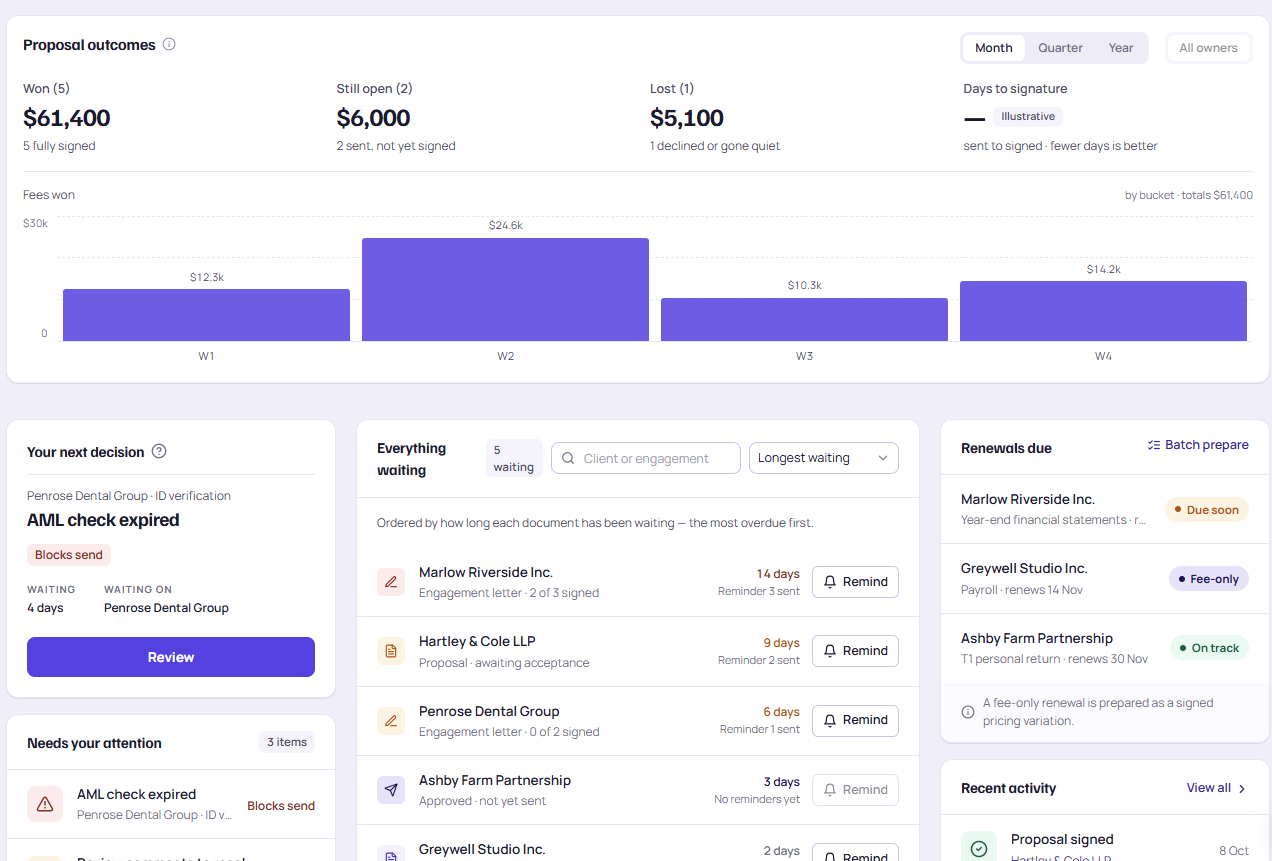
At any moment, you can see where every new client is.
Which clients are waiting on ID, which letters are out for signature and which are ready to start, out of the same records your team already works in.
- Every new client sits at one named step, so a stalled onboarding is visible, not remembered.
- Fee type is set in the proposal, so fixed, recurring and hourly work report separately.
Solo practitioner · you are the onboarding team
And it works, until three new clients say yes in the same week of tax season. The suite drafts the letter from the proposal and holds it until the checks clear, so nothing waits on you remembering.
- Letters drafted from the proposal
- Checks and signature in order
Small firm · everyone can onboard a client
That flexibility is the risk. Five people each with their own letter template is how five versions of your terms end up signed. One clause library and partner approval keep every letter the practice’s letter.
- One governed clause library
- Partner approval before release
Growing firm · someone owns compliance
And they need to show the programme works, not just that it exists. Every identity check, screening result and risk assessment sits on the client record with who did it and when.
- Checks recorded per client
- Exportable when asked
Larger firm · several offices, one standard
The question is not whether each office onboards clients well. It is whether they all do it the same way. One flow, one clause library and one record across offices make that the default.
- One flow across offices
- The fee on the proposal is the fee on the letter
One record, not five systems
Five steps, not five systems.
The proposal sets the fee. The fee populates the letter. The signed letter creates the jobs, and the jobs carry the fee to the invoice. Nothing is rekeyed, whether you are one person or fifty.
- One agreed fee flows into the letter and onto the invoice.
- The signed letter becomes the jobs, with the client’s history attached.
Where it connects
Five connections, one client record.
Your client onboarding tool should not be an island. Pick a connection to see what it writes back. Documents, payment, signatures, checks and client uploads all land on the record your team already works from.
 Birchline Contracting LtdClient record · onboarding
Just written to the record
Sample client, shown for illustration.
Microsoft 365
Your documents, in your own tenant.
- Signed letters and identity evidence are stored in your own SharePoint, under your retention rules.
- The kick-off meeting is offered against the owner’s real calendar.
- Nobody has to live in a second mailbox to onboard a client.
Why this one
Not onboarding built for accountants. Onboarding built by them.
Built inside a working practice, by people who had to send the proposal, check the ID, chase the signature and open the job themselves. Every step exists because somebody got caught out by its absence.
How FigsFlow compares
Others send the letter. FigsFlow owns the whole onboarding.
When Canadian practices compare onboarding, they usually set FigsFlow beside proposal and engagement tools, practice-management suites and ledger-based practice tools. This is how the onboarding flow compares, based on the vendors’ own published material.
Onboarding pricing
Start free. Pay by the people who use it.
Priced per firm, in Canadian dollars, billed annually. Unlimited e-signatures on every plan.
All three plans are free to use until February 28, 2027. No card required to start.
Launch offerOne person
Solo
For the practitioner who is the whole firm.
- Proposals, pricing and letters
- Governed clause library
- Unlimited e-signatures
Fair use: 150 engagements a year.
Up to 3 people, then C$25 each
Team
When more than one person sends letters.
- Everything in Solo
- Approvals and firm countersigning
- Compliance Program included
Fair use: 450 engagements a year.
Most chosen · up to 15 people, then C$15 each
Practice
Advanced Pricing included.
- Everything in Team
- Formula pricing builder, website pricing embed and client value calculator
- Additional workspaces available
Unlimited engagements.
Only need engagement letters? Letters is free for one person, up to 20 letters a year. Identity checks are billed per check: C$6.50 on the Compliance Program, then C$5.50 from your 100th check, or C$8.00 pay as you go in packs of 10. Plus GST/HST.
Related modules
Next in the platform
Onboarding turns a yes into an engaged client. These four do the work inside it, on the same record.
More of the platform
Proposals
Where the scope and the fee are set. Everything after it inherits them.
See the proposals moduleFINTRAC compliance
Client identification, screening and risk assessment. The gate the letter waits behind.
See the compliance moduleEngagement letters
Populated from the proposal, signed electronically, and the signature opens the jobs.
See the letters moduleClient portal
Where the new client accepts, uploads, signs and pays, under your practice’s name.
See the client portalQuestions
Client onboarding software: what practices ask before they switch.
Something missing? Bring it to the demo and you will get a straight answer.