
Guide to Companies House WebFiling 2026: What You Can File & What to Know
WebFiling now needs a GOV.UK One Login. What changed on 13 October 2025, how to fix sign-in problems, authentication codes, and what you can and cannot file.

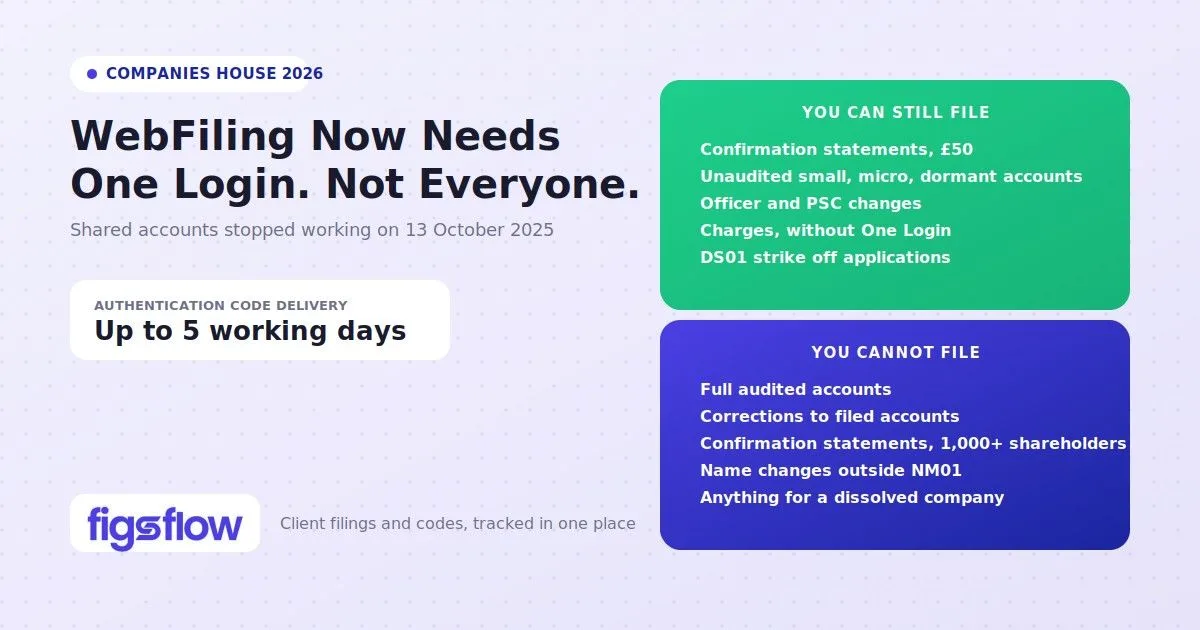
WebFiling does more than most people realise.
Companies House updated the system significantly in October 2025, and while most businesses made the switch without much friction, the questions that keep coming up are not about access — they are about scope. What exactly can you file through WebFiling? What falls outside it? And what changed?
These are reasonable things to be uncertain about. The system quietly handles a wide range of submissions beyond the obvious annual accounts and confirmation statements, but it also has firm limits that tend to surface at inconvenient moments if you do not know about them in advance.
This guide covers what WebFiling is, who it is for, what you can and cannot file, how authentication and sign-in work, what to expect after submission, and what it costs.
What WebFiling Is & Who It Is For
Companies House WebFiling is the government’s online portal for submitting statutory filings, available around the clock, every day of the week.
Once you submit, Companies House sends an email confirming receipt within three hours, and a second email confirming acceptance or rejection within two working days. The system has built-in validation that catches common errors before submission, which is part of why online filings have a meaningfully lower rejection rate than paper.
WebFiling is available to limited companies and limited liability partnerships (LLPs), with eligibility based on company number format. All-digit company numbers are covered, as are those with the prefixes NI, RO, and SC for limited companies, and OC, SO, and NC for LLPs.
The GOV.UK One Login Change
Since 13 October 2025, signing in to WebFiling requires a GOV.UK One Login. The previous standalone sign-in no longer works, and existing WebFiling accounts must be connected to a GOV.UK One Login to access the system. That connection is permanent. As a practical benefit, One Login gives you access to multiple government services under a single set of credentials, with two-factor authentication built in.
If you cannot sign in to WebFiling
Almost every sign-in problem now traces back to that switchover, and it is usually one of four things.
Your old email and password are being refused. They no longer exist as a route in. You need a GOV.UK One Login, and then to connect your existing WebFiling account to it the first time you are prompted. Nothing is lost in the process — the account and its company list carry over.
You created a One Login with a different email address. This is the most common cause of a messy migration. Where possible, use the same email address that your WebFiling account already holds; if the WebFiling address is one you no longer control, update it before connecting rather than after.
You are being asked for an authentication code you do not have. When you connect, Companies House may ask for each company’s authentication code to confirm you are still authorised to file for it. That is expected behaviour, not an error. Codes are posted to the registered office and take up to five working days, so request them before a deadline rather than on the day.
You only need to file a charge. Charge, or mortgage, documents remain filable without connecting your account to One Login — the one exception to the new sign-in requirement.
One piece of housekeeping worth doing while you are in there: review your ‘Your companies’ list and remove any you no longer act for. A tidy list makes the authentication-code prompts far less confusing.
WebFiling and HMRC are not the same service
This is worth being precise about, because two separate changes happened within months of each other and they get conflated constantly.
HMRC’s joint ‘File your accounts and Company Tax Return’ service — the one that let a small company submit accounts to Companies House and a CT600 to HMRC in a single pass — closed on 31 March 2026. From 1 April 2026 the Company Tax Return has to go to HMRC through commercial software, with only narrow paper exceptions.
Companies House WebFiling did not close. It is still there, and it still accepts unaudited small, abridged, micro-entity and dormant accounts, confirmation statements, officer and address changes, PSC filings and the rest. What changed is that the convenient one-submission-for-both route is gone: accounts and the tax return are now two separate jobs, filed to two separate places.
So if a client tells you “the accounts filing service has shut down”, they are half right. The joint service has. WebFiling has not.
Looking further ahead, Companies House has said that in time accounts will only be filable using commercial software. GOV.UK has not attached a firm date to that, though it references wider changes to accounts arriving on 1 April 2028. Treat it as a direction of travel to plan for rather than a deadline in the diary — and if your practice still files any accounts by hand through WebFiling, that is the workflow to move first.
One exception applies: charge (mortgage) documents can still be filed without connecting to GOV.UK One Login. Everything else requires it.
The area that most often catches firms and accountants off guard is shared accounts. Only one person can connect a WebFiling account to their GOV.UK One Login. If multiple people previously shared access to the same account, that arrangement no longer works. Each person who needs to file must have their own GOV.UK One Login with a separate email address, and must be individually authorised for each company they file for.
What You Can File Through WebFiling
WebFiling covers the majority of routine filings for both limited companies and LLPs across every stage of a company’s life. That said, it does not cover everything. Full audited accounts and certain specialist account types must go through commercial software, and a handful of filings still require paper.
Here is what the portal actually handles.
Incorporation & Company Names
You can incorporate a private company limited by shares or guarantee through WebFiling, including community interest companies. Name changes via NM01 cost £20 for standard processing and £85 for same-day.
Annual Accounts
WebFiling supports dormant, micro-entity, abridged, small full, and package accounts. Full audited accounts cannot be filed here and require commercial software.
Confirmation Statement (CS01)
The annual confirmation statement costs £50 per payment year. You can update SIC codes, shareholder information, statement of capital, and PSC exemption statements. Companies with 1,000 or more shareholders must use software filing instead.
Officers
All standard officer appointments, terminations, and changes of particulars are available. When appointing a director, you will need their 11-character Companies House personal code, issued after completing identity verification. Secretary appointments do not require this. If you need to look up an existing officer's filing history first, our guide to Companies House director search covers how.
Addresses
Registered office address changes, business correspondence address updates, and single alternative inspection location (SAIL) filings are all available through WebFiling. Registered office changes are also covered by the PROOF scheme, so paper submissions for these are automatically rejected once you have enrolled.
People with Significant Control
The full suite of PSC filings is available, covering notifications, changes of details, cessations, and PSC statements.
Charges
You can register new charges, register charges over acquired property, satisfy a charge, and release property from a charge. Filing on behalf of another company requires a lender’s authentication code.
Closing a Company
DS01 to apply for strike-off and DS02 to withdraw a strike-off application are both available through WebFiling.
LLPs
LLPs can file confirmation statements, address changes, member appointments and terminations, charges, and PSC filings. While many specialist LLP account types are restricted, LLPs are now able to file package accounts directly through the WebFiling service.
These are the most commonly used filing types, but the portal covers additional transactions not listed here. You can access the full list on the Companies House website: Companies House WebFiling Help and Support. If you need to look up company records before filing, our guide to Companies House advanced search covers how to pull full company data.
What WebFiling Cannot Do
WebFiling handles most routine filings well, but it has real limits. The most significant ones sit around accounts and confirmation statements. If your company requires an audit, files as a charitable company, or has a complex shareholding structure, you will likely hit a boundary at some point. The same applies if you need to correct something already filed or change a company name through any route other than a special resolution.
The limits are not always obvious until you are mid-process, so it is worth knowing them in advance.
Accounts
Full audited accounts must go through commercial software. Charitable companies have no online filing option for full audited accounts at all. If you need to correct accounts already submitted, there is no amendment facility in WebFiling, and corrections require a paper submission. PDF attachments are not accepted under any circumstances.
Confirmation Statements
Companies with 1,000 or more shareholders, those required to submit lists of subsidiary and associated undertakings, and those with complex or multi-currency share capital cannot use WebFiling for their confirmation statement. Software filing is the correct route in all these cases.
Name Changes
WebFiling only supports name changes by special resolution (NM01). Any other method requires paper. If the proposed name includes sensitive or restricted words, the NM06 form must be submitted first, and that process is paper-only.
General
WebFiling processes one transaction at a time. Dissolved, converted, or closed companies cannot use WebFiling at all.
If you are unsure whether your filing falls outside WebFiling’s scope, checking before you start is considerably easier than correcting a submission after the fact.
Authentication Codes, Sign-In & Account Setup
Before you can file for a company, you need two things: a WebFiling account and an authentication code for each company you file for. These are separate, and understanding how they work together saves a lot of unnecessary back-and-forth.
Authentication Codes
The authentication code is the digital equivalent of an officer’s signature. It is a six-character code linked to the company number, not to your WebFiling account. One Login can cover multiple companies, each with its own separate code. New codes are posted to the registered office address and take up to five working days to arrive.
One thing that causes unnecessary delays: if the registered office address held by Companies House is incorrect, the code will not arrive. You will need to correct the address via a paper AD01 form first, then request the code again. If the company is enrolled in the PROOF scheme, paper address changes are not permitted, and you will need to contact Companies House directly.
Once a code has been entered successfully, you can store the company details so you do not need to re-enter them for future filings. You can also use it to digitally authorise other people to file for that company.
Account Setup & Sign-In
Registering is straightforward. Select ‘Create a new account’ on the sign-in screen, verify your email address, and set a password between 8 and 64 characters. One password per email address covers all companies you file for under that Login.
Your email address carries more weight than it used to, since GOV.UK One Login ties directly to it. If your WebFiling email address is outdated, updating it before your next Login avoids friction when reconnecting your account.
PROOF Scheme
If you have not already enrolled, it is worth doing. Protected Online Filing means Companies House will automatically reject any paper versions of covered forms, including registered office changes, officer appointments, resignations, and changes of particulars. For companies with any exposure to fraudulent filing risk, it is one of the more straightforward protective measures available and takes only a few clicks to join through the company overview screen.
After You File — What to Expect
Once a submission goes through, Companies House sends a receipt email within three hours. That email confirms the data was received, not that the filing has been accepted. Acceptance or rejection arrives separately, typically within two working days. If your filing is rejected, the email will include the reason, and you can correct and resubmit. PDFs of each submission are accessible from ‘My Recent Filings’ for the last ten days.
A filing appearing in ‘My Recent Filings’ simply means it was submitted. Acceptance is confirmed by the second email, not by the filing appearing in that list.
The eReminders service is free and available through WebFiling. You can register up to four email addresses per company, and the same reminder goes to all of them simultaneously. Accounts reminders arrive approximately 42 days before the filing due date. The confirmation statement reminder arrives on the due date itself.
What Filing Through WebFiling Costs
The majority of WebFiling transactions carry no fee. Officer appointments, address changes, PSC filings, charge satisfactions, and most routine filings cost nothing to submit. The transactions that do carry a fee are limited to a handful.
| Filing | Fee |
|---|---|
| Confirmation Statement (CS01 / LLCS01) | £50 per year |
| Change of company name, standard service (NM01) | £20 |
| Change of company name, same day service (NM01) | £85 |
| Register a charge (MR01, MR02, and LLP equivalents) | £14 |
| CIC report (CIC34) | £15 |
Payment is accepted by Visa, Mastercard, Maestro, American Express, PayPal, or a pre-arranged Companies House online filing credit account. For name changes paid by card, any rejection triggers an automatic refund within 24 hours, though it may take up to four days to appear on your statement.
Conclusion
The October 2025 changes made WebFiling more structured than before.
GOV.UK One Login is now a permanent requirement, shared accounts no longer work as they did, and anyone who hasn’t reconnected under the new system should do so before their next filing deadline.
Beyond the access changes, the system handles considerably more than most people give it credit for. Routine filings, officer changes, PSC updates, charges, and confirmation statements all sit within WebFiling’s scope.
If there is one practical takeaway, it is to spend a few minutes on the things that are easy to overlook: setting up eReminders, enrolling in PROOF if you have not already, and making sure every person who needs to file has their own GOV.UK One Login.
Next Step: Verify Your Identity with Companies House
Identity verification is now part of the process. Find out who needs to verify, when to do it, and how to get your personal code.