
CRM for accountants, built around how UK practices actually win clients
FigsFlow is CRM for accountants: enquiries, pipeline and proposals on one client record — nothing re-typed between systems. Every deal carries a live next task from first enquiry to signed engagement. Your ledger and tax software still do the return. FigsFlow is the CRM software for accountants that runs everything before it.
 G2 reviews
 Google reviews
 Verified reviews
Trustpilot reviews
Verified reviews
Trustpilot reviews
Trusted by the best


Watch a real enquiry move through the CRM pipeline
No mock-up. This is FigsFlow's own accounting CRM — the same pipeline board, the same task engine that runs every accountancy practice's enquiries. This CRM for accountants works the way your team already does. Click through the pipeline below.
Practice dashboard
Every deal across the practice — pipeline health, what needs attention, and where fee income is concentrated.
Needs attention
5 flagged| Deal | Stage | Value | Flag |
|---|---|---|---|
| Annual accounts + CT600 — Marchmont Joinery LtdS. Devlin | Proposal | £1,850 | Stuck 14d |
| VAT returns — Halcyon Lettings LtdH. Mensah | Contact | £780 | No live task |
| Payroll setup — Ferndale Dental PracticeJ. Price | Discovery | £1,140 | Idle 3d |
| CGT advisory — Oakhill Developments LtdR. Kaur | Proposal | £2,400 | Rescheduled 2× |
| Bookkeeping — Kestrel Logistics LtdT. Okafor | Follow-up | £3,600 | No reply 6d |
Pipeline by stage
Open boardEvery stage carries its own stall clock. Cross it and the board raises a task against the owner the deal already has.
Fee income won by service
Rolling 12 monthsAn accounts-and-tax bundle reports as what it actually contains, not as one line.
Deals by owner
By deal ownerEvery deal carries one owner, with collaborators and advisers alongside. Nothing moves past Enquiry unowned.
Deals & pipeline
Six stages, and nothing arrives without an owner. Every stage carries its own clock, so nothing sits quietly.
The fee is quoted once
Proposal seamThe deal's value is the proposal's value. Revise the quote from £450 to £500 and the deal updates itself — there is no second field to keep in step, and nothing to reconcile when the work is won.
Tasks
Every deal carries exactly one live next step. Finish it and the next appears from your own follow-up procedure.
My queue
3 overdue| Task | Type | Due |
|---|---|---|
| Chase proposal — Marchmont Joinery LtdRescheduled once · note recorded | Overdue | |
| Call back — self-assessment enquiryCreated automatically when the deal opened | Call | Today 09:15 |
| Follow up on the proposalKestrel Logistics Ltd · you assist | To-do | Today 14:00 |
| Confirm scope before quotingOakhill Developments Ltd | Call | Today |
| Send document checklistHalcyon Lettings Ltd · you assist | 21/08/2026 |
Rescheduling costs a note
Second push escalatesPush a task back once and it needs a note. Push it twice and it is flagged — so nothing gets quietly moved day after day for a fortnight.
Cover, not gaps
Annual leaveA colleague picks up someone's pending tasks while they are away, so a client never waits out an absence. Every task is recorded — created, completed, rescheduled, by whom and when — and that record is what your follow-up reporting runs on.
Keep-warm
Close a deal “may come back later” and the cadence starts itself — timed to the tax calendar, not a generic 30-day drip.
Cadence — Brayford Care Homes Ltd
Consent verified| Step | When | Status |
|---|---|---|
| Thanks for the enquiry | 12/06/2026 | Sent |
| Mid-year check-in | 04/09/2026 | Sent |
| Timed to CGT year-end | 06/01/2027 | Queued |
They reply and the cadence stops automatically. The deal reopens at Follow-up rather than starting from scratch.
One-to-one, from the deal owner's Outlook
Approve & sendThis cadence is one-to-one, not bulk mail. It arrives as a personal email because it is one. (Campaigns are handled separately.)
Sources
Where the work actually came from, and what it turned into. The source sits on the deal from the moment it opens.
Where the work came from
Enforced source listSource is picked from an enforced list, not typed as free text — which is the only way this report is worth reading.
Reports
Fee income by service and by deal type, out of the same records the pipeline already holds. Nothing tallied by hand.
Win rate
Last 30 daysWon and lost reasons
Short enforced list| Reason | Outcome | Count |
|---|---|---|
| Service fit | Won | 4 |
| Recommended by a client | Won | 3 |
| Fee too high | Lost | 3 |
| May come back later | Lost | 2 |
| No response | Lost | 1 |
Both captured on close — so you know why clients choose you, not only why they don't. No deal can carry a won and a lost reason at once.
Fee income by deal type
Reported separatelyExisting-client growth doesn't hide inside one sales number. The handful of views your team works from are built in; everything else exports filtered to Excel.
Sample data, real interface. Every figure here is illustrative. Book a walkthrough and we'll load your own services and stages instead.
Book a Demo →Every one of these is costing you a client right now.
Not because anyone did anything wrong. Because nobody was told it was their job.
Still “being looked at.”
Three people saw it. Nobody replied. They've signed with the practice down the road that called back the same afternoon.
What fixes it ↓The routing table assigns a deal owner from the service before anyone opens the email.
“It's somewhere in the inbox.”
A partner asks what happened to that enquiry from March. Nobody can actually say.
What fixes it ↓Every message is logged to the contact and the deal, not to somebody’s sent items.
You didn't lose that client. You replied second.
No owner, no chase. The practice that called back first wins the client you already had.
What fixes it ↓A call-back task, due today, exists before anyone has read the enquiry.
Your “pipeline” is a spreadsheet only Susan understands.
Colour-coded, unshared, and out of action the moment Susan's on leave.
What fixes it ↓One board, with access set by role — and a colleague picks up pending tasks during leave.
Nobody decided to lose that enquiry. It just wasn't anyone's job.
It arrived, it sat there, and by the time anyone checked, it didn't matter anymore.
What fixes it ↓Nothing moves past Enquiry unowned. The CRM enforces one owner on every deal and surfaces any deal missing one.
Every one of these has the same fix — a pipeline where nothing arrives without an owner.
See the pipeline that fixes this →The enquiry comes in. The rest takes care of itself.
A landlord emails asking about a self-assessment return. Here is every place that enquiry touches FigsFlow, and nothing anyone has to type twice.
The enquiry lands.
A landlord fills in the web form asking about their self-assessment return. FigsFlow creates the contact and the deal in the same second, tags it “Self Assessment,” and assigns it to the deal owner for that service. Nobody chooses who picks it up. It's already decided.
The first task exists before anyone's read the email.
A call-back task, due today, sits on the owner's queue. Not a reminder someone set. The deal doesn't exist without it.
The fee gets quoted once.
The deal owner sends a proposal at £450. That figure doesn't get copied into a second system, a spreadsheet, or a “deal value” field by hand. The deal's value is the proposal's value. If the owner revises the fee to £500 next week, the deal updates itself.
The follow-up happens on schedule, not on memory.
No reply to the £500 proposal by Tuesday, so the deal moves itself to Follow-up and a chase call lands on the owner's queue with a due date. Push it back once and it needs a note. Push it back twice and a manager sees it.
The letter's signed, and the deal just closes.
No one marks it “won.” The signed engagement letter does that automatically. The landlord is now a client, and the entire history — the original enquiry, the £500 quote, the follow-up, the signed letter — is already sitting on their record. Nobody writes a handover summary. There's nothing to hand over that isn't already there.
Drag the handle, press play, or pick a step
That's one enquiry. Every one behind it moves through exactly the same record.
Watch an enquiry route itself →No deal is ever just sitting there.
Not a to-do list somebody keeps on the side. The pipeline itself won't let a deal go quiet.
From the moment an enquiry lands to the moment it's won or lost, every deal always carries exactly one live next-step task — a call, an email, or a to-do, with an owner and a due date. Finish one, and the next is created automatically, based on the firm's own follow-up process and the deal's stage. Push a task back once, and it needs a note. Push it back twice, and it's flagged and escalated — so nothing gets quietly delayed day after day, and nothing depends on someone remembering to chase it.
Created the moment the deal opened. Complete it and the next step appears from your own follow-up procedure.
If a deal has gone quiet, that's not a person forgetting. That's the one thing this pipeline isn't allowed to do — the one job a CRM built for accounting practices cannot leave to memory.
See a deal carry its next action →Every deal carries a next action. The system won't let one exist without it.
CRM for accountants fails the moment the task list lives somewhere else. This is not a to-do list kept alongside the pipeline — the pipeline is the to-do list.
One live task, always — from enquiry to close.
Complete it and the next appears on the right date, from your own follow-up procedure.
Queues you work through, not lists you hunt in.
Calls, emails and to-dos split into today, overdue and upcoming, for each person.
Rescheduling costs a note. Every time.
Push the same task twice and it's flagged and escalated, so nothing gets quietly moved day after day for a fortnight.
A stalled deal raises its own task.
Sitting at Enquiry more than 24 hours tells the owner, not nobody.
Cover, not gaps.
A colleague picks up someone's pending tasks, so a client never waits out an annual leave.
Every task recorded.
Created, completed, rescheduled, by whom, when. That's what your follow-up reporting runs on.
Due today, 09:15 · assigned to R. Kaur · created the moment the deal opened
Across 23 live deals. Not a habit someone keeps up — a rule the record enforces.
Sorted by due date, grouped by queue. The queue is the pipeline, filtered — not a second list to keep in step.
- 26/08 → 05/09 · owner away on audit fieldwork
- 05/09 → 12/09 · client did not confirm the slot
Both earlier moves are explained on the record. The next one is what puts this deal in front of a manager.
The threshold for Enquiry is 24 hours. This deal crossed it at 09:14 and raised its own task.
Every stage carries its own clock. Crossing it raises a task against the owner the deal already has.
| Task | Deal | Due | Now with |
|---|---|---|---|
| Chase proposal | Marchmont Joinery Ltd | Overdue | H. Mensah |
| Follow up on the proposal | Kestrel Logistics Ltd | Today 14:00 | H. Mensah |
| Send document checklist | Halcyon Lettings Ltd | 21/08 | H. Mensah |
| Confirm scope before quoting | Oakhill Developments Ltd | 24/08 | H. Mensah |
The window is dated. On 29/08 the tasks return to S. Devlin without anyone remembering to move them.
- Task created — call back the enquiry
- Task closed — acknowledge enquiry
- Reassigned — J. Price to R. Kaur, routing correction
- Moved — 27/08 to 02/09, client rearranged the call
- Flagged — second push escalated to the manager
Nothing is overwritten. A correction is another line, so the trail still reads straight six months on.
If a deal in your pipeline has gone quiet, that's not someone forgetting. That's the one thing this CRM won't allow.
Book a demo on your own pipeline →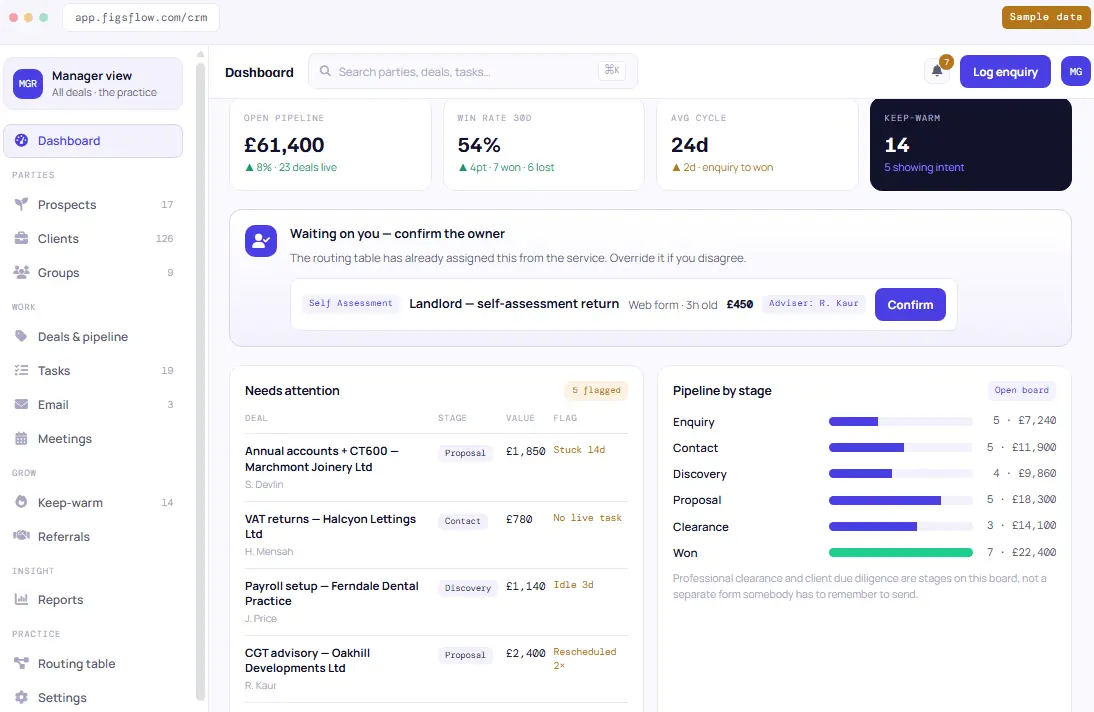
Try removing a role.
One owner on every deal. Collaborators and advisers, as many as the job needs.
Assigned from the service before anyone opens the email — not decided later by whoever picks up the phone. The owner carries the deal. Collaborators pick up tasks alongside them. Advisers weigh in on the technical call without taking the work on. It is the part of an accounting CRM that most practice software leaves as a manual step.
- Routed off the service itself — an enquiry for annual accounts and a CT600 goes to an owner from a routing table your practice maintains, with collaborators and advisers added as the job needs them. Override any of it whenever you want.
- Nothing moves past Enquiry unowned — the CRM enforces one owner on every deal. Collaborators and advisers are optional, and there's no limit on how many sit alongside the owner.
- My deals and my tasks span every role — you see what you own, what you're assisting with as a collaborator, and where you've been pulled in to advise, in one view.
- Partners see across every owner — access is set by role, so a manager or partner sees every deal while a standard user sees the deals they own, collaborate on or advise on.
- Expansion and win-back stay with business development — even when a collaborator did the work or an adviser scoped it, so existing-client work gets chased as hard as a new enquiry.
Every deal has an owner. Every absence has cover. Neither is tracked in someone's head — which is the standard any CRM for accountants should be judged against, not a feature list.
See how ownership and cover work →“Not right now” is not a no.
When a client says “maybe later”, the enquiry usually goes cold because nobody follows up. FigsFlow keeps in touch for you, so “later” actually comes back.
- Close a deal “may come back later” and the cadence starts itself — no separate spreadsheet, no reminder in a diary.
- One-to-one from the deal owner's own Outlook — a pre-drafted message to approve and send. This cadence is one-to-one, not bulk mail. (Campaigns are handled separately.)
- Timed to the tax calendar — a CGT enquiry gets revisited as the year-end approaches, not on a generic 30-day drip.
- They reply and the cadence stops — automatically, and the deal reopens at Follow-up rather than starting from scratch.
- Past clients are an audience too — a one-off engagement delivered two years ago is a win-back, and re-engagement opens a reactivation deal on the same record.
- Consent checked before anything sends — no lawful basis to contact, no enrolment.
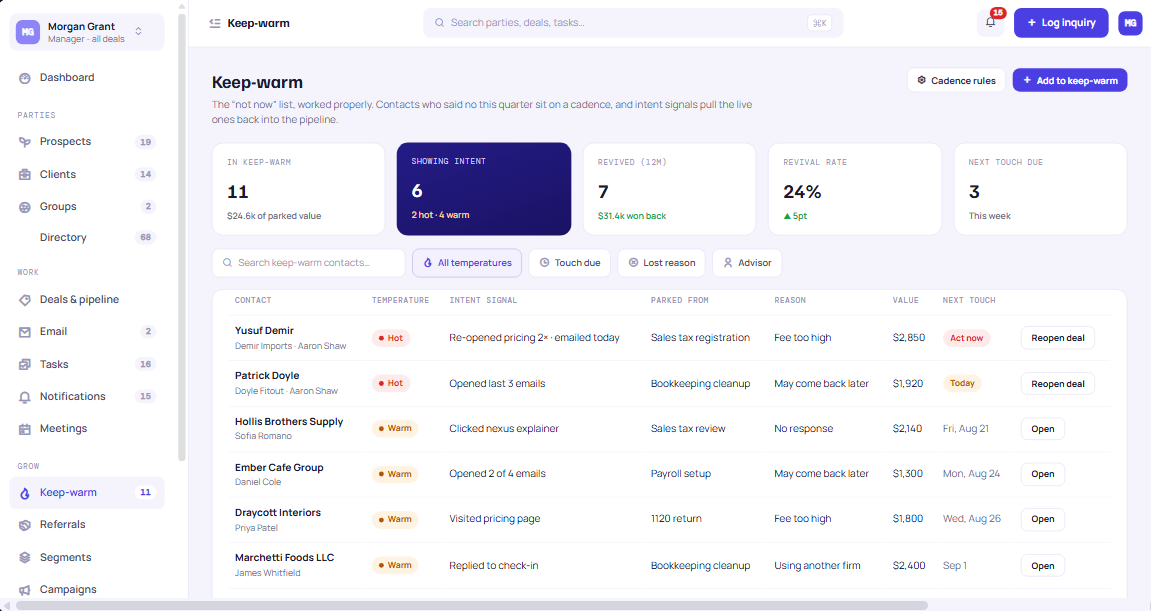
Every prospect who wasn’t ready gets the same follow-up as your live deals — without anyone having to remember.
See keep-warm in action →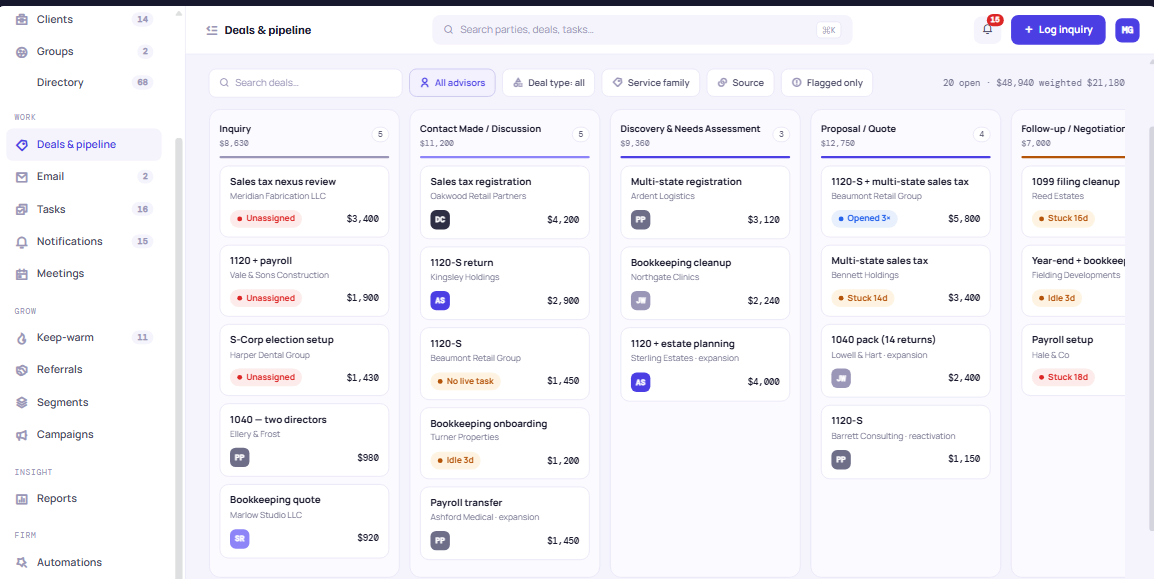
At the end of the quarter, you can answer the partner's question.
Fees won by service and by deal type, plus why you won or lost each one — all pulled from the records your team already keeps. No spreadsheets, no counting by hand.
- Won and lost reasons both captured on close — from a short enforced list, so you know why clients choose you, not only why they don't.
- Revenue by service and by deal type — new business, expansion and reactivation reported separately, so existing-client growth doesn't hide inside one sales number.
- Bundle revenue broken down to its components — an accounts-and-tax package reports as what it actually contains.
- No deal can carry both a won and a lost reason — flagged as a data error rather than quietly skewing the numbers.
- The daily cuts built in, everything else exported — the handful of views your team works from, plus a full filtered export to Excel for monthly and ad-hoc analysis.
The pipeline isn't just where deals live. It's where next year's fee forecast comes from.
See the pipeline report →The one account that never needs reconciling.
One record.
The deal, the fee, the signature and the job are the same object, so there's nothing to reconcile and nothing to re-key.
Two systems.
The gap is where the agreed fee, the deal type and six weeks of context stop existing — and somebody writes a handover note to bridge it.
Free, fast and honestly fine at four deals. No value discipline, no follow-up that survives a holiday, and no way to tell you what your win rate was last year.
Excellent at getting a fee agreed and collected, which at your size is most of the battle. Then it stops — the work, the deadlines and the client history live somewhere else.
Strong on running the work you've won. But there's no pre-client record, so everyone you want to track has to be admitted to your client list — and priced as one.
One place for the four proposals, the chase dates, the letter and the job — so the discipline doesn't depend on your memory in a week when you have none.
Bar length is how far each category actually reaches on one record — not how good it is. Most of these are excellent at their own end. The gap is the part somebody in your practice clears manually, every time, and the part a CRM comparison chart never shows you — and it is exactly where an accounting CRM is supposed to earn its place.
Same choice as the comparison above — pick once, everything below follows.
Sole practitioner · 1 person
You are the pipeline, and it works. Until the week you have four proposals out and can't remember which two you chased — and the trigger, more often than not, is a holiday or a bout of flu.
| Who | What's on their screen |
|---|---|
| You — every morning | Today's chase list, in order, and nothing else on the screen. |
| You again — first of the month | Win rate and revenue by service, because there's nobody else to ask. |
| You — mid-return | One button: log the enquiry. Thirty seconds, not a form-filling exercise. |
- The web enquiry form. You already get these enquiries. This just stops you re-typing them at 9pm.
- Keep-warm. The “not this quarter” list that otherwise lives entirely in your head.
- One chase rule. Seven days in Proposal and a task appears, whether or not you're at your desk.
Small practice · 2–10 people
Two or three of you see every enquiry, which is exactly why one gets missed. Nobody was told it was theirs, and everybody assumed somebody else had already replied.
| Who | What's on their screen |
|---|---|
| The partner — Monday | Every open deal and what's due this week, across all of you, on one board. |
| Whoever answers the phone | Logs the enquiry against the client that already exists, not a second record. |
| Your admin — month-end | Revenue by service, without asking the partner to remember. |
- Deal ownership. One owner on every deal, with collaborators and advisers alongside, so “I thought you had it” stops being possible.
- The proposal seam. The fee on the deal is the fee on the proposal — nothing reconciling the two.
- Won and lost reasons. Six months of these is the first time you'll actually know why you lose.
Growing practice · 10–50 people
This is the size where somebody finally owns business development — and discovers the pipeline they've inherited lives in four people's inboxes and one colour-coded spreadsheet that only Susan understands.
| Who | What's on their screen |
|---|---|
| Business development — daily | The chase queue for the whole practice, with nothing relying on a reminder. |
| Managers — weekly | Their own team's deals — not everybody else's, and not a permission ticket to get there. |
| Partners — quarterly | Revenue by service and by deal type, so expansion reads separately from new work. |
- The routing table. Enquiries assign themselves by service, so nothing waits for a partner to allocate it.
- Reschedule flagging. The control that stops a chase being pushed quietly for a fortnight.
- Deal-type reporting. New, expansion and reactivation apart — because they're grown differently.
Larger firm · 50+ · multi-office
At this size the question isn't whether you have a CRM. It's whether the one you have knows what a CT600 is — and whether the Leeds office works the way the London office does.
| Who | What's on their screen |
|---|---|
| Each office — independently | Same pipeline, same stages, own deals. Not four ways of working. |
| Service-line heads — across offices | Their family of services everywhere, every stage and every owner across offices. |
| The board — monthly | One revenue picture, decomposed to component services, with no manual consolidation. |
- Governed routing across offices. One table, maintained centrally, so allocation isn't a local habit.
- Permission-gated visibility. A manager oversees a team, a partner oversees the practice. One setting each.
- The full export. Everything into Excel for the cuts your board already asks for every month.
Role decides the view, not a permission grid. A manager sees every deal plus the practice's reports; a deal owner sees the deals they own, collaborate on or advise on, and nothing else. That's one setting per person, not a screen-by-screen configuration exercise — which is why a practice of six and a practice of sixty set it up the same way. It's the one part of the CRM that doesn't change with headcount.
It runs inside the Microsoft licence you already pay for.
No new mail platform, no second calendar, no Copilot upgrade. CRM for accountants should sit inside the licence you already pay for, so FigsFlow connects to what your practice already runs, and does the parts those tools were never going to do.
Microsoft 365
Outlook and Teams · your own tenant- Reads real free/busy from the deal owner's own Outlook and writes the booking back to it — working hours, buffers and minimum notice respected, times stored in UTC and shown in the booker's own zone.
- Meetings are created as Teams meetings hosted by the deal owner, with the join link minted automatically. Their calendar, their lobby, their recording — not a generic service account.
- Set to record and transcribe at the moment they're created, so a discovery call captures itself without anyone remembering to press anything.
- One-to-one follow-up sends from the deal owner's own mailbox, so a keep-warm message arrives as a personal email rather than as marketing.
- No Teams Premium. No Microsoft 365 Copilot licence. Transcripts come through the standard unmetered Graph APIs.
- If the Microsoft connection ever fails, it tells you. A scheduler that quietly stops reading a calendar is worse than no scheduler at all.
Stripe
The same rail your proposals use- The same Stripe rail your proposals already use — not a second payment setup to maintain.
- Payment confirms on Stripe's webhook, never the browser redirect, so a client who closes the tab can't lose a booking they've paid for.
- On payment the slot hold confirms, the booking link unlocks, a VAT invoice is raised through the same invoicing as your proposals, and the deal reconciles itself.
- Card and bank details are never entered into FigsFlow. Payment happens in Stripe's own hosted flow.
- One-to-one: your connected Outlook mailbox, inside FigsFlow. Threads, compose and reply, with every message logged to the contact and the deal — so correspondence is part of the record instead of sitting in somebody's sent items.
- Bulk and campaigns: a managed sending platform, priced on emails sent rather than on how many contacts you hold, so a large contact base isn't a subscription penalty.
- Consent flows out, unsubscribes flow back, and the two are never allowed to disagree. FigsFlow stays the system of record for consent.
- Hard bounces and complaints suppress the contact automatically.
- Your sending domain needs SPF, DKIM and DMARC configured before you cut over — deliverability drops otherwise, and admins can see the authentication status at any time.
Calling
Outbound, and we say so- Click to call from the contact or the deal, carried by a managed calling provider, presenting your practice's main number as caller ID.
- Calls placed through the dialer record automatically and log to the timeline under your own retention policy.
- A recording notice plays where required, handled to UK rules — and the recording policy goes to your MLRO or DPO for sign-off before it's switched on.
- Outbound only for now. Inbound calls, queues and transfers stay on Teams. We'd rather say that than imply a phone system we haven't built.
What happens to everything that gets captured
It proposes · it doesn't decide- A Teams meeting or a recorded call produces a transcript. The transcript produces a summary and one proposed next task, both landing on the deal.
- It proposes. It doesn't decide. The summary is written to the record and the task is created for a person to action — it never moves a deal, sets a fee or agrees terms.
Every integration here is one your practice already runs, doing a job it was already licensed for — which is what a CRM system for accountants should assume from the start, not bolt on later.
Ask us about your Microsoft setup →Not a CRM built for accountants. A CRM built by them.
Built inside a working UK practice, by the people who had to run it. That’s the difference between a practice CRM designed at a desk and one proven on a live pipeline.
The rest of the same record.
Every module below is its own page. None of them is a separate system: CRM for accountants only works when it is one client record, and the CRM is where that record starts — the same principle behind any practice management CRM worth running.
Onboarding suite
Scoped, priced, engaged and checked, in one run. Where a won deal becomes a client properly.
Explore →Proposals
Where the deal's value and line items come from. Revise the quote and the deal follows.
Explore →Pricing and quoting
Computes the fee the proposal carries. The CRM never prices anything itself.
Explore →Engagement letters
The signature that closes the deal. Nobody marks it won by hand.
Explore →AML and client due diligence
CDD, EDD and ongoing monitoring against the same party record, not a separate file.
Explore →Risk assessment and scoring
Deterministic, not inferred. A score you can show a reviewer and explain.
Explore →Companies House
Register data, filing deadlines and identity-verification status on the client record.
Explore →HMRC deadlines
The whole tax calendar, tracked against the clients you've won.
Explore →MTD for Income Tax
Tracks, schedules, chases and evidences the quarterly cycle.
Explore →Audit trail and evidence
Immutable and exportable. Every action on every record, the deal included.
Explore →Jobs, tasks and deadlines
Where a won deal becomes work, with the pre-signature history already attached.
Explore →Workflow templates
The steps a service always takes, so delivery doesn't depend on who picked it up.
Explore →Team and capacity
Who actually has room, before you promise a date in a proposal.
Explore →Timesheets and billing
What the work cost, against what the deal said it would.
Explore →Practice dashboard
The partner's view across won work, not just won deals.
Explore →Client portal
Where the client sends what you asked for, against the same record.
Explore →Forms and information requests
The service-specific request that asks for exactly what that service needs, and nothing else.
Explore →E-signature and approvals
Signing, including the engagement letter that closes the deal.
Explore →Meetings and scheduling
Booking into the deal owner's real calendar. The outcome lands on the deal.
Explore →Client mobile app
The client's side of all of it, on their phone.
Explore →AI assistant
Turns a meeting or call transcript into a summary and a proposed next task on the deal. It proposes; it never decides.
Explore →Reporting and analytics
Revenue by service and by deal type, out of the records your pipeline already holds.
Explore →Resources
If you'd rather read first.
Not everyone reaches a pricing conversation from a demo. Some of this is how the pipeline works, and some of it is how to choose CRM software for accountants in the first place.
A tour of the pipeline board
What the six stages are, and why they're those six.
Watch the guideChoosing a CRM for accounting firms
The questions a demo should answer.
Watch the guideSetting up your routing table
Which deal owner takes which service.
Watch the guideHow enquiries get lost in a shared inbox
And the three fixes that actually hold.
Read the articleWhat to track on a deal
Service, source, referrer and deal type, in an accountancy practice.
Read the articleWin and loss reasons for accountancy practices
A starter list you can enforce.
Read the article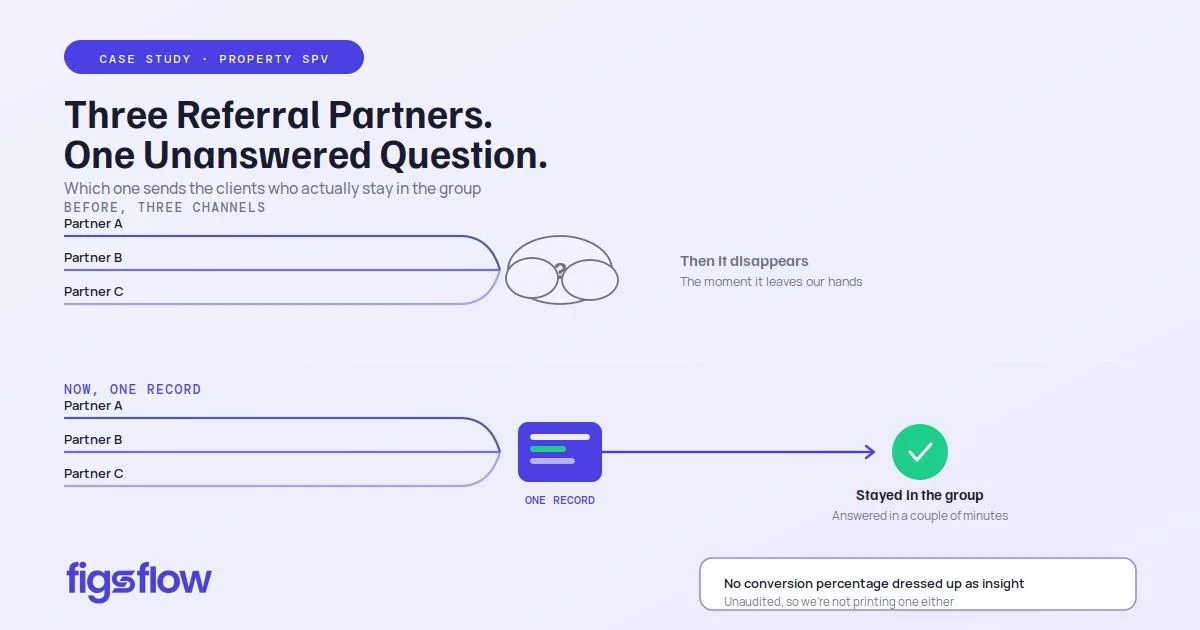
We ran three referral channels and couldn't tell you which one was working
How moving the enquiry pipeline onto the FigsFlow CRM put referral sources on the client record, not in someone's inbox.
Read the case study →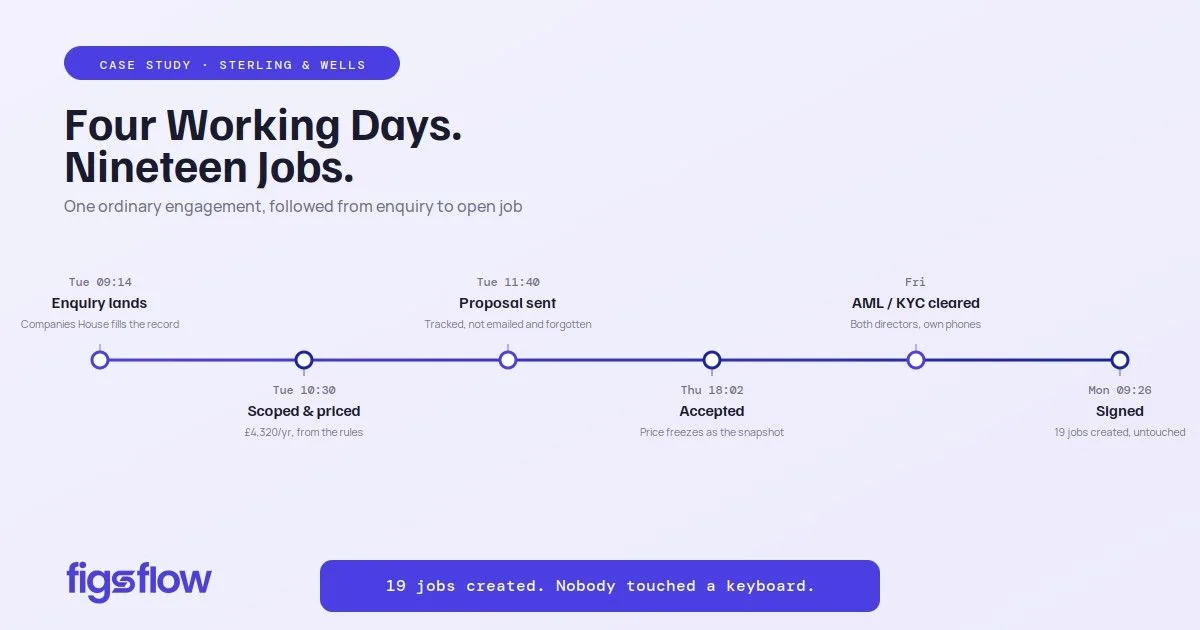
One engagement, from enquiry to open job
A website enquiry lands in the CRM as a record, then moves through scoping, pricing, proposal and engagement without being retyped.
Read the case study →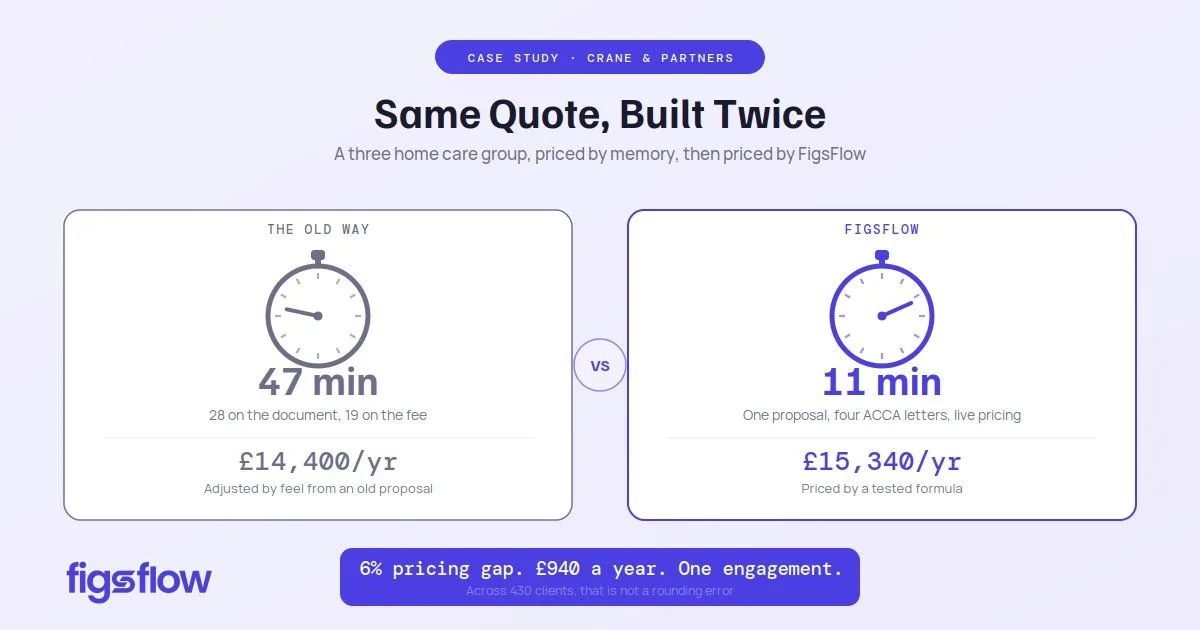
Proposal and engagement letter software, tested in the real world
They took the hardest quote in the practice, a three-home care group, and priced it twice: by feel and in FigsFlow.
Read the case study →Questions
The questions people actually ask.
Is this a CRM, or a pipeline view bolted onto practice software?
It's a CRM — client relationship management built for how a practice actually works, not a generic sales tool. Contacts, deals, pipelines, tasks, deal ownership, won and lost reasons, keep-warm and reporting — the whole funnel from first enquiry to signed engagement. What makes it different isn't the feature list, it's that the deal and the client are the same record, so nothing needs reconciling the moment work is won.
Do we need Microsoft 365?
For the parts that touch your calendar and mailbox, yes. Booking reads free/busy from the deal owner's own Outlook and creates the meeting in Teams; one-to-one follow-up sends from that same mailbox; the email workspace presents it inside FigsFlow. The pipeline, tasks, ownership and reporting — the core of the CRM for accountants — don't depend on it. If your practice runs on Google Workspace, ask what's supported before you plan around it.
Can we move our existing pipeline across from HubSpot?
Yes — pipelines, deals, contacts, activities and won/lost history move across. Most firms migrating make the switch because a general CRM was never built as a CRM for accountants, and the stage names and reasons don't match how a practice actually loses work. The job worth doing before you move is consolidating your lost reasons: most HubSpot setups have accumulated around thirty, and a short enforced list is what makes the reporting usable afterwards.
Does it send marketing email as well as one-to-one?
Both, deliberately separated. One-to-one goes from the deal owner's own mailbox, so a follow-up reads as a personal email. Bulk and campaigns go through a managed sending platform priced on emails sent rather than contacts held. Consent flows out, unsubscribes flow back, and the two aren't allowed to disagree.
Does the AI move deals or set fees?
No. It takes a meeting or call transcript, returns a summary and proposes one next task, and both land on the deal for a person to action. It doesn't change a stage, set a price or agree terms. Everything deterministic works whether or not it's switched on.
Can a partner see everyone's deals, and a deal owner only their own?
Yes, and it's one setting per person rather than a screen-by-screen exercise. A standard user sees the deals they own, collaborate on or advise on. A manager or partner sees across every owner, filterable by owner, service, deal type, stage or date.